

Leaderboard
The leaderboard turns quality participation into something visible and worth competing for. Your top contributors are recognized publicly, which encourages every member to engage more thoughtfully.
What You Will Learn
- How to find the leaderboard page
- What information is displayed for each member
- How the top 3 medal positions work
- How to add the leaderboard sidebar widget
- Why public recognition improves community quality
The Leaderboard Page
The community leaderboard is available at /community/leaderboard/. Any member - and guests, if your community is public - can view it. No login is required.
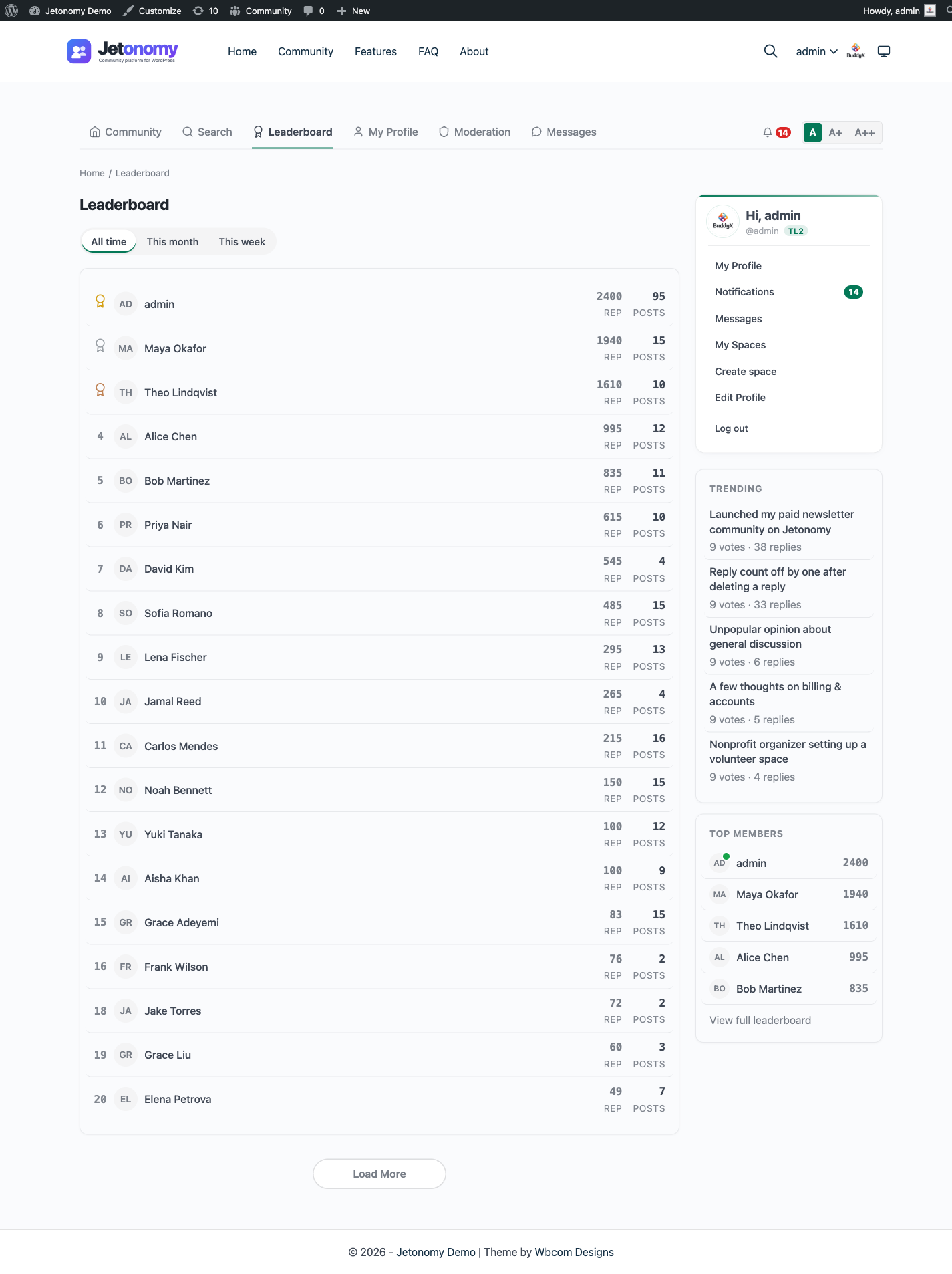
Members are ranked by total reputation score, highest first. The leaderboard updates in real time as reputation changes - there is no daily cache delay between earning reputation and appearing in the rankings.
How Reputation Is Earned
Reputation is what drives a member's position on the board. Members earn it through quality participation - upvotes on their topics and replies, and having an answer accepted on a question. Downvotes and moderator removals subtract from it. The exact point values are defaults you can adjust under Jetonomy → Settings, so you can tune what your community rewards. See Voting & Reputation for the full list of actions and their default point values.
Time Period Filter
The leaderboard page has a row of period pills at the top that scope which members appear:
| Pill | What it shows |
|---|---|
| All time | Every member, ranked by reputation (the default) |
| This month | Only members active within the last 30 days, ranked by reputation |
| This week | Only members active within the last 7 days, ranked by reputation |
The month and week filters narrow the board to recently active members - ranking is still by total reputation score within each window, not by reputation earned during that period.
What Each Row Shows
Every row on the leaderboard displays:
| Column | Description |
|---|---|
| Rank | Position number (1, 2, 3...) |
| Avatar | Member's initials avatar - their first two initials, not the uploaded photo, so the board stays fast (no online status dot on the leaderboard) |
| Name | Display name, linked to their profile page |
| Reputation | Total reputation score |
| Posts | Total published topic count |
Clicking a member's name goes directly to their profile page.
Top 3 Medal Positions
The first three positions on the leaderboard display a medal icon next to the rank number:
| Position | Medal |
|---|---|
| 1st place | Gold medal |
| 2nd place | Silver medal |
| 3rd place | Bronze medal |
Medal icons draw the eye immediately when someone opens the leaderboard page. Being in the top 3 is a genuine achievement that members notice and compete for.
The Leaderboard Sidebar Widget
Add the Jetonomy: Leaderboard widget to any sidebar from Appearance → Widgets. The widget shows the top 5 members by reputation, listing each member's name and reputation score - a compact preview of the leaderboard without requiring members to visit the full page. (Its default heading text is "Top Members".)
Configuration options:
| Option | Default | Description |
|---|---|---|
| Title | Top Members | Widget heading text |
| Count | 5 | Number of members to show (max 20) |
The widget runs a single direct LIMIT query to fetch the top members by reputation.
Why the Leaderboard Improves Community Quality
Recognition is a powerful motivator. When members see their name on the leaderboard, they are more likely to write detailed answers, respond helpfully to new members, and keep coming back. Members who are close to moving up a rank are especially motivated - the leaderboard creates natural competition without requiring badges, gamification plugins, or manual awards.
Tip: Reference the leaderboard in your community welcome message or newsletter. "See who our top contributors are this month" gives members a reason to engage and something to aspire to.
What's Next?
Learn how the online status green dot works - when it shows, where it appears, and how Jetonomy tracks it efficiently.