

White Label
Remove all Jetonomy branding and present your community as entirely your own product.
PRO - This feature requires Jetonomy Pro.
What You Will Learn
- How to enable White Label
- How to remove Jetonomy branding from the frontend and admin
- How to set a custom admin menu label and icon
- How to rebrand transactional emails and digests
Why White Label Matters
You built your community. Your members know your brand - not the plugin powering it. White Label means your community looks like yours from every angle: the frontend pages, the admin sidebar, and the notification emails. This is especially important for agencies delivering client projects and for SaaS products embedding community features under their own brand.
Enabling White Label
- Go to Jetonomy → Extensions in your WordPress admin.
- Find White Label and click Enable.
- A Branding tab appears under Jetonomy → Settings.
Removing Frontend Branding
Go to Jetonomy → Settings → Branding.
| Setting | Default | What it controls |
|---|---|---|
| "Powered by Jetonomy" footer | Shown | Remove the attribution link from the community footer |
| Jetonomy logo in community nav | Shown | Replace with your own logo or hide entirely |
| Custom CSS injection | Empty | Add CSS that loads on every community page |
Upload your own logo (SVG or PNG, max 400×100 px) to replace the Jetonomy logo in the community navigation bar. Leave the logo field blank to show no logo at all.
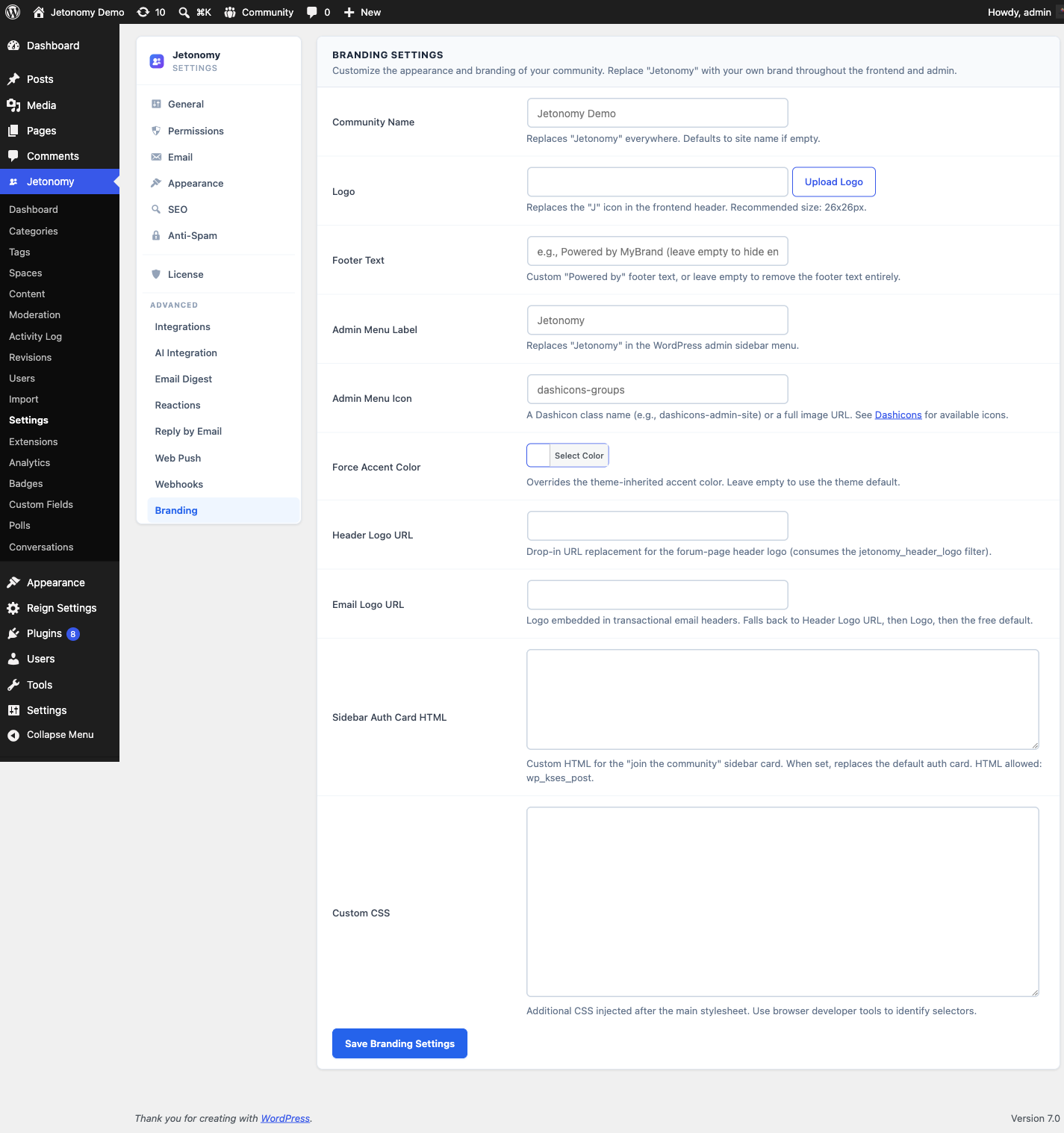
Tip: Use the Custom CSS injection field to apply brand-specific color overrides without editing any theme files. The CSS injects after Jetonomy's own stylesheet so your values always win.
Admin Menu Customization
By default, the Jetonomy admin menu item is labeled "Jetonomy" with the Jetonomy logo icon.
In Jetonomy → Settings → Branding → Admin Menu:
- Menu label - Change to any string (e.g. "Community", "Forum", "My Community").
- Menu icon - Enter any Dashicons class (e.g.
dashicons-groups) or leave blank to use the default.
The label change applies to the top-level menu item and the browser window title on all Jetonomy admin pages.
Email Branding
White Label also affects transactional emails and digests. In Settings → Branding → Email:
- From name - Defaults to your site name. Change to any value.
- Email footer - Replaces the default Jetonomy email footer with your own text or HTML.
- Logo in emails - Upload a logo displayed at the top of notification emails.
Branding Settings Reference
White Label stores its configuration in the jetonomy_pro_white_label option. The settings worth calling out:
| Setting | What it does |
|---|---|
header_logo_url |
The logo actually displayed in the community header. This is the image members see at the top of every community page. |
logo_url |
The fallback / Open Graph logo. Used for social share cards (OG image) and anywhere a logo is needed but no header logo is set. Keep this set even if you customize the header separately. |
accent_color |
A global accent colour override. Recolours Pro-rebranded surfaces - including email accents - in one place so your brand colour is consistent across the community and its emails. |
custom_css |
Freeform CSS injected on every community page. It loads after Jetonomy's own stylesheet, so your rules always win - use it for brand colour and spacing tweaks without touching theme files. |
sidebar_auth_card_html |
Custom HTML for the community sidebar's sign-in / call-to-action card. When set, it replaces Jetonomy's default auth card with your own markup; leave it empty to keep the default card. |
footer_text |
Replaces the "Powered by Jetonomy" footer text. |
email_logo_url |
Logo shown at the top of notification and digest emails. |
Tip:
header_logo_urlandlogo_urlare deliberately separate. Setheader_logo_urlfor the on-page logo andlogo_urlfor the share-card / fallback image - they are often different sizes and aspect ratios.
REST API
White Label exposes its settings under jetonomy/v1:
| Method | Endpoint | Description |
|---|---|---|
GET |
/settings/white-label |
Read the current white-label settings |
PATCH |
/settings/white-label |
Save white-label settings |
Both routes require manage_options. See the REST API reference for full payloads.
Upgrading From Older Versions
On Jetonomy 1.4.1 and newer every White Label setting applies on every surface - the header logo, footer text, email accent colour, email logos, the sidebar sign-in card, and the admin footer all rebrand on each render and send. On older versions the Branding settings saved but did not always take effect; update both the free and Pro plugins together so all branding applies.
What's Next?
Bring large language models into your community for smarter spam detection, auto-moderation, reply suggestions, and thread summaries.