

Voting & Reputation
Free & ProVoting is the engine behind Jetonomy's quality signals. It surfaces the best content, rewards helpful members, and gives you a community where the most useful posts rise to the top naturally, without moderator intervention.
What You Will Learn
- How to vote on topics and replies
- How vote scores appear in listings and on reply cards
- How votes translate into reputation points
- How votes power the Popular sort and trending sidebar
- The one-vote-per-item rule and how to undo a vote
Voting on Topics and Replies
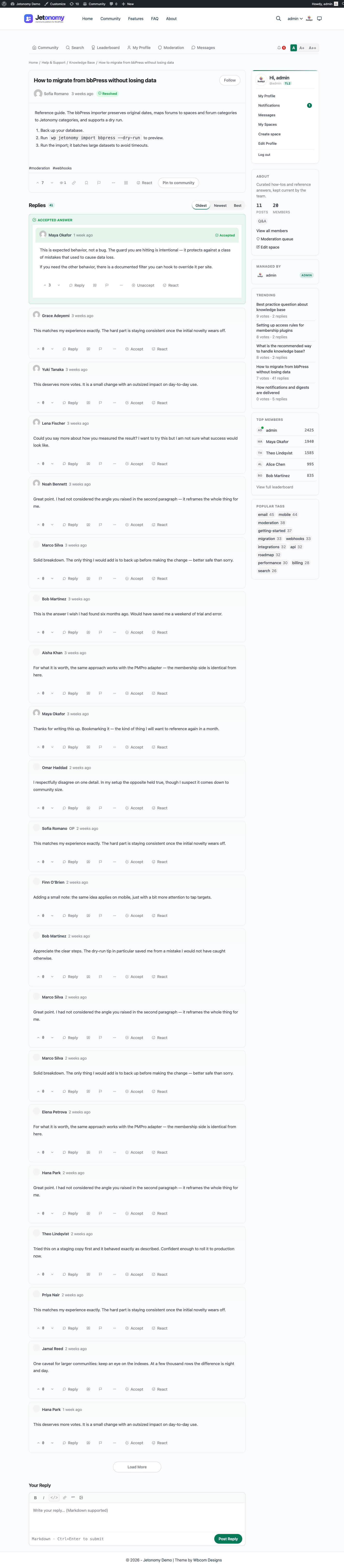
Every topic and every reply has an upvote button (thumbs up) and a downvote button (thumbs down). The net vote score (upvotes minus downvotes) is displayed between them.
To vote: Click the upvote or downvote button. The score updates instantly. No page reload.
To undo a vote: Click the same button again. The vote is removed and the score returns to its previous value.
To change your vote direction: Click the opposite button. Jetonomy removes your previous vote and applies the new one in a single action. The score adjusts correctly.
You must be logged in to vote. If you click a vote button while logged out, Jetonomy sends you to the WordPress login page and returns you to the same topic once you sign in.
Note: You cannot vote on your own posts or replies. The vote buttons are visible but disabled with a tooltip explaining why.
Note: When a space admin disables voting on a space, vote controls are removed from the interface entirely, not just greyed out. Members will not see the upvote or downvote buttons on any post or reply in that space.
Where Vote Scores Appear
Topic listing page - Each topic card shows the net vote score. This is how members quickly identify high-quality discussions without opening them.
Single topic page - The topic's vote score appears prominently alongside the title.
Reply cards - Every reply in a thread shows its vote score. In Q&A spaces, this score directly determines the Best sort order, making it easy to find the most helpful answer.
Vote scores are updated in real time as you vote. You never need to reload the page to see the current score.
How Votes Affect Reputation
When you receive votes on your content, your Jetonomy reputation score changes. Reputation is displayed on your public profile and powers your trust level progression.
| Event | Reputation change |
|---|---|
| Your post is upvoted | +10 |
| Your reply is upvoted | +5 |
| Your reply is accepted as an answer (Q&A) | +15 |
| Your post or reply is downvoted | -2 |
| Your post is deleted by a moderator | -20 |
These are the defaults. Every value is admin-configurable per site under Jetonomy → Settings → Permissions → Reputation Points - positive numbers reward, negative numbers penalize, and any row you leave alone keeps its default. See Permissions Settings → Reputation Points for the full table and how to change a value.
Reputation is calculated and stored in real time. The moment someone votes on your content, your reputation score updates. There is no batch processing.
Casting a downvote does not cost you any reputation points. Downvotes are free for voters.
How Votes Power Content Discovery
Votes are not just cosmetic. They feed two core discovery features:
Popular sort - On the space listing page, the Popular sort orders topics by their net vote score. High-vote topics stay visible longer. New topics start at zero and rise based on community reaction.
Trending sidebar - The community home page and individual space pages show a trending sidebar highlighting the topics with the highest recent vote velocity, meaning they received the most votes in a short window. A post with 20 upvotes in 2 hours outranks one with 100 upvotes spread over a month.
In Ideas spaces, vote scores are the primary ranking signal on the roadmap view. Ideas with the most votes appear first, giving product teams a clear priority signal.
The One Vote Per Item Rule
Each member can cast exactly one vote per post and one vote per reply. The database enforces this with a unique constraint. There is no way to vote twice on the same item.
Toggling (undoing) and changing direction both work correctly within this constraint. At any moment, your vote on a given item is either +1, -1, or nothing.
If you vote on a topic in the listing view, then open the topic and vote again, you are interacting with the same vote record. The second click undoes the first vote.
What's Next?
Learn how to bookmark topics for quick access and how to follow spaces to get notified about new posts.