

Anti Spam
Spam is the fastest way to kill a community's quality. Jetonomy has multiple layers of protection that work silently in the background - your real members never know they are there.
What You Will Learn
- How to enable reCAPTCHA v3 or Cloudflare Turnstile
- Where to enter your API keys in the admin settings
- How trusted members are automatically exempted from CAPTCHA
- How Akismet integration catches spam that passes CAPTCHA
- How rate limiting protects against new-member spam floods
Choosing a CAPTCHA Provider
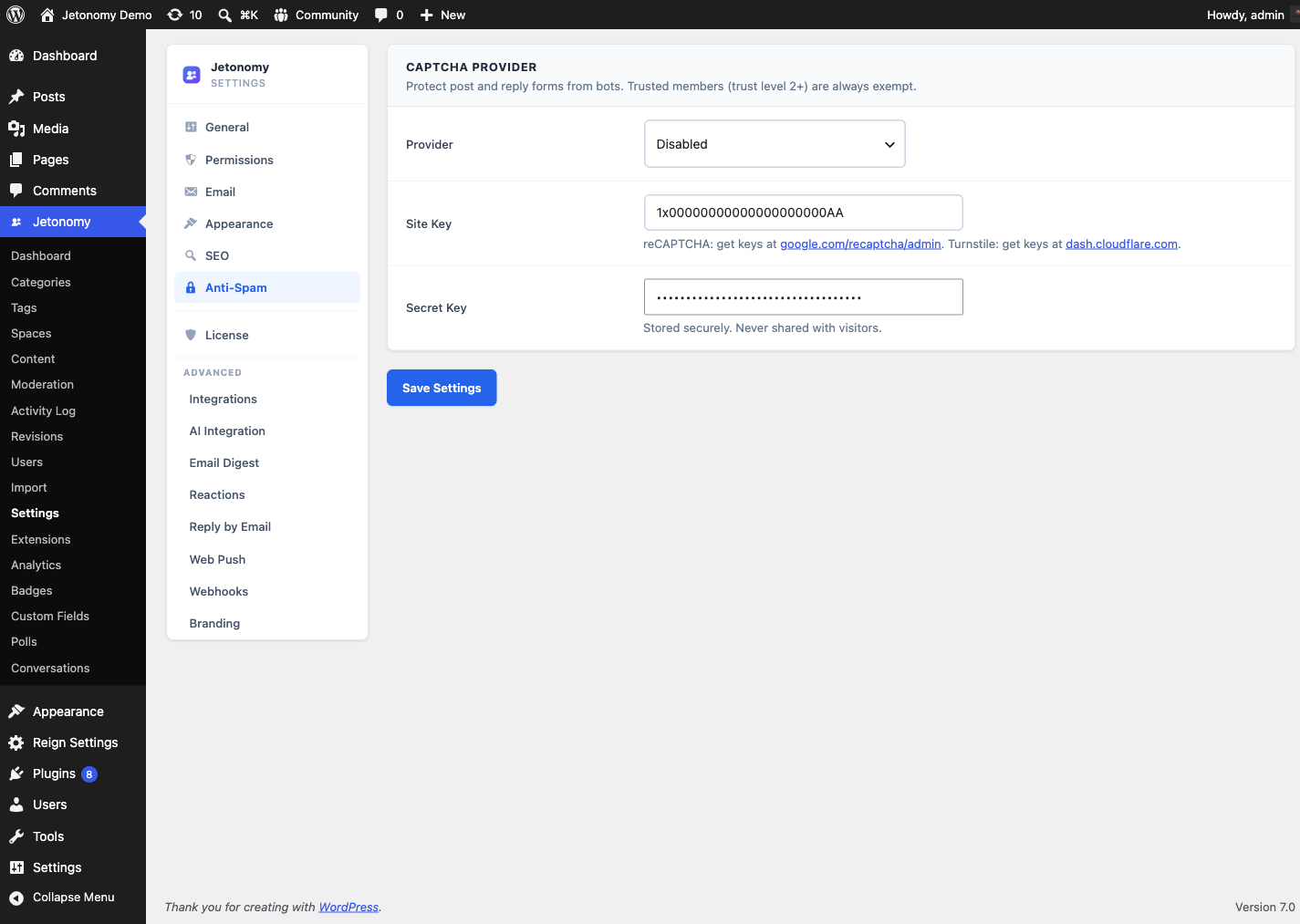
Go to Jetonomy → Settings → Anti-Spam to configure your CAPTCHA provider.
Jetonomy supports two providers:
| Provider | Type | User friction |
|---|---|---|
| Google reCAPTCHA v3 | Score-based, invisible | None - runs in background |
| Cloudflare Turnstile | Challenge-based, invisible | None - usually auto-passes |
Both are invisible to real users. reCAPTCHA v3 assigns a bot-likelihood score and blocks low-scoring submissions. Cloudflare Turnstile analyzes browser signals and shows a challenge only when it cannot verify the user automatically.
Choose Cloudflare Turnstile if your community has members who are privacy-conscious or who block Google services. Both providers have free tiers sufficient for most communities.
Setting Up reCAPTCHA v3
- Go to google.com/recaptcha and create a v3 site.
- Add your domain to the allowed domains list.
- Copy the Site Key and Secret Key.
- In Jetonomy → Settings → Anti-Spam, select reCAPTCHA v3, paste both keys, and click Save.
Setting Up Cloudflare Turnstile
- Log in to your Cloudflare dashboard and go to Turnstile.
- Add a site and set the widget mode to Invisible.
- Copy the Site Key and Secret Key.
- In Jetonomy → Settings → Anti-Spam, select Cloudflare Turnstile, paste both keys, and click Save.
Note: After saving, Jetonomy automatically loads the CAPTCHA script on the post and reply forms. You do not need to add any code to your theme.
Trusted Members Skip CAPTCHA
Members at Trust Level 2 and above never see or trigger a CAPTCHA check. Jetonomy bypasses the verification entirely for them - the API call is never made.
This means your most active, trusted members post without any friction while new accounts get verified. As members earn reputation and cross the TL2 threshold, they transition out of CAPTCHA checks automatically.
Akismet Integration
If the Akismet plugin is active on your site, Jetonomy sends every new post and reply through Akismet's spam detection API as a second layer of protection. Content that passes CAPTCHA but that Akismet marks as spam is held in the moderation queue rather than published.
See the Moderation Queue guide for how to review Akismet-held content.
Akismet and CAPTCHA work independently. You can run both at the same time for maximum protection, or use either one alone.
AI-Powered Spam Detection (Pro)
Jetonomy Pro's AI extension adds a third layer: posts and replies publish instantly, then a background reviewer scores each one for spam probability on a schedule (the AI is never in the posting path). Posts above the configured threshold are moved to the moderation queue with a reason the model generated. Posts below it stay published as normal.
This catches the kinds of spam that pattern matching and Akismet miss - subtly rewritten affiliate spam, contextually wrong replies designed to pad posting history, and coordinated attacks that use clean accounts.
Run the detection through any supported provider - OpenAI, Anthropic, a custom endpoint, or self-hosted Ollama (which keeps all content on your own server). See AI Integration for setup.
AI spam detection stacks on top of CAPTCHA, Akismet, and rate limits - not instead of them. Each layer catches different threats.
Rate Limiting for New Members
Trust Level 0 members (brand-new accounts) are subject to posting rate limits regardless of CAPTCHA:
| Content type | Default limit |
|---|---|
| Topics per day | 3 |
| Replies per day | 10 |
| Votes per day | 5 |
Limits reset after 24 hours. Members at Trust Level 1 and above are exempt from all rate limits.
You can adjust the default thresholds at Jetonomy → Settings → Permissions. Setting a limit to 0 disables it for that trust level.
Tip: Rate limiting is your best defense against coordinated spam from many new accounts. Even if a bot farm passes CAPTCHA, each account can only post 3 topics before hitting the daily limit.
Rate Limit Settings
These rate limits live alongside the trust system. The per-day caps shown above are the Trust Level 0 defaults; every trust level above TL0 is exempt. See Trust Levels for how a member graduates out of rate limiting by earning their way to TL1, and where the "Rate limit lifted" capability fits in the wider trust ladder.
What's Next?
When spam prevention is not enough and you need to act on a specific member, the next guide covers banning.