What you’re building
A public-facing feature-request board where customers post ideas, other customers vote, and the top ideas surface for your product team to consider. Stops feature decisions from being driven by the loudest CSAT respondent.
This works for any product with a paying customer base: SaaS, plugins, courses, services. The pattern: a place to redirect every “could you add X?” email so the data lives in one searchable, voteable system.
The customer journey
What a customer does end to end, when they wish your product did something it doesn’t:
- Hits the gap. “I wish this had a CSV export.” Or “Why can’t I bulk-delete?”
- Opens the Ideas board. Searches the feature name.
- Finds it. Sees “47 votes, status: Planned.” Hits the upvote button. Done.
- (If not there) Posts a new idea. Title + 2-3 sentences explaining the use case. Tags it.
- Comes back when notified. If they posted the idea, they hear about it when it hits “Planned”, and again at “Shipped”.
The customer never sent you an email. Their vote is one data point. Your roadmap meeting now has signal instead of anecdotes.
What you set up (admin side)
- Create one Ideas space. Name it “Feature requests” or “Roadmap” or “Ideas”.
- Set the join policy to public posting. Anyone with an account can post + vote. Some teams limit voting to paying customers via membership gating - works either way.
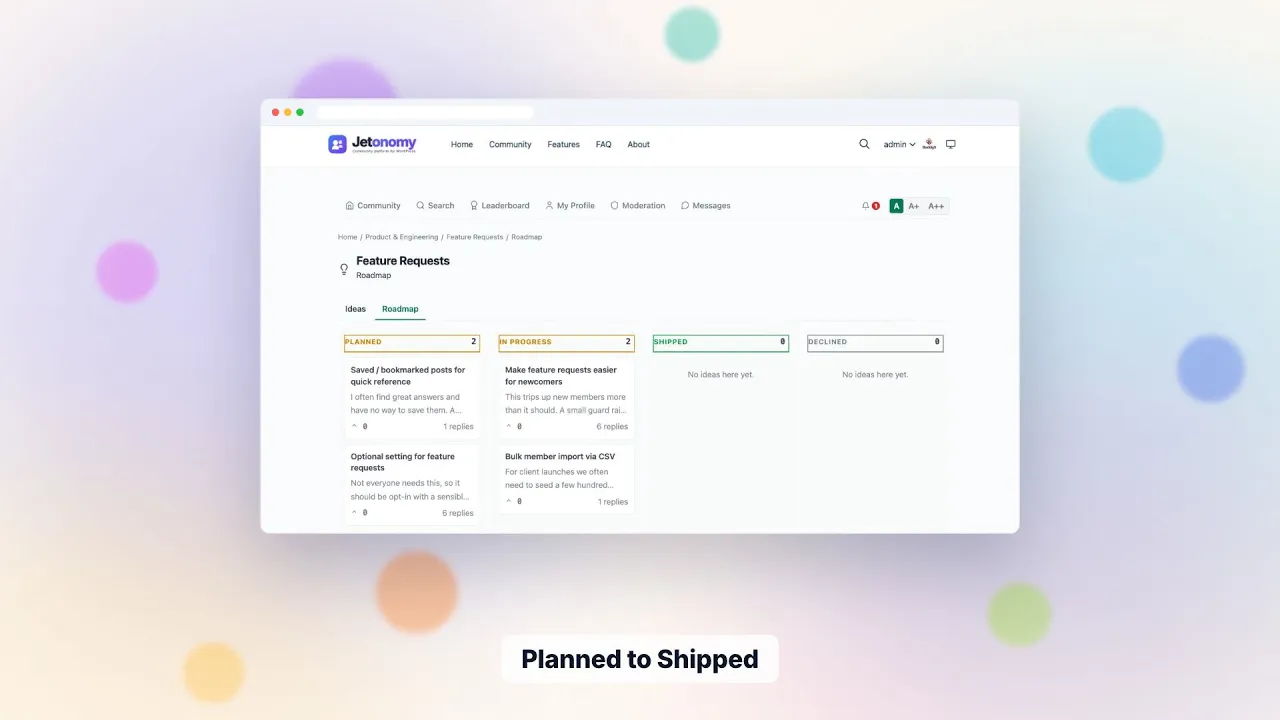
- Learn the status set. Ideas start with no status, then move through Planned / In progress / Shipped, with Declined as the off-ramp.
- Turn on require approval in the space settings if you expect spam or duplicates. Held ideas wait in the moderation queue until a moderator approves them, and moderators can merge duplicate posts.
- Pin “How to submit a good idea” (pinning is a moderator capability) with format: “Currently: X. I wish: Y. So I can: Z.” Better-quality ideas get more votes.
- Set up a weekly review cadence. Sort by votes, work the top 10. Update statuses. Reply with timeline if known.
The status-change loop is the magic
When a moderator changes an idea’s status, the person who posted it gets notified. This is the moment that converts “I submitted an idea” into “they actually listened.” Authors who get the notification feel heard even if their idea wasn’t picked - because they know you’re reading. Voters see the new status the next time they open the board.
Common cadence:
- Weekly: triage new ideas, mark Declined where needed
- Monthly: sprint planning, mark some ideas as Planned with rough timeline
- On ship: mark Shipped, include the docs link
Why this works on Jetonomy specifically
- Ideas is its own space type. Voting is first-class, not bolted on. The vote count is visible and you can sort a space by votes. A separate roadmap view groups ideas that carry a status into lanes. The leaderboard ranks members by reputation, not ideas.
- Tags work across spaces - a tag like “exports” connects ideas, Q&A questions, and forum discussions about exports.
- Votes register in place - no page reload when a customer upvotes. Other people’s new activity arrives through a light poll, not a live socket.
- Status visibility - status labels and the roadmap lanes make the board easy to scan.
- Self-hosted - your roadmap data stays in your own WordPress database, on your domain.
What changes in your product ops
- Roadmap meetings open with “top 10 voted this month” instead of “what’s in my inbox”
- Sales team can point prospects at the public roadmap as proof you ship customer-requested features
- Customers stop emailing “wishlist” requests - they post in the Ideas board where you can see them
- Marketing wins: every “Shipped” status update is a mini-announcement, and the idea’s author gets a personal notification
Step by step: first board in an afternoon
- Install the free plugin and run the setup wizard. Choose the Ideas community type.
- Create a category such as “Product” and an Ideas space inside it, named “Feature requests” or “Roadmap”.
- In the space settings, decide who may post and reply. Leave voting on.
- Switch on require approval for the first month.
- Write and pin a short guide to a good idea.
- Seed five to ten real requests from your inbox, crediting the people who made them if they agree.
- Open the roadmap view and give the top few a status.
Announce it by email and in your product, with a link, and reply to old feature-request emails with the board link.
A normal week
A product manager spends about half an hour a week on the board. Clear the approval queue first, then sort by votes and read the top ten.
- Monday: approve new ideas, merge duplicates and thank the authors.
- Midweek: reply to ideas where the answer is a workaround, and point to docs.
- End of week: change statuses after your planning meeting. Each change notifies the author.
- After a release: mark shipped ideas, and link the release notes in a reply.
Authors earn reputation when a moderator moves their idea to Planned or Shipped, which is a small reward for good suggestions. The values are adjustable in Settings.
Moderation for an ideas board
The usual problems are duplicates, rants and “me too” posts without a use case. The free tools cover most of it.
- Approval hold keeps the first posts out of the public view until you read them.
- Flags let members report abuse, and moderators clear them from one queue.
- Merge collapses duplicate ideas into one so votes are not split.
- Closing a post stops further replies on a thread you have settled.
- Space moderators let a customer success lead run the board without site admin access.
Declined is a status, not a delete. Use it with a short reply that explains why, because an honest no is better than silence.
What to measure
Count ideas by status each month: how many arrived, how many you planned, how many you shipped and how many you declined. Track the vote total on shipped ideas to see whether you build what people ask for. That is a ratio you can calculate from the board itself.
For anything beyond that, analytics is a Pro extension with an overview, top spaces, top contributors, engagement and moderation figures, plus a CSV export. See analytics. Voting data is also available over the REST API if you want to feed a spreadsheet.
What the ideas board does not do
- It has no revenue weighting. Votes are counted equally.
- It has no built-in integration with a ticket or issue tracker. Pro webhooks can send events to another service, with no retries, or a developer can use the REST API.
- It has no changelog widget or embed for your product screens. Link to the board instead.
- A status applies to a whole idea. There are no sub-tasks or release dates.
- It has no separate private idea box for one customer. Use a private or hidden space for a closed group.
Writing good status replies
A status without a sentence reads as a bureaucratic move. When you set Planned, say what quarter-sized chunk it belongs to, or say plainly that you have no date. When you set Declined, explain the trade-off in two lines and name a workaround if one exists. When you set Shipped, link the release notes and thank the people who voted.
Use tags to group ideas by theme, such as “exports” or “billing”. A tag page lists matching topics across spaces, so the same theme in a Q&A space and the board sits side by side. That is a quick way to see how often a theme comes up before you commit to it.
What it costs to run
The ideas board, voting, statuses, the roadmap view and the moderation queue are all in the free plugin. Pro starts at $69 a year for one site and adds analytics, reactions, polls, webhooks and more; one licence covers every extension. There is no per-seat or per-voter charge. You pay for your own hosting and for the time someone spends triaging.
If a Pro licence lapses, the extensions switch off after 30 days and the free board and every vote stay. That keeps your roadmap safe from a missed renewal.
Data, privacy and ownership
Ideas, votes and statuses live in Jetonomy’s tables in your WordPress database, and voters are ordinary WordPress users. You can export through the REST API, WP-CLI or a database backup. Members can delete their own account, and the plugin handles WordPress export and erase requests. A private or hidden space keeps the board away from search engines; a public one is crawlable, so a feature request can appear in search results.
Moving from a spreadsheet or another tool
There is no importer for feedback tools or spreadsheets. The importers cover bbPress, wpForo and Asgaros only. To bring existing requests in, post the top ones by hand, or have a developer write a script against the REST API that creates ideas and statuses from a CSV. Credit the original requesters in the body, and tell them where their idea went. Our migration guide covers the forum importers.
Who should keep a hosted tool
If you need a public changelog widget, deep CRM or issue-tracker sync, or per-customer revenue weighting out of the box, a dedicated hosted tool may fit better. Check the vendor’s site for current features. If you want the board on your own domain and your own login, Jetonomy fits.
Your first 30 days
- Week 1: create the space, seed it and announce it.
- Week 2: give the first statuses and reply to every idea in the top ten.
- Week 3: review the approval setting and the duplicates.
- Week 4: post a short “what we shipped from the board” topic.
- Week 4: decide whether a private, gated space for paying customers would help.
- Week 4: set a monthly review slot in your calendar.
Alongside the rest of your stack
Jetonomy is one of several separate, optional plugins from the same team, on one WordPress site and one login. A hosted product would bundle things in one bill; here you install, host and update each plugin yourself.
BuddyNext is the social layer, with profiles, an activity feed and groups. With both active, the forum adopts BuddyNext’s look and BuddyNext owns the page header and navigation, with nothing to configure. See BuddyNext and Jetonomy.
Learnomy is the LMS plugin. With Jetonomy Pro, a space can be gated by a Learnomy course or membership plan, so a board can belong to the people on a course. Enrolling adds the member, expiry removes them, and their posts stay. See Learnomy and Jetonomy.
WP Career Board, Listora, Eventonomy, WPMediaVerse and WB Gamification also run on the same site. We make no integration claims about them here. MemberPress and Paid Memberships Pro gating is in the free plugin. See all partners and the ideas roadmap feature.
Common questions
How is this different from a hosted feedback tool? The pattern is the same. Yours is self-hosted, lives on your domain and uses your WordPress logins. The trade-off is that you host and update it yourself, and some hosted tools bundle extras such as changelog widgets or CRM syncs that Jetonomy does not. Check the vendor’s site for what they offer today.
Should I show vote counts publicly? Yes. Showing votes creates social proof for ideas. Customers see “47 people want this” and either pile on or move on.
What about prioritization signals beyond votes? Vote count, tags (which show how often a theme comes up) and your sales and support team’s own weight. Jetonomy gives you the customer signal; you still apply business judgment.
Try it
Spin up the demo, create an Ideas space, post 3 fake ideas, vote on them as another user, mark one as Planned. The state-change UX is the part you need to feel.