

Webhooks
Automatically send community events to any external URL - connect Jetonomy to Slack, Zapier, your CRM, or any custom pipeline.
PRO - This feature requires Jetonomy Pro.
What You Will Learn
- How to create and manage webhook endpoints
- Which community events you can subscribe to
- How to test a webhook before going live
- How to read the delivery log to debug failures
Why Webhooks Matter
Jetonomy lives inside WordPress - but your business does not. Your team lives in Slack. Your sales data lives in a CRM. Your analytics live in a data warehouse. Webhooks close that gap. Every time something happens in your community, Jetonomy can push that data wherever you need it - in real time, with zero polling.
Enabling Webhooks
- Go to Jetonomy → Extensions in your WordPress admin.
- Find Outbound Webhooks and click Enable.
- A Webhooks item appears under the Jetonomy admin menu.
Creating a Webhook
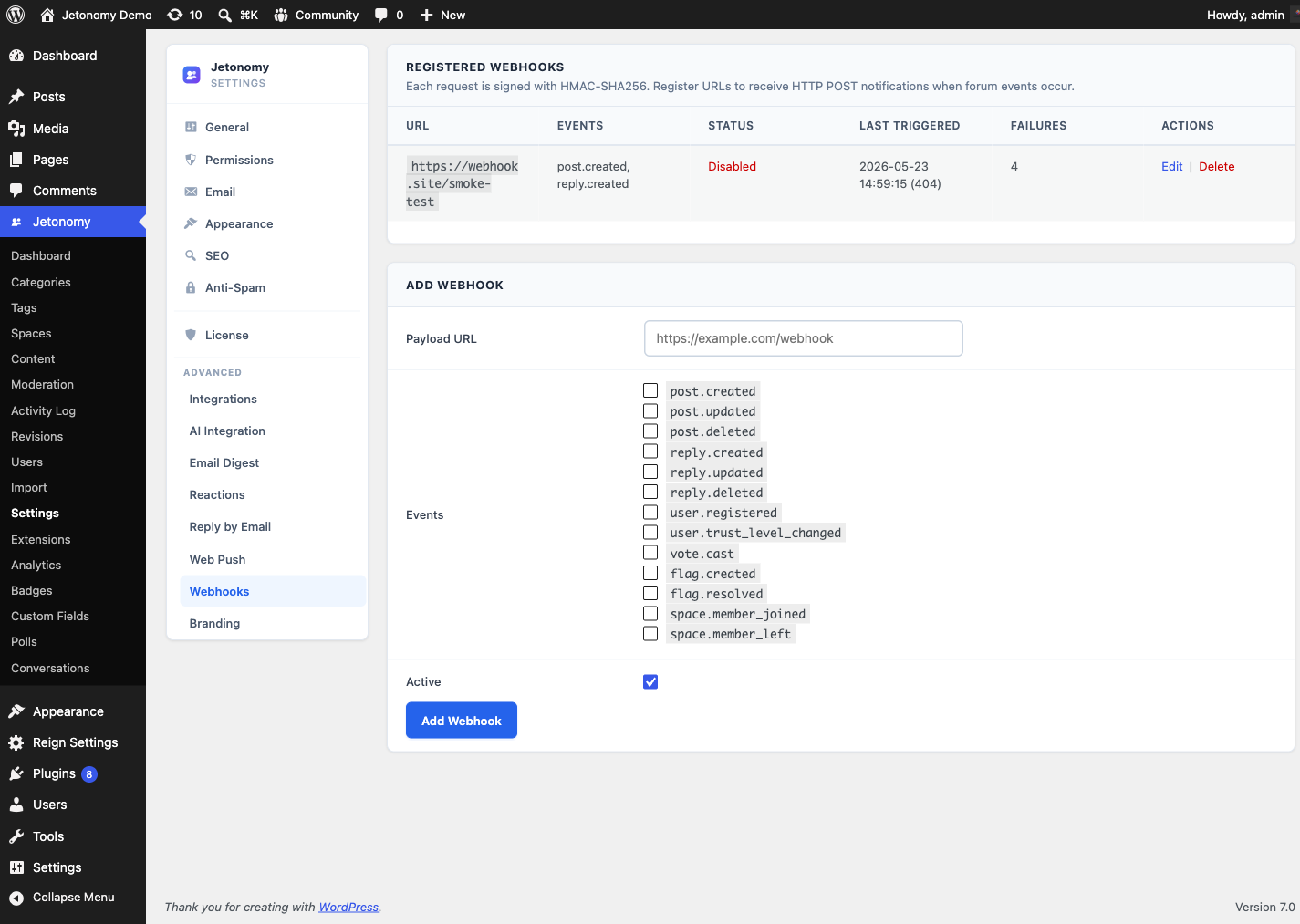
- Go to Jetonomy → Webhooks.
- Click Add Webhook.
- Fill in the endpoint settings:
| Setting | Description |
|---|---|
| URL | The HTTPS endpoint that will receive the POST request |
| Events | Which community events trigger this webhook |
| Secret | Optional signing secret for verifying payload authenticity |
| Active | Toggle the webhook on or off without deleting it |
- Click Save Webhook.
Available Events
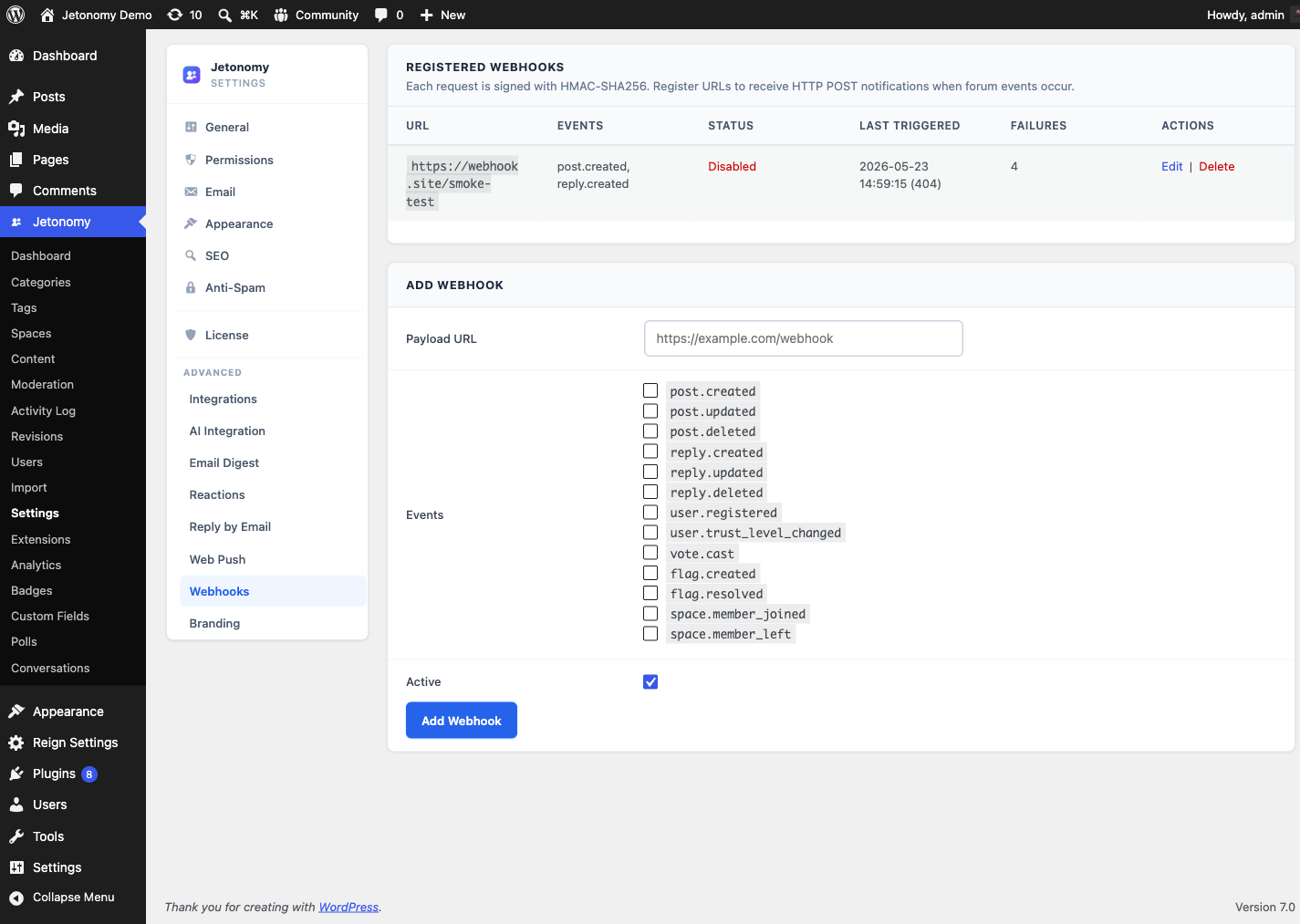
Subscribe to any combination of these events:
| Event | Fires when... |
|---|---|
post.created |
A new topic is published |
post.updated |
A topic is edited |
post.deleted |
A topic is deleted or trashed |
reply.created |
A new reply is posted |
reply.updated |
A reply is edited |
reply.deleted |
A reply is deleted or trashed |
vote.cast |
A member votes on a post or reply |
answer.accepted |
A Q&A answer is accepted |
member.joined |
A new user joins the community |
member.left |
A member leaves a space |
member.banned |
A member is banned |
user.registered |
A new user account is created |
trust_level.changed |
A member is promoted or demoted |
flag.created |
Content is flagged by a member |
flag.resolved |
A flag is resolved by a moderator |
moderation.action |
A moderator approves, spams, or trashes content |
You can create multiple webhooks pointing to different URLs with different event subsets - for example, one webhook for Slack (post events only) and one for your CRM (member events only).
Payload Format
Every webhook delivers a JSON body with this structure:
{
  "event": "post.created",
  "timestamp": "2026-03-26T08:14:32Z",
  "site_url": "https://yoursite.com",
  "data": {
    "post_id": 1024,
    "title": "How do I reset my password?",
    "author_id": 45,
    "author_name": "Priya Sharma",
    "space_id": 3,
    "space_slug": "support",
    "url": "https://yoursite.com/community/s/support/t/how-do-i-reset-my-password/"
  }
}
The data object varies by event type. All events include event, timestamp, and site_url.
Verifying Payloads
If you set a secret, Jetonomy includes an X-Jetonomy-Signature header with each request. The value is an HMAC-SHA256 signature of the raw request body, signed with your secret.
Verify on your server:
$signature = hash_hmac( 'sha256', $raw_body, $your_secret );
$expected   = 'sha256=' . $signature;
$received   = $_SERVER['HTTP_X_JETONOMY_SIGNATURE'];

if ( ! hash_equals( $expected, $received ) ) {
    http_response_code( 401 );
    exit;
}
Testing a Webhook
Before you point a webhook at a production system, send a test:
- Open the webhook in Jetonomy → Webhooks.
- Click Send Test.
- Jetonomy sends a sample
pingevent to your URL and shows the HTTP response code and body inline.
Use a tool like webhook.site to inspect the full request during development.
Delivery Log
Every delivery attempt is logged. Go to Jetonomy → Webhooks → [webhook name] → Delivery Log to see:
- Timestamp of each attempt
- HTTP response code
- Response body (first 500 characters)
- Whether the delivery succeeded or failed
Failed deliveries are retried up to three times with exponential backoff (5 min, 30 min, 2 hrs). After the third failure, the delivery is marked as permanently failed and no further retries are attempted.
Tip: If you see consistent failures, check that your endpoint returns a
2xxresponse within 10 seconds. Jetonomy times out at 10 seconds and treats the delivery as failed.
Use Case Examples
- Slack notifications - Post a message to a Slack channel whenever a new topic is created in your community.
- CRM sync - Push
member.joinedevents to HubSpot or Salesforce to trigger a welcome sequence. - Zapier - Connect any event to thousands of apps via a Zapier webhook trigger - no custom code needed.
- Analytics pipeline - Stream all events to a data warehouse like BigQuery or Amplitude for long-term retention and custom analysis.
Upgrading From Older Versions
On Jetonomy 1.4.1 and newer every event in the list above fires reliably for real community activity. If you configured webhooks on an older version and saw zero deliveries despite real activity, update both the free and Pro plugins together to 1.4.1 or later - your existing webhooks start delivering without any reconfiguration.
What's Next?
Send browser push notifications to members even when they are not on your site.