

Space Types
Free & ProThe space type you choose determines how posts are structured, how replies work, and what extra features appear. Pick the right type and your community will feel purpose-built - pick the wrong one and members will feel like they are fighting the interface.
What You Will Learn
- What each space type is designed for
- How posts and replies behave differently per type
- The unique features each type unlocks
- How to change a space type after creation
The Four Space Types
Forum
Forum is the default type. It is the right choice for general discussion, support, announcements, or any conversation without a single "correct" answer.
How it works:
- Members post a topic with a title and rich content.
- Replies thread up to three levels deep (reply to a reply to a reply).
- Votes on replies surface the best contributions via the Best sort, but no reply is formally "accepted."
- Topics can be sorted by Newest, Oldest, or Best on the space listing page.
Use Forum for: support channels, general discussion, community announcements, staff Q&A sessions.
Q&A
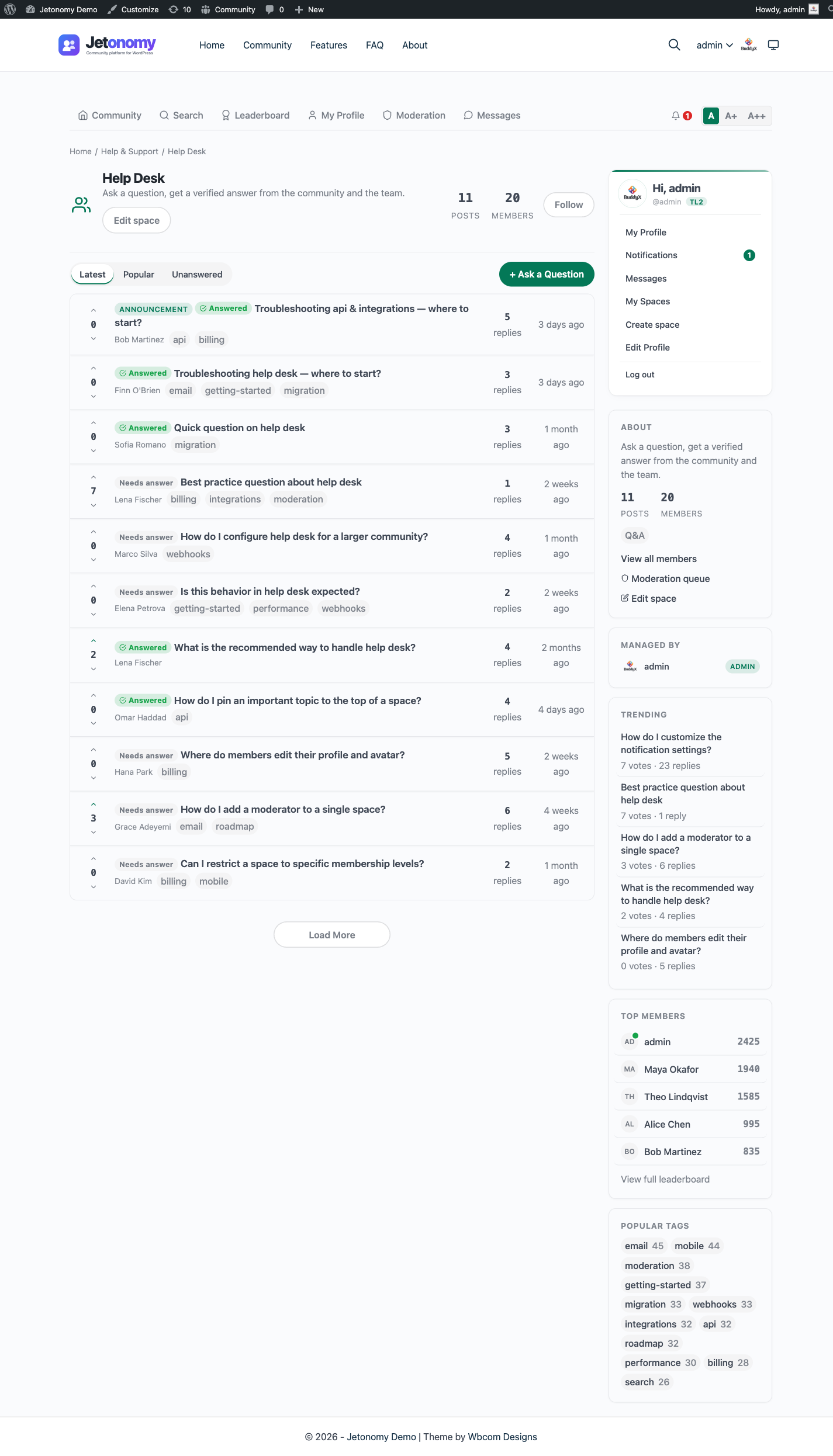
Q&A is built for questions that have a definitive best answer. It follows the model made popular by Stack Overflow. The person who asked the question marks one reply as the accepted answer.
How it works:
- Every post is a question. The title should be phrased as a question.
- Replies are answers. Each answer is voted on independently.
- The post author sees an Accept button on every reply. Clicking it marks that reply as the accepted answer and pins it to the top of the reply list, regardless of sort order.
- The accepted answer author earns a reputation bonus (+15 points).
- The post listing shows an "Answered" badge on topics with an accepted answer. This badge also appears on the space list so members can see at a glance which Q&A spaces have resolved questions.
Use Q&A for: help & support, how-to guides, technical documentation requests, troubleshooting.
Tip: The Unanswered filter on the space listing page shows only topics with no accepted answer. This is a powerful tool for community moderators and support teams tracking open questions.
Ideas
Ideas is built for feature requests, product feedback, and roadmap voting. Each idea has a status that you control, and members vote to indicate demand.
How it works:
- Members submit ideas with a title and description.
- Other members upvote (or downvote) to signal interest. Vote score drives the default sort order.
- Each idea has an Idea Status that the space moderator or admin updates manually:
| Status | Meaning |
|---|---|
| Planned | On the roadmap |
| In Progress | Being built right now |
| Shipped | Completed and available |
| Declined | Will not be implemented |
- Status updates appear in the reply thread as a system activity entry, so members can see when an idea's status changed.
- The space listing page has a filter bar showing counts per status, making it easy to browse the roadmap.
Use Ideas for: product feedback boards, feature request trackers, community roadmaps, vote-to-prioritize workflows.
For a full guide to the Ideas roadmap view, see Ideas Roadmap.
Tip: Pick the
lightbulbicon from the Lucide icon picker and name the space something like "Ideas & Feedback" to set the right expectation before members click through.
Feed
Feed is designed for short-form status updates - brief posts without a required title. Posts render as feed cards rather than the row list used by Forum and Q&A, so it behaves more like an activity stream than a traditional forum.
How it works:
- The post title field is optional. Members can post a standalone message, image, or link.
- Posts appear in a card-style feed sorted chronologically by default.
- Replies work the same as Forum type, threaded up to three levels deep.
- Voting is available, but the feed sort does not default to Best - it defaults to Latest.
Use Feed for: member introductions, community announcements, daily check-ins, showcasing work, open-ended community updates.
Empty-State Copy Adapts to the Space Type
A space with no posts yet does not show a generic "No posts" message. The empty state speaks the space's own language so the first visitor knows exactly what to do, and its call-to-action button matches:
| Space type | Empty-state message | Button |
|---|---|---|
| Forum | "No posts yet. Be the first to start a discussion!" | New Post |
| Q&A | "No questions yet. Ask the first one and get answers from the community." | Ask a question |
| Feed | "Nothing posted yet. Share the first update." | Share an update |
| Ideas | "No ideas yet. Suggest the first one and let the community vote." | Suggest an idea |
The button only appears for a visitor who is actually allowed to post in the space. A member (or anyone who can join an open space) sees the call-to-action; a visitor who cannot post sees the message without a button.
Note: Space cards on the community home and category listings also carry an "Active [time] ago" recency signal (for example, "Active 2 hours ago"), so members can tell a thriving space from a dormant one at a glance. A space with no recorded activity shows no label.
Changing the Space Type
You can change the type of an existing space at any time. Either open it in Jetonomy → Spaces in wp-admin, or use the Edit space button on the space header itself (front-end edit), and update the Type field.
The change takes effect immediately for all new posts. Existing posts keep their original structure. A Q&A post does not lose its accepted answer, and an Ideas post does not lose its status history.
If you change a Q&A space to Forum, the Accept button disappears from the UI but existing accepted answers remain stored in the database.
What's Next?
Learn how to control who can see your spaces and how members join them.