

Import from Asgaros Forum
Move your existing Asgaros Forum community into Jetonomy - forums, topics, replies, and user profiles - using the built-in Asgaros importer.
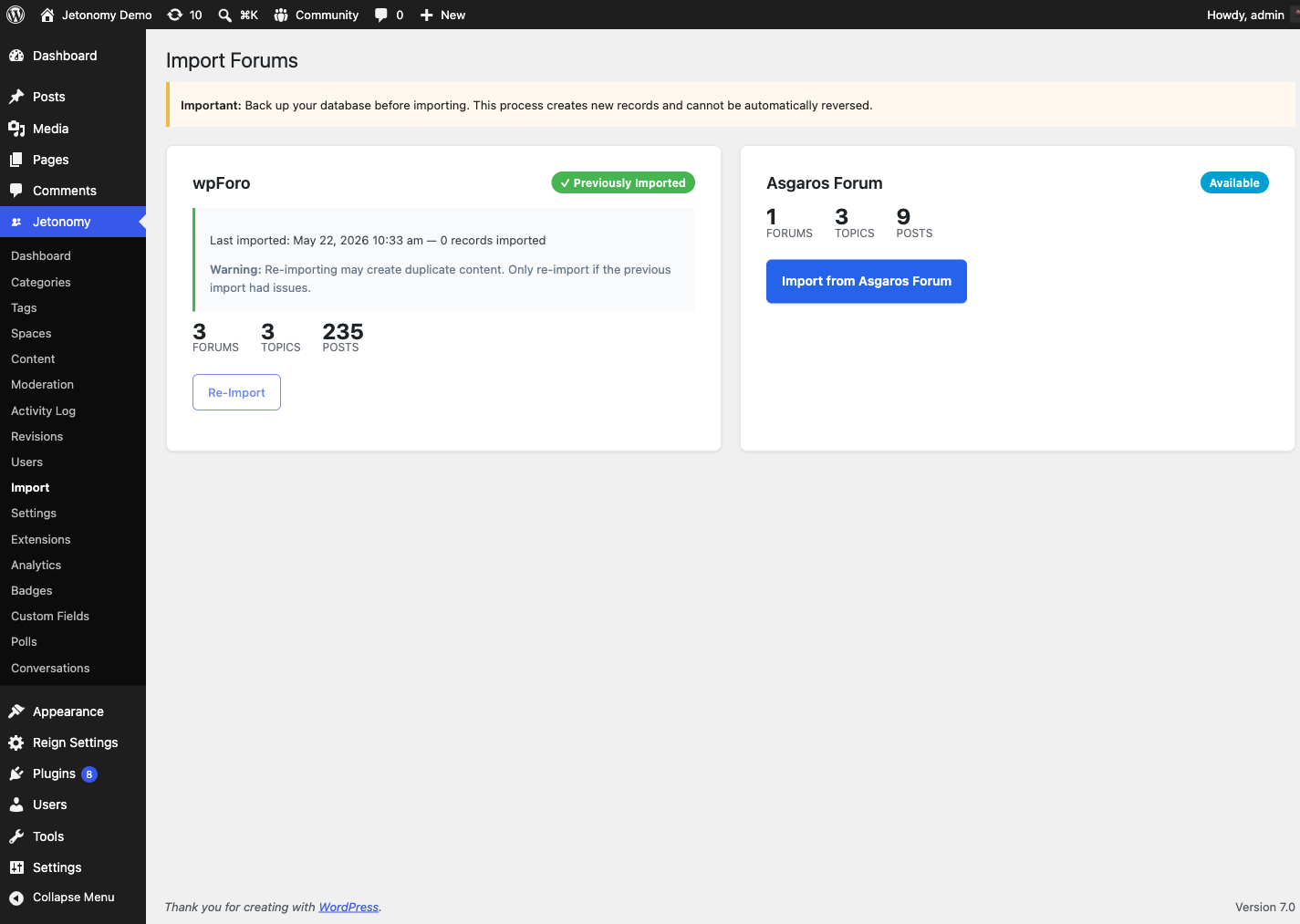
New to migration? Read the Migration overview first - it explains how to read the import screen (stat previews, status badges, the progress tracker) and the backup rule that applies to every import.
What You Will Learn
- What the Asgaros importer brings over and what it leaves behind
- How Asgaros forum hierarchy maps onto Jetonomy spaces
- How to start and monitor the import
- What to verify after the import
What Gets Imported
| Asgaros Data | Imported As | Notes |
|---|---|---|
| Forums | Jetonomy Spaces | Forum name and description preserved |
| Sub-forums | Jetonomy Sub-spaces | Parent/child forum hierarchy is preserved |
| Topics | Jetonomy Posts | Topic title + first post content preserved |
| Replies (posts) | Jetonomy Replies | Imported as flat replies on the post |
| User accounts | Linked to existing WP users | Matched by WP user ID |
| Sticky topics | Pinned posts | Preserved |
| Closed topics | Closed posts | Preserved |
| Unapproved topics | Pending posts | Topics not approved in Asgaros import as pending |
| Inline images and attached files (1.8.0+) | WordPress media library + Jetonomy attachments | Downloaded from Asgaros and re-registered as attachments; images stay inline, other files show as a download link |
Not imported:
- Asgaros topic tags
- Asgaros user reputation / points
- Asgaros likes / reactions
- Asgaros moderator assignments (assign Space Moderator roles manually after import)
- Asgaros subscriptions (replaced by Jetonomy follow/subscribe)
- Custom Asgaros meta fields (use the
jetonomy_importersfilter to extend)
Attachments (1.8.0+): If a file cannot be recovered - for example it is already missing from disk - the import still completes and tells you how many files it could not bring over ("N files could not be recovered and were left linked in the original post text"). That is a warning to check a handful of posts by hand, not a failed import. See the Migration overview for details.
Asgaros Data Structure Differences
Forum hierarchy - Asgaros keeps your forums and sub-forums in a single nested list. The importer creates one Jetonomy category ("Imported from Asgaros") and one space per Asgaros forum, importing parent forums before their children so your sub-forums come across as Jetonomy sub-spaces.
Post structure - In Asgaros, a topic's opening message and all its replies are stored together. The importer promotes the opening message as the Jetonomy post body and imports the remaining messages as replies.
For developers: Asgaros stores forums in one table with a
parent_forumcolumn (hence the parent-before-child import order), and stores the opening post plus all replies together in theforum_poststable.
Pre-Import Checklist
- Back up your database. The importer reads but never modifies Asgaros tables, but a backup protects against any edge cases.
- Activate Jetonomy and complete the setup wizard.
- Keep Asgaros Forum active during the import - the importer reads from its live tables.
- Disable page caching if active, to avoid stale data during the import.
Tip: For large Asgaros communities, run the import via WP-CLI to avoid browser timeouts.
Preview Before You Import
Always take a full database backup before you run the Asgaros import - that is your way to undo if you want to start over. There is no preview mode for Asgaros: only the bbPress importer supports a true --dry-run that counts records without writing them. The Asgaros importer always writes data, so a backup (not a dry run) is your safety net.
Heads up: The
--dry-runflag is accepted on thewp jetonomy import asgaroscommand, but the Asgaros importer does not act on it - it performs the real import either way. Do not use it expecting a preview.
Running the Import
- Go to Jetonomy → Import in your WordPress admin.
- Select Asgaros Forum as the source.
- Click Start Import.
The Asgaros importer runs the entire import in a single pass - the progress bar advances in one step from start to complete. Because it is single-pass, it cannot be resumed partway through; if it is interrupted, click Start Over to run it again.
Estimated Import Times
| Community Size | Topics + Replies | Estimated Time |
|---|---|---|
| Small | Under 10,000 | 2 - 5 minutes |
| Medium | 10,000 - 100,000 | 10 - 40 minutes |
| Large | 100,000 - 500,000 | 1 - 4 hours |
| Very large | 500,000+ | Use WP-CLI |
Running via WP-CLI
Run this from your server's command line (SSH); on most managed hosts you point it at the WordPress install with --path. The valid source value is asgaros (lowercase) - if you mistype it, the command lists the sources it recognizes.
wp --path="/path/to/wordpress" jetonomy import asgaros
WP-CLI is the recommended way to import larger Asgaros databases - it is not subject to browser timeouts and prints an Imported / Skipped / Errors summary when finished.
Note: The
--dry-runflag is accepted by the command but is not honored by the Asgaros importer - it will still write data. Take a backup first.
Post-Import Checklist
After the import completes:
- Visit your community home and confirm spaces match your old Asgaros forums
- Confirm that sub-forums appear as sub-spaces under their parent
- Open several posts from different spaces and verify content is intact
- Assign Space Moderator roles to your former forum moderators (moderator assignments are not imported)
- Go to Settings → Permalinks and click Save to flush rewrite rules (the Asgaros importer does not flush them automatically, so this step is needed if new spaces return a 404)
- Consider deactivating Asgaros after confirming the import - it is no longer needed
Re-running an Import
Once Asgaros has been imported, its card on Jetonomy → Import changes to a Previously Imported badge showing the date and record count of the last import, and the Start button becomes Re-Import. Jetonomy warns you first because re-importing creates duplicate content - it does not skip what you already brought over. Only re-import if the first attempt had a real problem.
What's Next?
Now that your community is live, configure who can read it and how members earn trust.