

Trust Levels
Jetonomy's trust system automatically promotes reliable members to higher privilege levels as they earn reputation - so you spend less time manually managing who can do what, and your most active members get recognized for their contributions.
What You Will Learn
- What the six trust levels are and what each one unlocks
- How members earn reputation points
- How automatic promotion works
- How to adjust thresholds in your admin settings
- How trust badges appear on member avatars
The Six Trust Levels
Jetonomy has six trust levels, numbered 0 through 5. Every new member starts at Trust Level 0. Levels 1 through 3 are earned automatically when a member meets the configured requirements. Levels 4 and 5 are not earned automatically - they are granted manually by an admin.
Promotion to levels 1-3 is based on a combination of activity stats, not a single reputation number. A member must meet every requirement listed for a level to reach it.
| Level | Name | Default Requirements |
|---|---|---|
| TL0 | Newcomer | Automatic on signup |
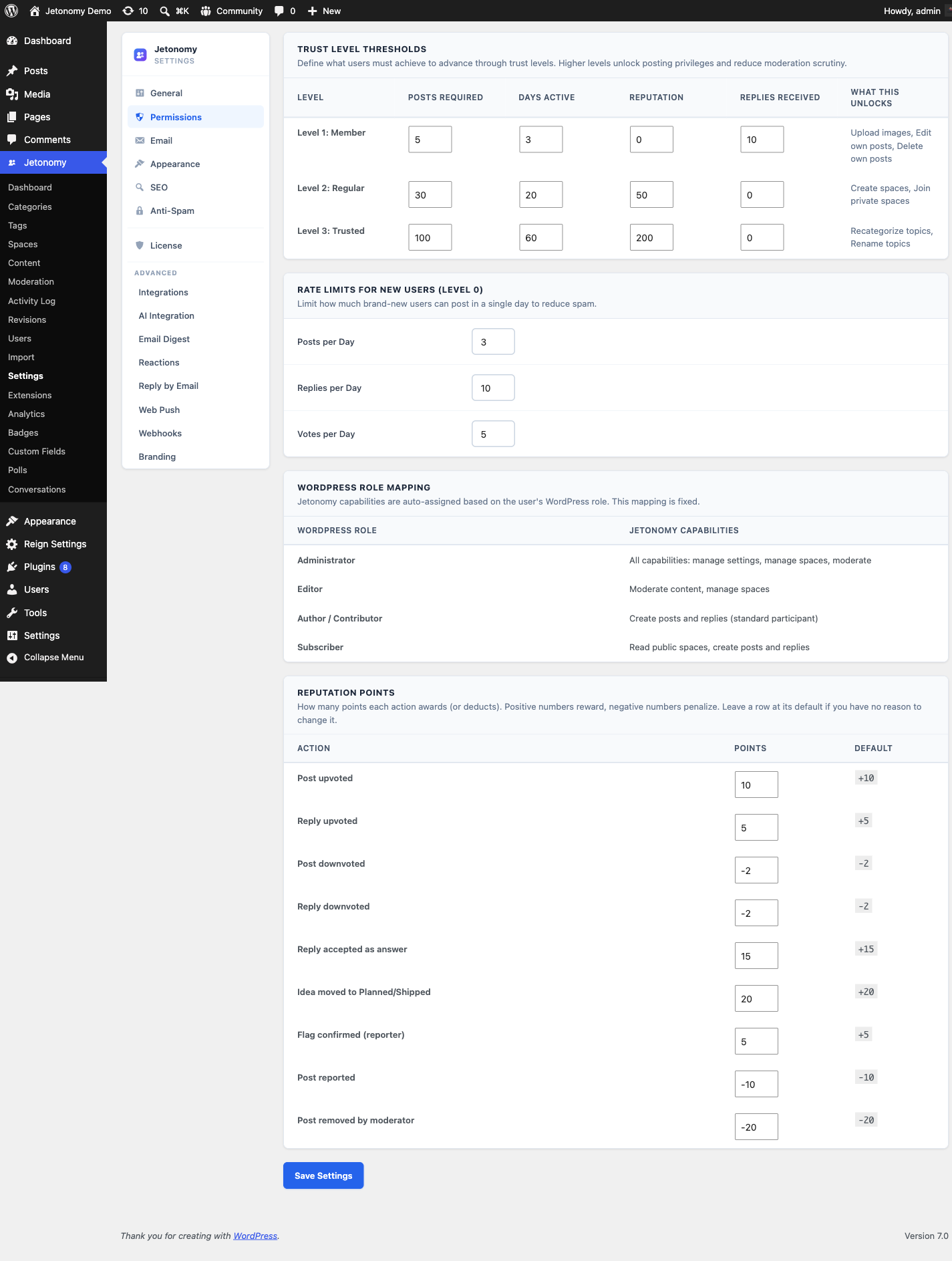
| TL1 | Member | 5 posts, 3 days active, 10 replies received |
| TL2 | Regular | 30 posts, 20 days active, 50 reputation |
| TL3 | Trusted | 100 posts, 60 days active, 200 reputation |
| TL4 | Leader | Manually granted by an admin |
| TL5 | Moderator | Manually granted by an admin |
What Each Level Unlocks
Trust levels expand what a member can do without moderator intervention.
| Capability | TL0 | TL1 | TL2 | TL3 | TL4 | TL5 |
|---|---|---|---|---|---|---|
| Create topics | Yes | Yes | Yes | Yes | Yes | Yes |
| Post replies | Yes | Yes | Yes | Yes | Yes | Yes |
| Flag content | Yes | Yes | Yes | Yes | Yes | Yes |
| Upload images | No | Yes | Yes | Yes | Yes | Yes |
| Edit / delete own posts | No | Yes | Yes | Yes | Yes | Yes |
| Daily post and rate limit lifted | No | Yes | Yes | Yes | Yes | Yes |
| Skip CAPTCHA | No | No | Yes | Yes | Yes | Yes |
| Create new spaces | No | No | Yes | Yes | Yes | Yes |
| Recategorize and rename others' topics | No | No | No | Yes | Yes | Yes |
| Moderate content and manage members | No | No | No | No | Yes | Yes |
| Manage settings, categories, and analytics | No | No | No | No | No | Yes |
Each level adds to the one below it - a Trusted member (TL3) keeps everything TL1 and TL2 unlocked and gains the recategorize/rename abilities on top. Note that the higher levels are not just lifted limits: TL2 members can start their own spaces, TL3 members can tidy up the category and titles of any topic, and TL4/TL5 members effectively act as community staff (moderation, member management, and - at TL5 - settings, categories, and analytics).
Space moderators and WordPress admins always have full capabilities regardless of trust level.
Note: "Rate limit lifted" at TL1 refers to the per-day posting caps that apply to brand-new (TL0) accounts - 3 topics, 10 replies, and 5 votes per day by default. Those caps and how to tune them are covered in Anti-Spam Protection → Rate Limiting for New Members.
How Members Earn Reputation
Reputation is updated in real time whenever a qualifying event occurs.
| Event | Points |
|---|---|
| Your topic is upvoted | +10 |
| Your reply is upvoted | +5 |
| Your reply is accepted as an answer (Q&A) | +15 |
| Your idea is moved to Planned/Shipped | +20 |
| A flag you submitted is confirmed | +5 |
| Your topic or reply is downvoted | -2 |
| Your post is reported | -10 |
| A moderator deletes your content | -20 |
Every point value is editable at Jetonomy → Settings → Permissions → Reputation Points - adjust any action's score without touching code.
Reputation points accumulate on your public profile. The leaderboard ranks members by reputation score - see the Leaderboard doc for details.
Automatic Promotion
A cron job runs twice daily to evaluate all members against the current requirements for levels 1-3. Any member who meets every requirement for the next level is automatically promoted.
Promotion is silent - members are not notified by default. You can add a welcome notification using the jetonomy_trust_level_changed action hook if you want to acknowledge promotions.
Demotion works the same way. If a member's reputation falls below a threshold (for example, because posts were deleted), they are automatically moved back to the appropriate level on the next cron run.
Tip: You can set a member's trust level directly from Jetonomy → Users in the WordPress admin. Find the user and click Change Trust Level, then pick the level. This is a manual override that sets the level immediately - useful for elevating a known expert or correcting an edge case.
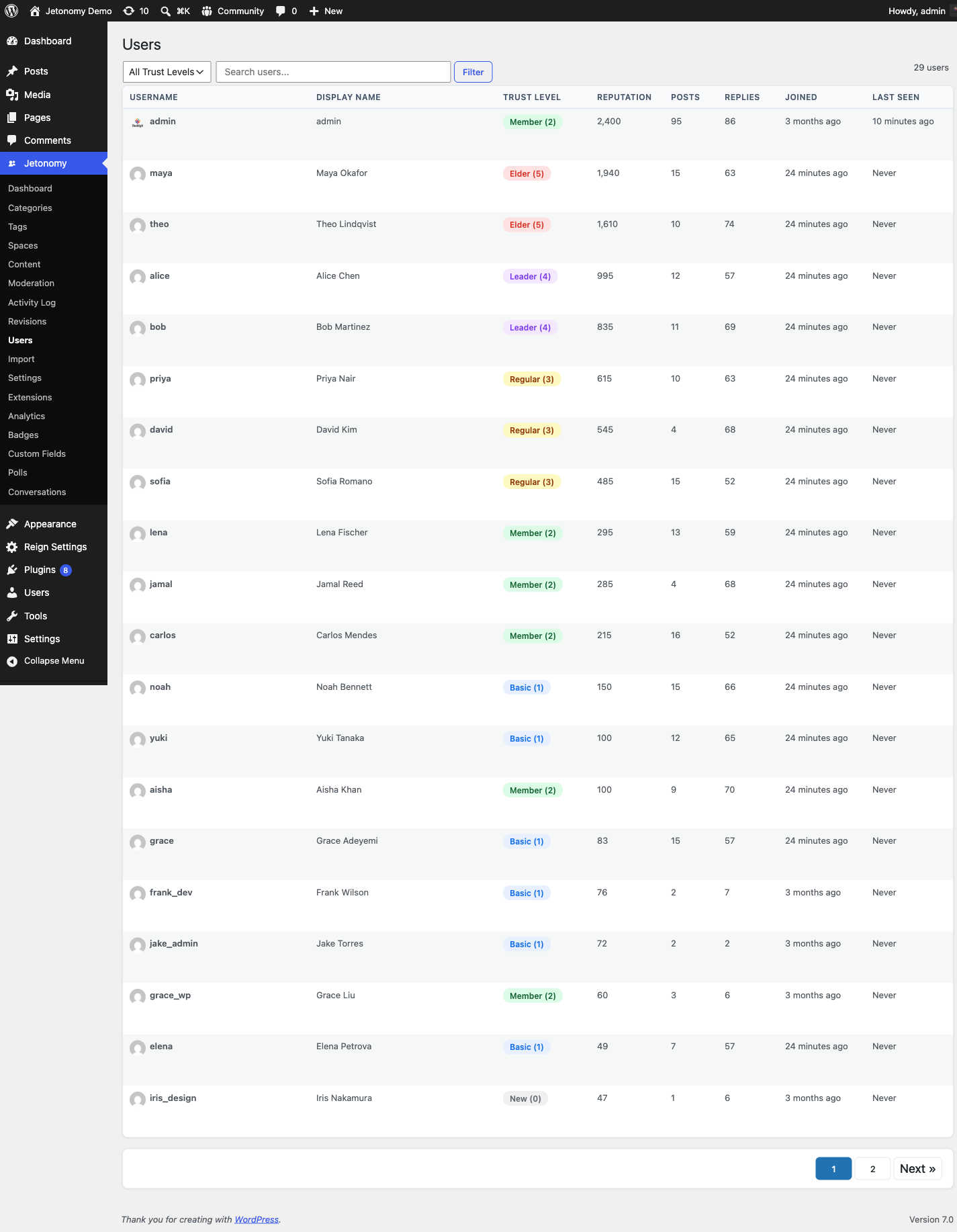
The Jetonomy → Users page is the central place to manage individual members: each row shows the member's trust level, post and reputation stats, and per-row controls to Change Trust Level and to Ban / Unban (covered in Banning Members).
Configuring Thresholds
Go to Jetonomy → Settings → Permissions to adjust the promotion requirements. Each of the three earned levels (1, 2, and 3) has its own row with four inputs: posts, days active, reputation, and replies received. A member must meet every value in a row to reach that level. Changes take effect on the next cron run.
Levels 4 and 5 have no requirement inputs - they are granted manually from Jetonomy → Users and cannot be earned automatically.
Lower requirements make promotion faster and more accessible. Higher requirements make higher trust levels a meaningful achievement. There is no right answer - tune these to the pace and size of your community.
Note: Setting a requirement to 0 removes it as a gate for that level. For example, setting a level's reputation requirement to 0 means members can reach it on activity stats alone.
Trust Badges on Avatars
Each trust level has a colored badge that appears on a member's avatar across topic listings, reply cards, and their profile page. The badge uses the data-jt-tl attribute so you can restyle it in your theme using CSS if needed.
| Level | Badge Color |
|---|---|
| TL0 | Grey |
| TL1 | Blue |
| TL2 | Green |
| TL3 | Teal |
| TL4 | Purple |
| TL5 | Gold |
Why Trust-Based Moderation Beats Manual Role Assignment
In a traditional forum, you manually decide who is a "trusted" member. That does not scale. With Jetonomy's trust system, your community self-selects. Members who contribute quality content earn their way to higher levels automatically. You only need to intervene in edge cases - banning bad actors or manually elevating a known expert to a higher level.
For Developers
Trust and moderation events fire WordPress action hooks you can listen to in a small custom plugin or your theme's functions.php - for example to send a welcome message when a member is promoted, or to log every resolved flag to an external system:
jetonomy_trust_level_changed- fires when a member's trust level goes up or down.jetonomy_flag_resolved- fires when a moderator marks a flag valid or dismisses it.jetonomy_sidebar_auth_card- lets you add content to the community sidebar.
The full signatures (parameters and when each one runs) are in the Hooks Reference in the developer guide.
What's Next?
Learn how members can flag content for review and how flagged content reaches the moderation queue.