

AI Moderation and Assist
Bring large language models into your community - for smarter spam detection, auto-moderation, reply suggestions, and thread summaries - without sending data to a third party unless you want to.
PRO - This feature requires Jetonomy Pro.
What You Will Learn
- How the AI extension is organized (providers + features)
- Which AI providers Jetonomy supports, including self-hosted Ollama
- How to enable AI-powered spam detection, content moderation, reply suggestions, and thread summaries
- Where to monitor token usage and cost
- How to keep community content private by running models locally
Why AI Matters for Communities
Moderation is the single biggest burden on community owners. Every post and every reply is a potential spam attempt, abuse report, or duplicate question. At 50 topics a day, a human moderator can keep up. At 500, they cannot.
The Jetonomy Pro AI extension gives your community a language model that reads every new post and every new reply, flags the ones that need a human, and leaves the rest alone. It does not replace your moderators - it filters what they see so they can focus on judgment calls instead of the obvious cases.
Supported Providers
Jetonomy's AI layer is built on a pluggable adapter pattern. Four providers ship out of the box:
| Provider | Hosted by | Best for |
|---|---|---|
| Ollama | You - runs on your own server | Privacy-sensitive communities, GDPR, full data control |
| OpenAI | OpenAI | Fastest time to value, best general quality |
| Anthropic | Anthropic (Claude) | High-quality moderation, long context windows |
| Custom | You | Self-hosted vLLM, LM Studio, or any OpenAI-compatible endpoint |
You can register more than one provider and assign different features to different providers - for example, run moderation through Ollama locally while using OpenAI only for summaries of long threads.
Tip: If you already run Ollama on the same server as WordPress, the AI extension uses it over localhost - no network hop, no API key, no data leaves your machine.
Multi-Provider Fallback Chain
Every AI feature can be assigned a primary provider plus an optional fallback chain. If the primary provider errors mid-request (rate limit, timeout, 5xx), Jetonomy automatically retries the next provider in the chain before surfacing an error to the admin.
Typical setup: Ollama (primary) → OpenAI (fallback) → Anthropic (second fallback). You get privacy-first moderation with a safety net for the moments when the local model is restarting or overloaded.
The chain is configured per feature at Jetonomy → Settings → AI Integration → Advanced. Requests that succeed via the fallback chain are logged with a fallback_used flag so you can spot providers that are flapping.
Monthly Spend Caps
Every cloud provider (OpenAI, Anthropic, Custom) can be given a monthly spend cap in USD. Once usage crosses the cap in the current billing window, Jetonomy stops dispatching requests to that provider and surfaces a clear admin notice explaining what happened and when the cap resets.
Spend caps protect you from a runaway loop - a broken summary trigger, a spam wave that hits the reply-suggestion endpoint - draining your account. Self-hosted Ollama has no cap UI because it has no per-request cost.
Caps are evaluated against the usage log (wp_jt_pro_ai_usage), not the provider's invoice, so the cap reacts immediately. Expect a 2 - 3% variance versus your invoice at the end of the month because Jetonomy's estimate uses published token rates.
AI-Powered Features
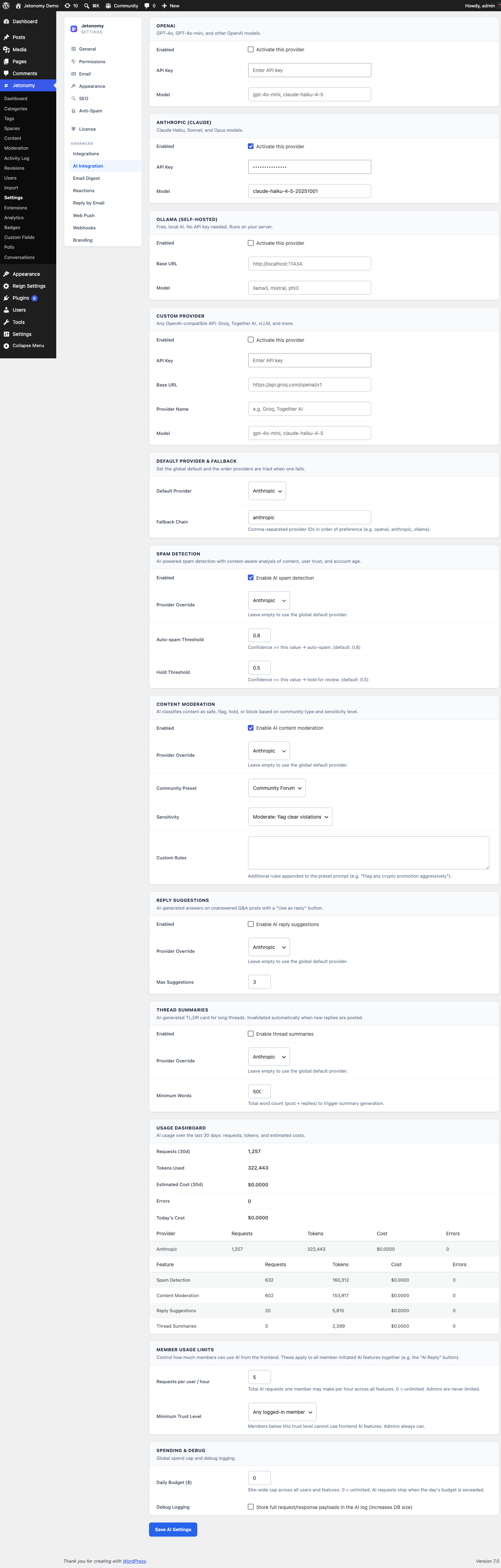
Each feature can be toggled independently from Jetonomy → Settings → AI Integration.
How Review Runs
AI review never sits between a member and the publish button. Posts and replies appear the instant they are submitted, with zero AI latency, so posting always stays fast. A background job then reviews the new content in batches on a schedule.
- Batched and scheduled. A recurring job (
jetonomy_pro_ai_batch_review) sweeps everything posted since its last run and classifies many items in a single model call - the spam and content-moderation checks share one pass. On a quiet site the sweep exits without touching the API at all. - Runs every 5 minutes by default. The interval is filterable via
jetonomy_pro_ai_review_interval(default 300 seconds, floored at 60 seconds). - Trusted members are skipped. Staff and members at or above a trust level are never sent to the model. The exemption threshold is filterable via
jetonomy_pro_ai_review_exempt_trust_level(default trust level 3). - Throughput controls. Each sweep inspects up to
jetonomy_pro_ai_review_batch_capnew posts and replies (default 60), classifyingjetonomy_pro_ai_review_chunk_sizeitems per model call (default 12). A failed model call is retried on the next cycle rather than dropped.
Both Spam Detection and Content Moderation below run together in this same background pass.
Spam Detection
The free plugin already classifies spam with a model rather than with patterns, but it can only talk to a locally hosted Ollama instance and only for that one job. The Pro extension widens that seam: OpenAI, Anthropic and custom providers, an ordered fallback chain when one is unreachable, spend caps, and the same models reused for content moderation, reply suggestions and thread summaries. Posts and replies publish instantly - the AI is never in the posting path. The background reviewer then scores each new post and reply for spam probability and moves anything above the threshold to the moderation queue. Content below the threshold stays published as normal.
Works alongside Akismet and trust-level rate limits - AI spam detection is the third layer, not a replacement.
Content Moderation
Flags content that breaks rules you describe in plain English. You write a few sentences - "no political attacks, no personal insults, no harassment" - and the background reviewer reads each new post and reply against that policy.
Violations are sent to the moderation queue with a reason the model generated. Your human moderators make the final call, but they see a pre-filled explanation instead of a blank flag.
Moderation presets - Four tuned presets ship out of the box so you do not have to write a policy from scratch:
| Preset | Tuned for |
|---|---|
| Community Forum | General discussion boards. Flags spam, harassment, obvious off-topic. Permissive on mild profanity and opinion-based disagreement. |
| Support Desk | Product and service support. Flags abusive language toward staff, solicitation, and off-topic promotion. Permissive on frustration. |
| Kids Safe | Under-13 communities. Aggressive filter - any profanity, sexual language, personal contact requests, or outside links flagged. |
| Academic | University and research communities. Flags plagiarism indicators, academic dishonesty keywords, and personal attacks. Permissive on technical debate. |
Pick a preset as your starting point and customize from there. The preset fills the policy text field - you edit it - and the model uses your edited copy.
Reply Suggestions
When a member is composing a reply, Jetonomy can ask the model for a draft based on the topic context. The member can accept it, edit it, or ignore it. Draft replies are never sent without human approval.
Great for knowledge-base communities where most answers follow a pattern.
Thread Summaries
On long threads (30+ replies), Jetonomy can generate a short summary pinned at the top of the topic. New visitors read the summary instead of scrolling through every back-and-forth. Summaries regenerate when new replies meaningfully change the conversation.
Cached in the wp_jt_pro_ai_cache table so each summary is generated once per content state.
Enabling AI Integration
- Go to Jetonomy → Extensions and enable AI.
- Open Jetonomy → Settings → AI Integration.
- Choose a provider. For Ollama, enter the base URL (usually
http://localhost:11434) and the model name (for example,llama3.1:8b). - (Optional) Add a fallback provider and set a monthly spend cap at AI Integration → Advanced.
- Turn on the individual features you want - Spam Detection, Content Moderation, Reply Suggestions, or Thread Summaries. Pick a Content Moderation preset if you enable moderation.
- Save.
Each feature has its own Enable switch and an optional Provider Override, so you can, for example, run moderation locally on Ollama while sending summaries to OpenAI - see the per-feature toggles in the AI Integration settings tab above.
Usage Tracking and Cost
Every AI request is logged to the wp_jt_pro_ai_usage table with the model used, token counts, latency, and estimated cost.
AI Usage dashboard widget - A dedicated widget appears on the main Jetonomy admin dashboard as soon as at least one provider is connected. It shows at a glance:
- Requests today and this month
- Token usage by feature
- Estimated spend by provider (and percentage of the monthly cap consumed)
- Average response time
- Error rate and fallback-chain activations
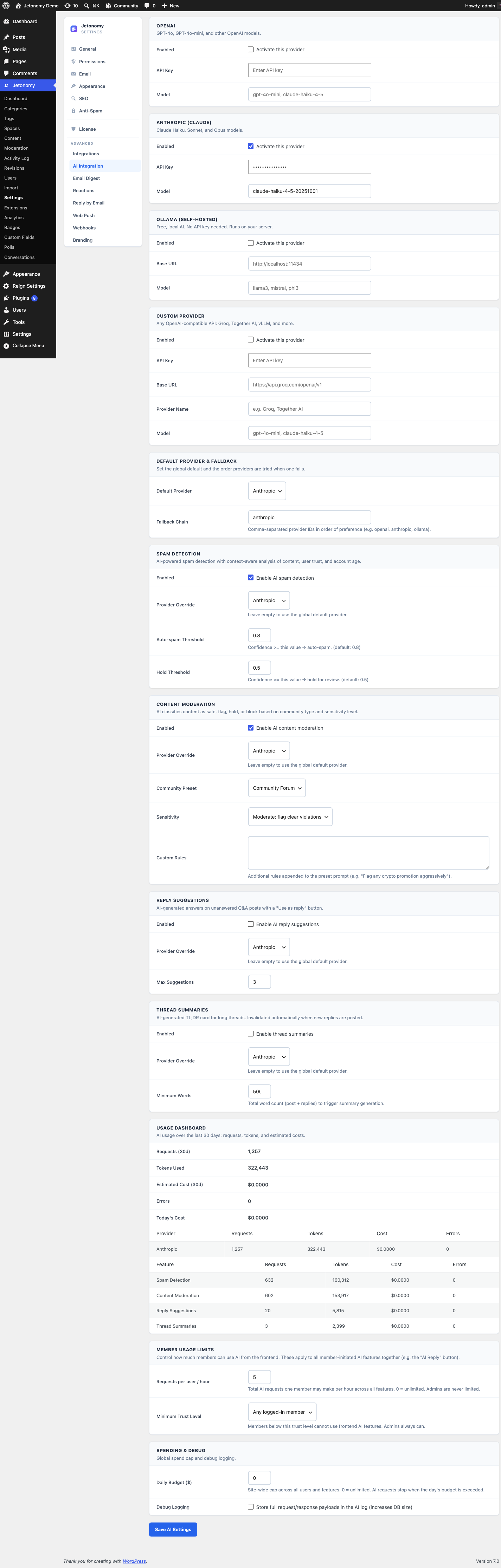
A detailed breakdown lives at Jetonomy → Settings → AI Integration → Usage with per-day charts, per-feature filtering, and CSV export.
If a feature starts running hot (a new spam wave, an unexpected summary loop), you see it in the dashboard and can pause that feature without disabling the whole extension. The spend cap will also pause the provider automatically if the runaway is expensive enough to cross the cap.
Privacy and Self-Hosting
For communities that cannot send member content to a third-party API - legal, health, financial, enterprise internal - run Ollama on the same server. Jetonomy talks to the model over localhost only. No external network calls, no API keys, no data leaves your machine.
The wp_jt_pro_ai_log audit table records every model decision (feature, object, confidence, action taken) so you have a permanent record of what the AI did and why - useful for compliance reviews.
REST API
The AI extension registers three endpoints under jetonomy/v1:
| Method | Endpoint | Description |
|---|---|---|
GET |
/ai/usage |
Aggregated usage metrics for a date range |
GET |
/ai/usage/summary |
Rolled-up usage summary for a date range |
POST |
/ai/suggest-reply |
Request a reply suggestion - pass post_id in the JSON body |
The two usage endpoints require an administrator (manage_options). /ai/suggest-reply requires any logged-in member and is rate-limited.
What's Next?
Give every Pro space its own SEO controls - custom meta titles, Open Graph images, schema, and sitemap rules.