

Shortcodes, Widgets and Blocks
Jetonomy includes eight shortcodes, four classic widgets, and eight Gutenberg blocks so you can embed community content anywhere on your WordPress site - sidebars, pages, posts, or block-based layouts.
What You Will Learn
- How to use the eight built-in shortcodes and their attributes
- How to add the four classic widgets to sidebar areas
- How to insert the eight Gutenberg blocks in the block editor
- How shortcodes and blocks share the same rendering logic
- Which surfaces are block-only and which are shortcode-only
At a Glance
| Type | Slug | Purpose | Since |
|---|---|---|---|
| Shortcode | [jetonomy_recent_posts] |
Recent posts feed | 1.0 |
| Shortcode | [jetonomy_trending_posts] |
Hot-scored trending posts | 1.3.0 |
| Shortcode | [jetonomy_spaces] |
Space directory grid | 1.0 |
| Shortcode | [jetonomy_leaderboard] |
Top members by reputation | 1.0 |
| Shortcode | [jetonomy_user_profile] |
Single user profile card | 1.2 |
| Shortcode | [jetonomy_space_members] |
Members of one space | 1.2 |
| Shortcode | [jetonomy_compose_topic] |
New in 1.3.7 - inline topic composer (fixed space or member picker) | 1.3.7 |
| Shortcode | [jetonomy_widget] |
Embed any of the four classic widgets on a page or page-builder canvas | 1.4.0 |
| Block | jetonomy/forum-feed |
Live post feed | 1.3.0 |
| Block | jetonomy/trending |
Trending topics with time-decayed hot score | 1.3.6 |
| Block | jetonomy/space-list |
Space grid | 1.3.0 |
| Block | jetonomy/leaderboard |
Top members | 1.3.0 |
| Block | jetonomy/navigation |
Permission-aware category + space tree | 1.3.5 |
| Block | jetonomy/user-panel |
Logged-in sidebar profile card | 1.3.5 |
| Block | jetonomy/login |
Inline login/register panel | 1.3.5 |
| Block | jetonomy/compose-topic |
New in 1.3.7 - topic composer embeddable anywhere | 1.3.7 |
Block-only vs shortcode-only
Most surfaces are available as both a block and a shortcode (Forum Feed, Trending, Space List, Leaderboard, Compose Topic). Three are available one way only:
- Block-only (no shortcode twin):
jetonomy/navigation,jetonomy/user-panel,jetonomy/login. To place these outside the block editor, add the block inside a reusable/synced pattern or a block-based template part. - Shortcode-only (no block twin):
[jetonomy_user_profile],[jetonomy_space_members],[jetonomy_widget]. Use these in classic editors, page builders, and widget areas.
Shortcodes
All shortcodes are registered by Jetonomy\Shortcodes::register() and are available on any page or post.
Self-styling on any page (1.4.0+): every shortcode auto-enqueues assets/css/blocks.css at render time and ships its own --jtb-* token block, so a bare [jetonomy_recent_posts] paste on a regular WordPress page renders fully styled - no need to put it inside a Forum Feed block container. Works in classic editor, page builders (Elementor, Divi, Bricks, WPBakery), widget areas, and template parts.
[jetonomy_recent_posts]
Displays a list of the most recent published posts across your community or within a specific space.
Attributes
| Attribute | Type | Default | Description |
|---|---|---|---|
count |
int | 5 |
Number of posts to display |
space_id |
int | 0 |
Restrict to a space. 0 = all spaces |
sort |
string | latest |
latest or votes |
[jetonomy_recent_posts count="5" space_id="3" sort="votes"]
Each post card shows the title, author name, space name, time ago, vote score, and reply count.
[jetonomy_trending_posts]
Displays a ranked list of "hot" posts using a time-decayed score of recent votes + replies.
Attributes
| Attribute | Type | Default | Description |
|---|---|---|---|
count |
int | 5 |
Number of posts to display |
space_id |
int | 0 |
Restrict to a space. 0 = all spaces |
window |
int | 7 |
Days of history used for the hot score |
[jetonomy_trending_posts count="10" window="14"]
[jetonomy_spaces]
Displays a list of public, active spaces, ordered by post count.
Attributes
| Attribute | Type | Default | Description |
|---|---|---|---|
count |
int | 6 |
Number of spaces to display |
category_id |
int | 0 |
Filter by category. 0 = all categories |
[jetonomy_spaces count="6" category_id="2"]
Each space card shows the title, a short description excerpt, and the post count.
[jetonomy_leaderboard]
Displays a ranked list of the top community members by reputation score.
Attributes
| Attribute | Type | Default | Description |
|---|---|---|---|
count |
int | 10 |
Number of members to display |
[jetonomy_leaderboard count="10"]
[jetonomy_user_profile]
Displays a compact profile card for a specific user or the currently logged-in user.
Attributes
| Attribute | Type | Default | Description |
|---|---|---|---|
user_id |
int | 0 |
Target user. 0 = current logged-in user |
[jetonomy_user_profile user_id="0"]
The card shows the display name, trust level badge, bio excerpt, reputation score, and post count.
[jetonomy_space_members]
Displays a list of members for a specific space, ordered by reputation.
Attributes
| Attribute | Type | Default | Description |
|---|---|---|---|
space_id |
int | - | Required. ID of the space |
count |
int | 10 |
Number of members to display |
[jetonomy_space_members space_id="5" count="20"]
[jetonomy_compose_topic] (new in 1.3.7)
Lets signed-in members start a new topic from any WordPress page, post, or page-builder canvas. Two modes: lock to one space, or show a picker of spaces the current user is a member of.
Attributes
| Attribute | Type | Default | Description |
|---|---|---|---|
mode |
string | picker |
picker (show a space select) or fixed (post to one space) |
space_id |
int | 0 |
Space ID to post into. Only used when mode="fixed". Invalid IDs degrade to picker at render time. |
types |
CSV | topic,question,idea |
Allowed post types for this embed |
[jetonomy_compose_topic mode="picker"]
[jetonomy_compose_topic mode="fixed" space_id="5"]
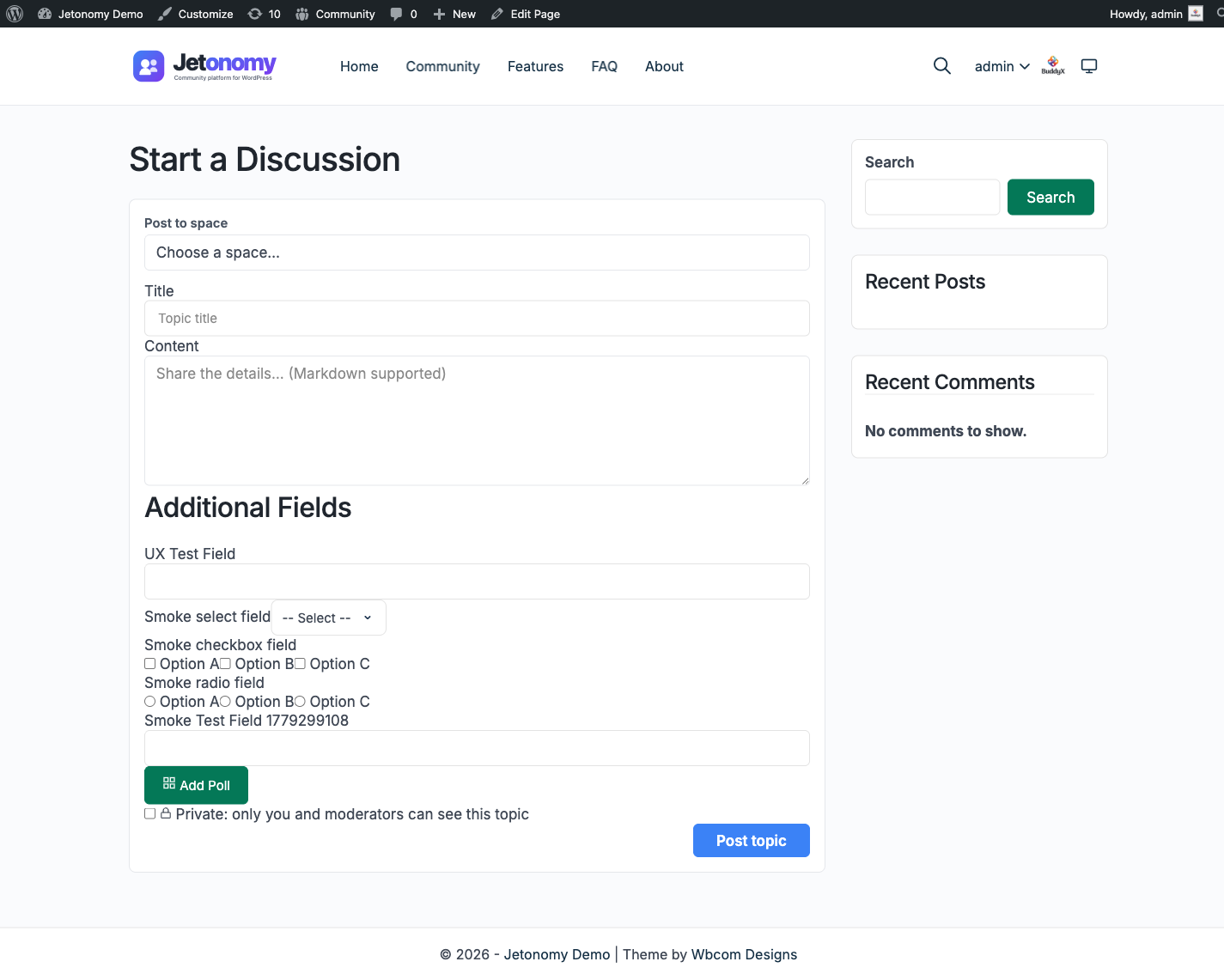
Behavior
- Logged-out viewers see a "Sign in to start a new topic" CTA that redirects back to the current URL after login - no form exposure, no wasted scroll.
- Picker mode queries
Permission_Engine::can($uid, 'create_posts', $space_id)against every space the user is a member of. Only spaces where they actually have posting rights appear. - Fixed mode hides the picker entirely. If the hardcoded
space_idis missing or the user cannot post in it, the embed silently degrades to picker mode rather than breaking. - Assets (
blocks.css+ the Interactivity API bundle) enqueue on-demand at render time so pages that don't use the shortcode carry no overhead. Works inside page builders that render shortcodes outsidethe_content(Elementor, Divi, Bricks, WPBakery).
Companion REST endpoint: GET /jetonomy/v1/spaces?postable_by_me=1 returns the user's postable spaces.
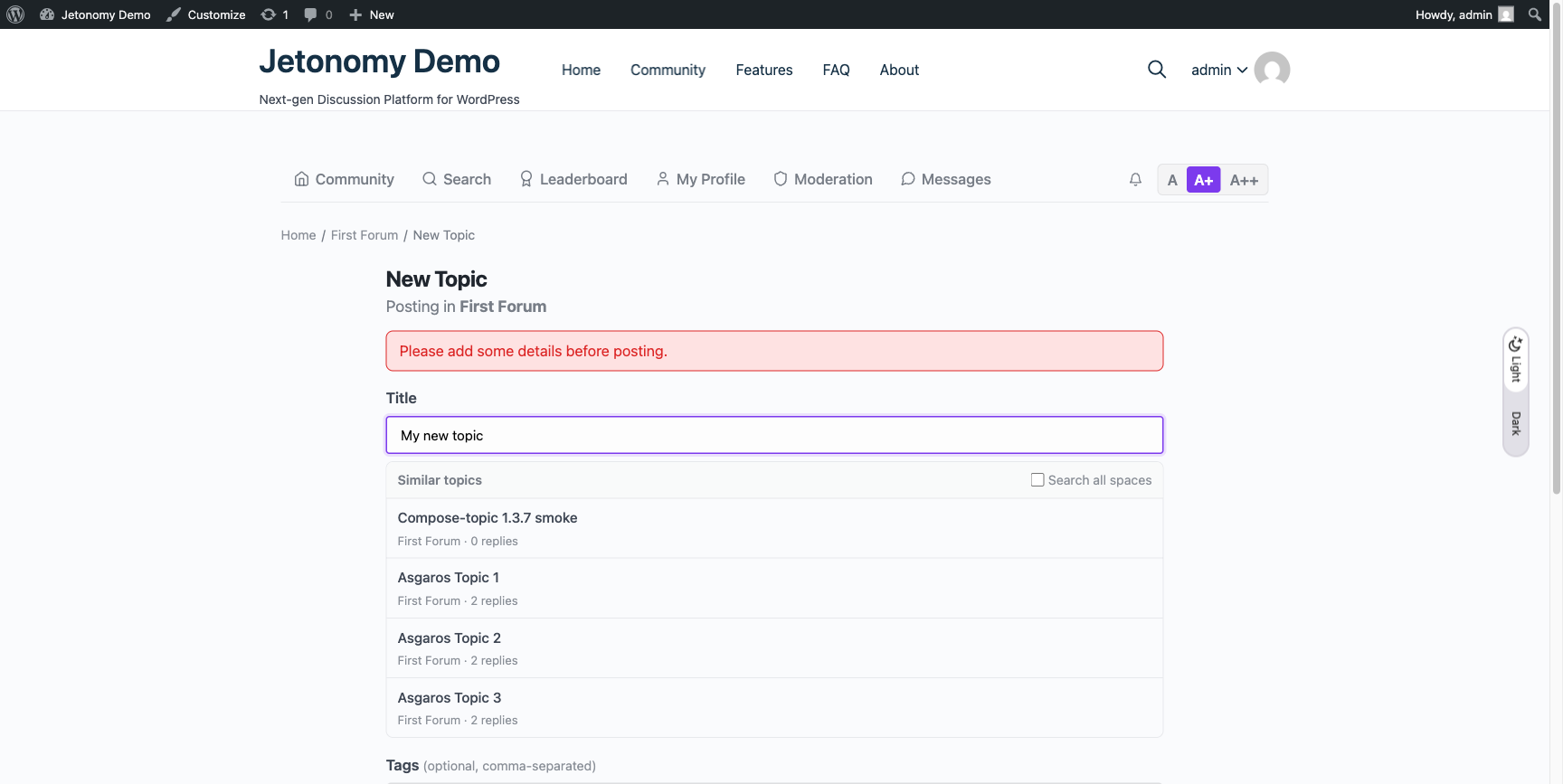
When the title is filled but the body is empty, an inline error banner appears above the title - no silent failures, no lost input:
Classic Widgets
Jetonomy registers four classic widgets for use in any theme widget area. Each widget is configured through the standard WordPress widget admin screen or the Customizer.
Recent Posts Widget
Displays recent forum posts in any sidebar or widget area.
Settings: Title, Count, Space (optional filter), Sort order
Leaderboard Widget
Displays top community contributors ranked by reputation.
Settings: Title, Count
Active Spaces Widget
Displays the most active spaces by post count.
Settings: Title, Count
User Stats Widget
Displays the currently logged-in user's stats: reputation, post count, reply count, and trust level.
Settings: Title (no other configuration - always reflects the current user)
[jetonomy_widget] shortcode (new in 1.4.0)
Each classic widget above can also be embedded directly into any page or page-builder canvas - without dropping into the Customizer or a sidebar - using the [jetonomy_widget] shortcode.
Attributes
| Attribute | Type | Required | Description |
|---|---|---|---|
id |
string | yes | Widget id: jetonomy_recent_posts, jetonomy_leaderboard, jetonomy_active_spaces, or jetonomy_user_stats |
title |
string | no | Override the widget's title (otherwise the widget's saved Customizer title or the default) |
count |
int | no | For Recent Posts, Leaderboard, and Active Spaces |
space_id |
int | no | For Recent Posts, optional space filter |
sort |
string | no | For Recent Posts: latest or votes |
[jetonomy_widget id="jetonomy_recent_posts" count="8" sort="latest"]
[jetonomy_widget id="jetonomy_leaderboard" count="10"]
[jetonomy_widget id="jetonomy_active_spaces" count="6"]
[jetonomy_widget id="jetonomy_user_stats" title="Your stats"]
Internally [jetonomy_widget] wraps WordPress core's the_widget() so the rendered markup matches what the same widget would output in a sidebar - same hooks, same CSS classes, same i18n. Useful for landing pages, footer columns, and page-builder canvases where the Customizer's sidebar widget area isn't available.
Gutenberg Blocks
Jetonomy registers eight server-side rendered blocks. Each block uses a render_callback that delegates to the matching shortcode (for most) or a dedicated render component (for Navigation, User Panel, and Login). Output is consistent wherever they appear.
All blocks live in the Widgets category of the block inserter and answer to the search term jet.
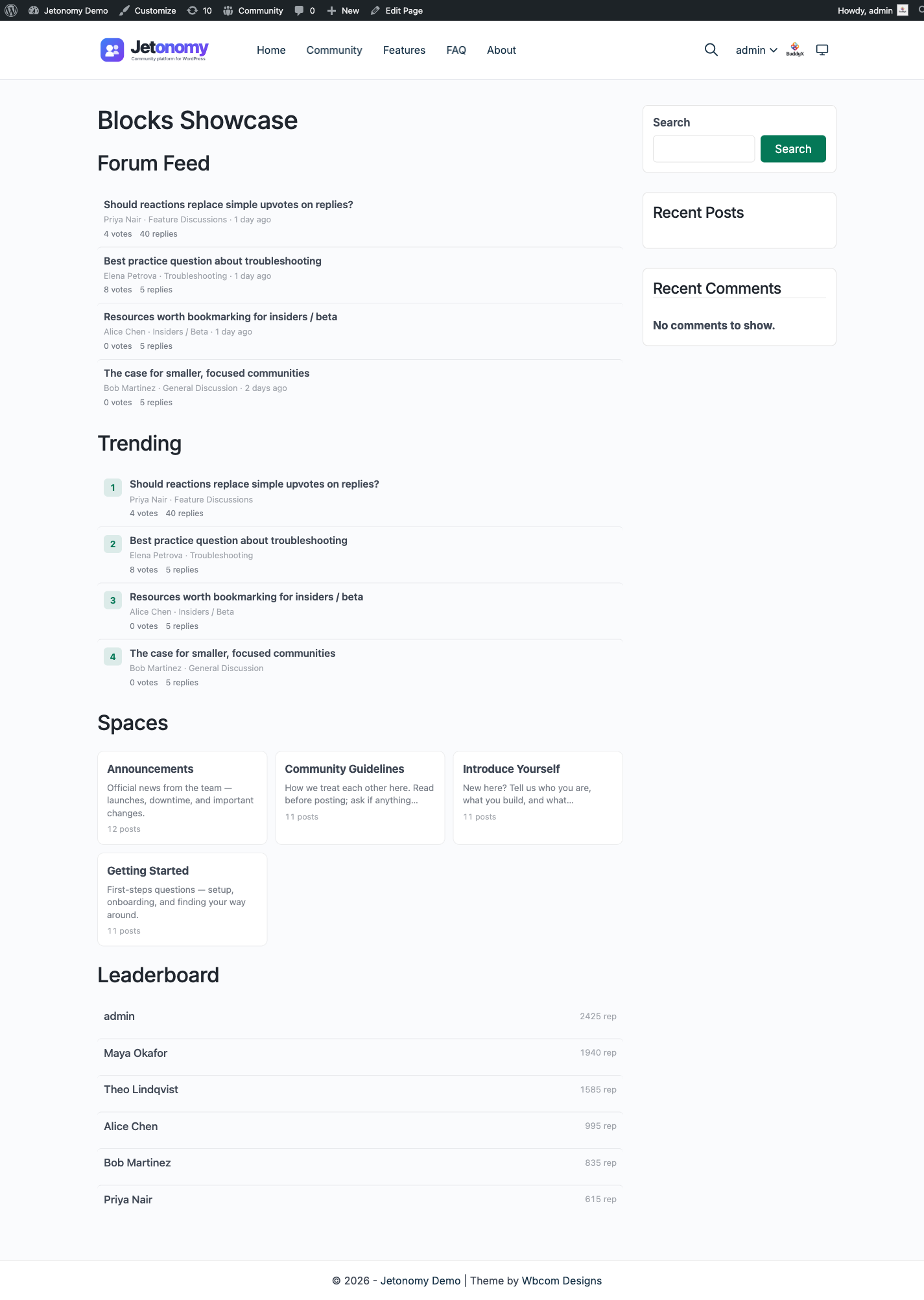
This is how the content blocks render on a published page - Forum Feed, Trending, Space List, and Leaderboard dropped onto a regular WordPress page. Because blocks and shortcodes share the same render path, the matching [jetonomy_*] shortcodes produce identical output:
Backend (editor) vs frontend (published) render (1.4.0+)
The two surfaces render differently - by design.
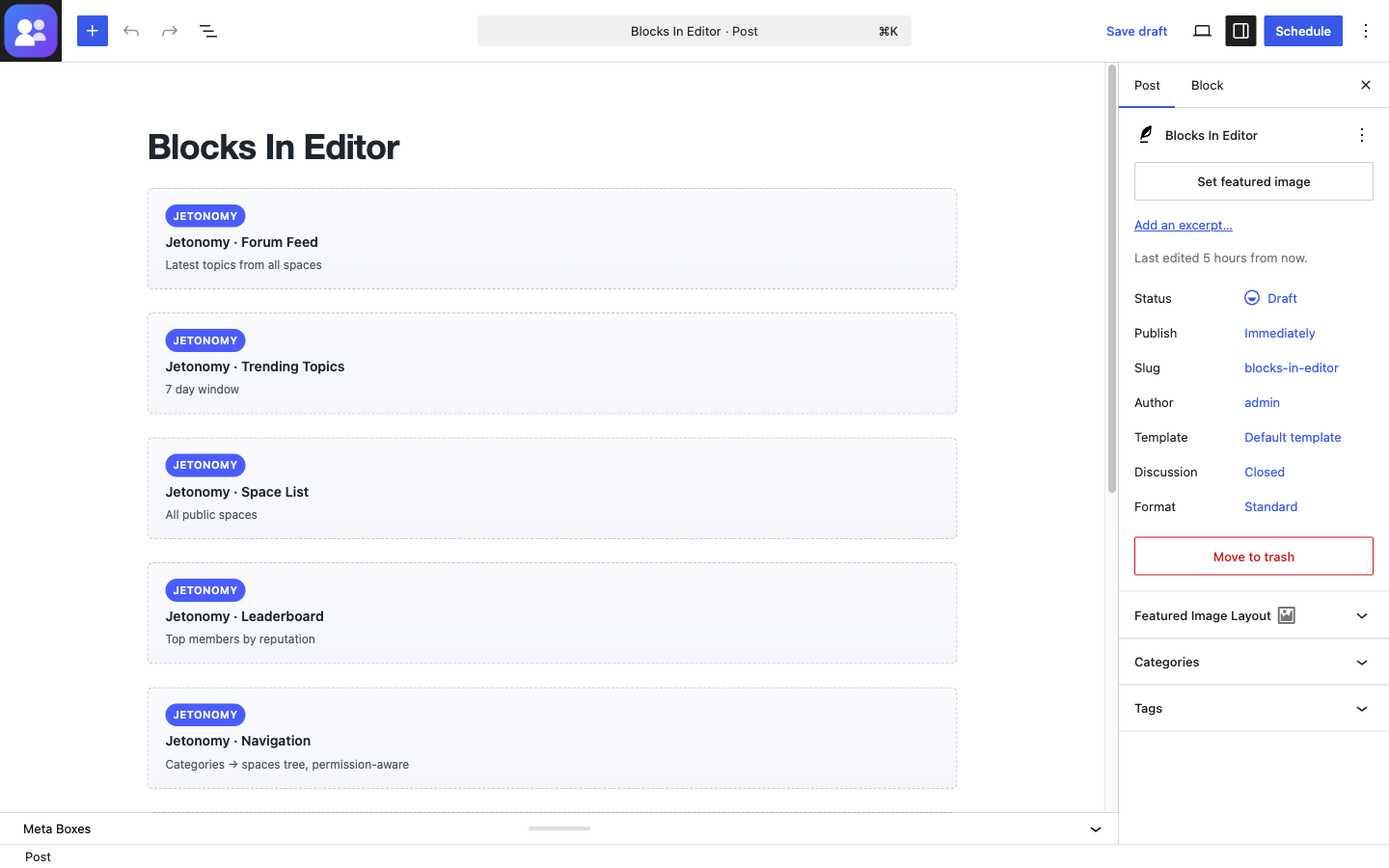
- Backend (block editor) - each block paints a framed static preview card with a "JETONOMY" pill badge, the block title, and an attribute-aware hint that reflects the current settings (
Filtered to space #3,7 day window,All public spaces, etc.). No REST calls fire. Dropping a block onto a page is instant; switching between Visual and Code editors does not trigger a network roundtrip. The preview is a mock - what the editor shows is not the actual queried data. - Frontend (published page) - the block's PHP
render_callbackruns against the live database on every request. Output is the same markup the matching[jetonomy_*]shortcode produces, with the block'swp-block-jetonomy-*wrapper class applied. Output is permission-aware: private spaces, banned authors, and silenced posts are filtered exactly as they would be on a regular community page.
Reason for the split: a live-data preview in the editor would (a) hammer the REST API on every keystroke in the title field, (b) leak permission-gated content to anyone who can edit the post, and (c) require a working REST connection at edit time. The static-card pattern mirrors what core blocks like Latest Posts do at the editor level, with the exception that core's render path can hit useEntityRecords() cheaply because the data is already cached client-side.
Each block exposes its settings through Inspector controls in the right sidebar, sized at the WordPress 6.7+ default (40px) with no deprecated bottom margins. The controls map one-to-one to the block attributes documented per block below.
Block inserter visibility was tightened in 1.4.0 - every block now registers an editor-side script (assets/js/blocks-editor.js) so all eight blocks appear in the inserter at once. Pre-1.4.0 only Compose Topic was visible because it was the only block carrying its own editor_script.
In the block editor each block paints the same lightweight preview card - a JETONOMY badge, the block name, and a hint that reflects the current settings (All public spaces, 7 day window, Categories → spaces tree, permission-aware) - so you can lay out a page without firing a single REST call:
jetonomy/forum-feed
Renders a live post feed from a selected space or all spaces.
Block Attributes
| Attribute | Type | Default | Description |
|---|---|---|---|
count |
number | 5 |
Posts to show |
spaceId |
number | 0 |
Space ID (0 = all spaces) |
sort |
string | latest |
latest or votes |
showHeader |
boolean | false |
Render a space header above the feed |
title |
string | '' |
Custom title when showHeader is on |
jetonomy/trending (1.3.6+)
Renders a ranked list of hot topics using a time-decayed score of recent engagement. Same render_callback plumbing as [jetonomy_trending_posts].
Block Attributes
| Attribute | Type | Default | Description |
|---|---|---|---|
count |
number | 5 |
Posts to show |
spaceId |
number | 0 |
Restrict to a space (0 = all) |
window |
number | 7 |
Days of history for the hot score |
showHeader |
boolean | true |
Render a "Trending" header |
title |
string | '' |
Custom title |
jetonomy/space-list
Renders a list of community spaces. Supports category filtering.
Block Attributes
| Attribute | Type | Default | Description |
|---|---|---|---|
count |
number | 6 |
Spaces to show |
categoryId |
number | 0 |
Filter by category (0 = all) |
jetonomy/leaderboard
Renders a leaderboard of top community members by reputation.
Block Attributes
| Attribute | Type | Default | Description |
|---|---|---|---|
count |
number | 10 |
Members to show |
jetonomy/navigation (1.3.5+)
Renders the Category → Space tree as permission-aware sidebar navigation. Designed for the community sidebar of any block theme or widget area.
Why this block exists
Most community themes render the space list with a hand-maintained nav menu. That list rots the moment you add a space, and it leaks private spaces to anonymous viewers. This block queries the live category/space tree on every render and honors Jetonomy's permission layer, so private spaces stay hidden from viewers who do not have access.
Block Attributes
| Attribute | Type | Default | Description |
|---|---|---|---|
showCategoryHeadings |
boolean | true |
Group spaces by parent category |
collapsible |
boolean | false |
Collapsible category headings |
showPostCount |
boolean | false |
Show topic count next to each space |
hideEmptyCategories |
boolean | true |
Hide categories that have no visible spaces |
title |
string | '' |
Optional wrapper title |
Scales to sites with thousands of spaces - the rendered tree uses Jetonomy's cached category/space index, not a per-request DB scan.
This block is block-only - there is no shortcode twin - so the rendered output is shown here:

jetonomy/user-panel (1.3.5+)
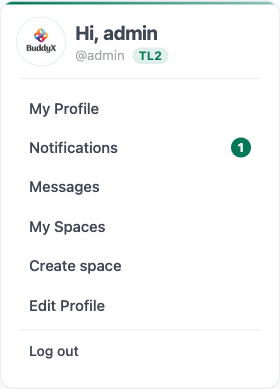
Renders a compact profile card for logged-in viewers - avatar, display name, notifications count, quick links to Profile / Notifications / Messages / Edit Profile / Logout. Empty for logged-out viewers so the sidebar layout doesn't shift.
Block Attributes
| Attribute | Type | Default | Description |
|---|---|---|---|
title |
string | '' |
Optional wrapper title above the card |
Auto-injects at the top of the community sidebar for logged-in viewers so admins don't need to add it by hand (disable with add_filter( 'jetonomy_sidebar_auth_card', '__return_false' )).
jetonomy/login (1.3.5+)
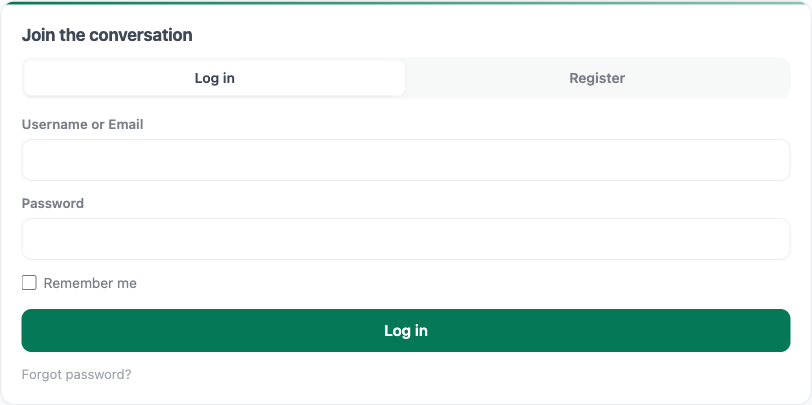
Renders an inline login and register panel for the community sidebar. Logged-out viewers see Login and Register tabs without leaving the page. Logged-in viewers get nothing rendered - no layout shift when state changes.
Block Attributes
| Attribute | Type | Default | Description |
|---|---|---|---|
title |
string | '' |
Header above the tabs |
showRegister |
boolean | true |
Show the Register tab alongside Login (honours users_can_register) |
Security
- Both forms are nonce-protected (
wp_ajax_jetonomy_quick_login/wp_ajax_jetonomy_quick_register) - Failed login attempts are rate-limited via
Jetonomy\Security\Rate_Limiter(5 attempts / 15 minutes per IP) - Registration respects whatever
users_can_registeris set to in your WP admin and any anti-spam adapter you have active (Akismet, AI spam detection)
jetonomy/compose-topic (new in 1.3.7)
Gutenberg equivalent of [jetonomy_compose_topic]. Drop it on any page, post, or template part and signed-in members can start a topic without leaving the page.
Block Attributes
| Attribute | Type | Default | Description |
|---|---|---|---|
mode |
string | picker |
picker or fixed |
spaceId |
number | 0 |
Space ID (fixed mode only) |
types |
string | topic,question,idea |
Allowed post types |
Editor experience
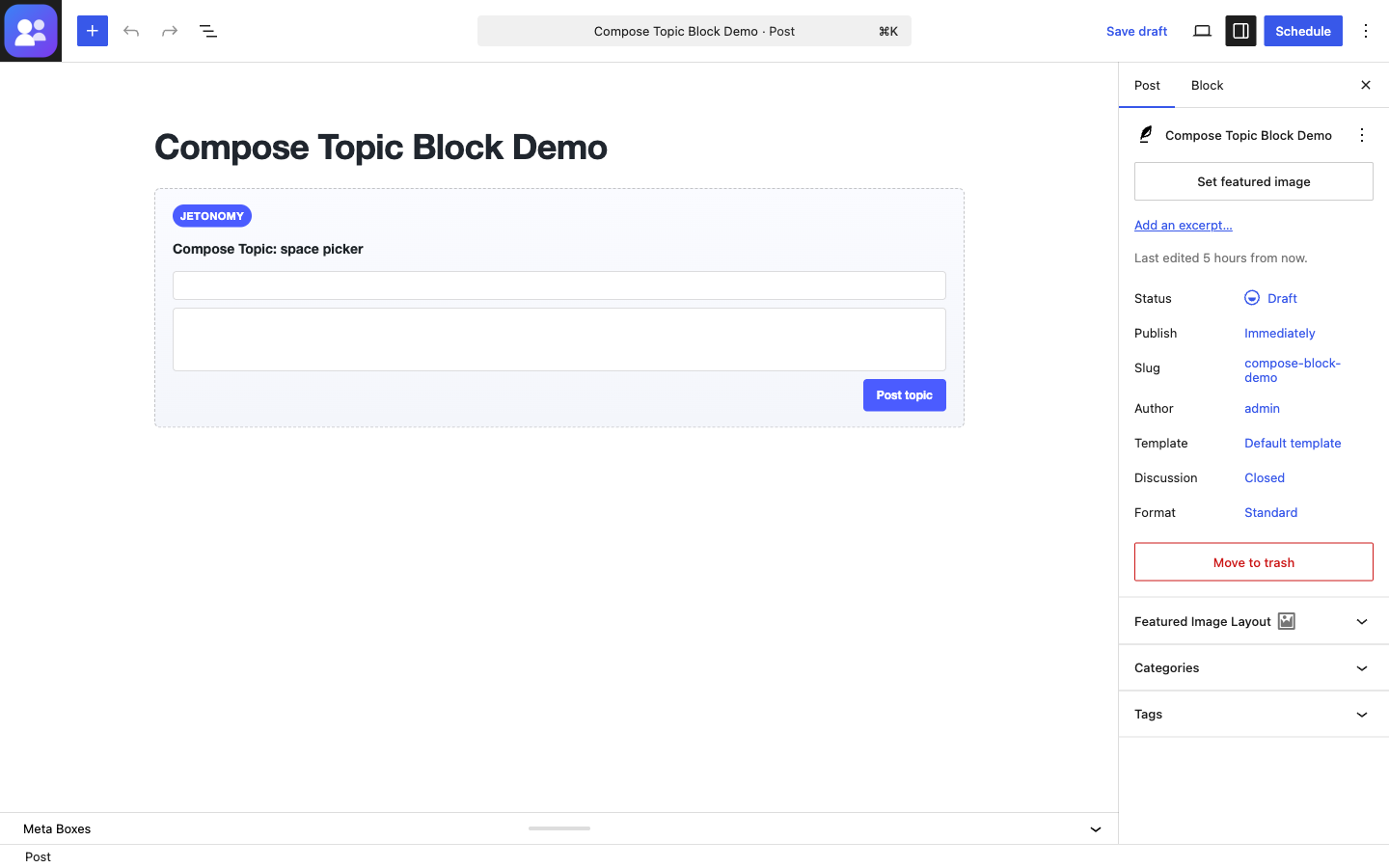
- The block editor shows a static preview (no live REST calls) - safe to drop into any page without hitting the server.
- Inspector controls: Mode select (picker / fixed), Space ID (visible only when Mode is fixed), Allowed types (comma-separated).
- Falls back to picker mode at render time if the fixed
spaceIddoesn't resolve to a space the viewer can post in - so themes/pages that were built before a space was deleted keep working instead of 500'ing.
Rendering
- Server render delegates to
[jetonomy_compose_topic], so the block + shortcode output are pixel-identical. - Styles come from
assets/css/blocks.css- self-contained, inherits theme tokens through--wp--preset--*fallbacks so it looks correct outside Jetonomy templates. - Built-in mobile breakpoint at 640px - submit button spans the column width, actions stack vertically.
CSS Classes for Styling
All shortcode and block output uses the jt-shortcode CSS class prefix so you can style them in your theme without affecting core community pages:
| Class | Element |
|---|---|
.jt-shortcode |
Wrapper on all shortcode output |
.jt-shortcode-recent-posts |
Recent posts container |
.jt-shortcode-post |
Individual post card |
.jt-shortcode-post-title |
Post title link |
.jt-shortcode-post-meta |
Author, space, and time line |
.jt-shortcode-post-stats |
Vote and reply counts |
.jt-shortcode-spaces |
Spaces container |
.jt-shortcode-space |
Individual space card |
.jt-shortcode-space-desc |
Space description excerpt |
.jt-shortcode-space-stats |
Space post-count line |
.jt-shortcode-trending-post |
Trending post row |
.jt-shortcode-trending-rank |
Trending rank badge (1, 2, 3 …) |
.jt-shortcode-trending-body |
Trending row body (title + meta + stats) |
.jt-shortcode-leaderboard |
Leaderboard container |
.jt-shortcode-rep |
Reputation pill in leaderboard / member rows |
.jt-shortcode-profile-card |
User profile card |
.jt-shortcode-profile-stats |
Reputation + post-count line on profile card |
.jt-shortcode-members |
Members list container |
.jt-shortcode-member |
Individual member row |
.jt-shortcode-empty |
Empty state message |
.jt-compose-topic-embed |
Compose-topic shortcode/block wrapper |
.jt-compose-topic-embed.jt-compose-topic-login |
Logged-out sign-in CTA variant |
.jt-compose-topic-field |
Label + input group |
.jt-compose-topic-space |
Space picker <select> |
.jt-compose-topic-title |
Title <input> |
.jt-compose-topic-body |
Details <textarea> |
.jt-compose-topic-submit |
Post topic button |
.jt-compose-topic-error |
Inline error banner (shown via state.submitError) |
.jt-compose-topic-posting-to |
"Posting in …" line in fixed mode |
Building Companion Shortcodes or Blocks
If you are building a companion plugin that needs to query Jetonomy data, guard your code with a class existence check:
if ( ! defined( 'JETONOMY_VERSION' ) ) {
    return;
}
Use the model classes for server-side rendering or the REST API for client-side fetches. See the REST API Reference for available endpoints.
What's Next?
- REST API Reference - Fetch community data from any context
- Template Overrides - Customize community page layouts
- Adapter System - Extend the search and email integrations