What you’re building
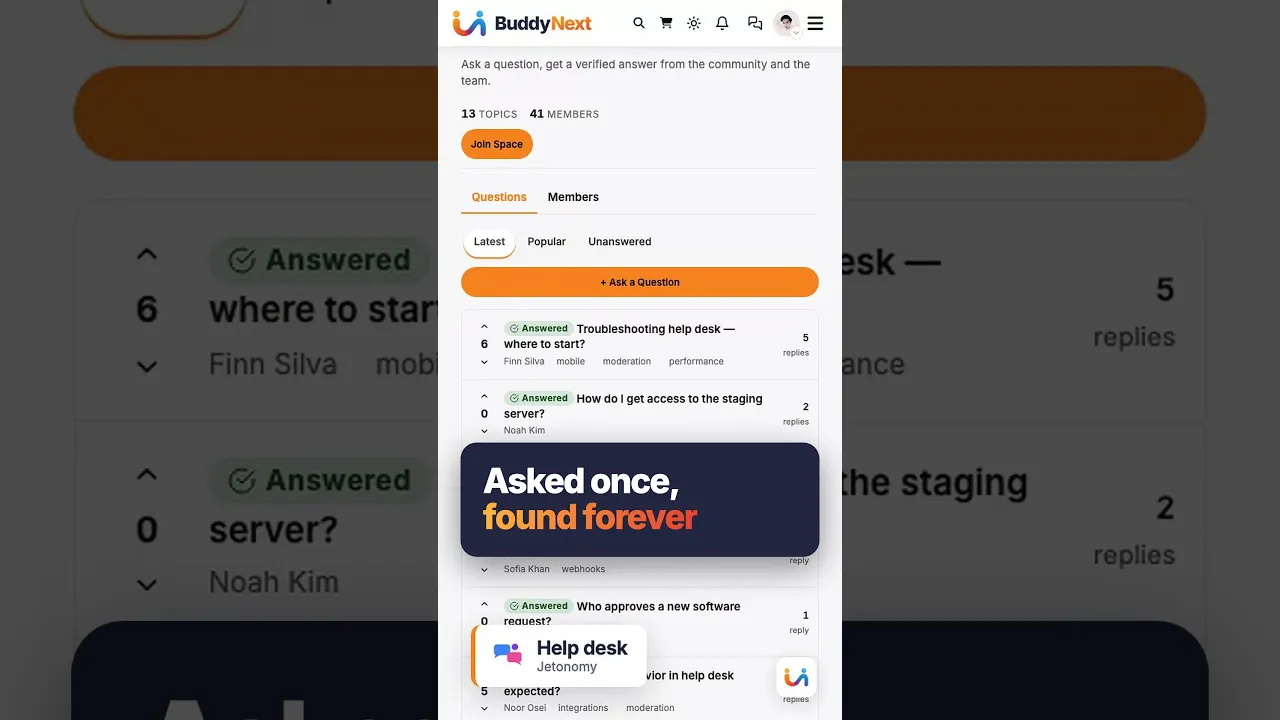
A peer-support forum where customers help each other before opening a support ticket. The most common pattern in B2B SaaS: take your top-5 ticket categories, give them a Forum space, and let the community answer the ones it can.
The result: support team focuses on the genuinely hard tickets. Customers who find an existing answer get it at once, and those who ask often hear from a peer before an agent is free. New customers feel less alone.
The member journey
What a customer does, end to end, when they hit a problem at 2am:
- Hits a wall. Error message, confusing setting, “wait, how do I…?”
- Searches your site. Lands on the Forum search (or Google brings them to an indexed topic).
- Finds an old topic. Title matches. The reply that fixed it has the most upvotes.
- Reads the fix. 30 seconds. Closes the tab. Goes back to work.
- (If no match) Opens a new topic. Tags it. Hits post. A notification goes to everyone subscribed to the space. With a busy enough customer base, another customer who solved it last week often answers first, though how fast depends on your audience.
- Upvotes the reply that worked. The thread becomes future search inventory.
The member never opened a ticket. Your queue stays empty for that issue forever.
What you set up (admin side)
- Create one Forum space called “Support” or “Help”. From admin → Spaces → New.
- Make the space public with open joining. Any logged-in member can then post, vote and flag. This is critical - gating the forum behind login kills SEO + new-customer discovery.
- Configure trust levels. Default levels 0-5 work out of the box. Levels 1 to 3 are earned automatically from posts, days active, replies received and reputation, and you can change the thresholds in Settings; levels 4 and 5 are granted by an admin.
- Seed 10-15 topics from your support inbox. Take real questions from the last 30 days, paste them in, write the answer. This solves the cold-start problem - visitors see real content from day one.
- Pin the top 3-5 evergreen topics. Pinning surfaces them above new posts. Use this for “Getting started,” “How to file a bug report,” common FAQ.
- Route your support page to ask the community first. Add a line on
/support: “Most questions get answered in the community in under an hour. Search the forum first → [link].”
Why this works on Jetonomy specifically
- Custom database tables keep topics and replies out of wp_posts, so a busy forum does not crowd your pages, posts and orders in the same table.
- Trust levels self-promote active members. With the default thresholds a customer reaches level 3 (Trusted) after about 100 posts, 60 days active and 200 reputation. A level is a ceiling on what a member may do, not a grant of moderator powers: editing other people’s posts, closing and pinning stay with moderators and admins. Anyone from level 0 up can flag a post for review in a space they can post in.
- Accepted answers are a Q&A-space feature. If you want askers to mark the fix, make your Support space a Q&A space instead; visitors then see what worked at a glance.
- Full-text search is built in. No SearchWP add-on. Members find what they need fast.
- Tags cross-link discussions across spaces, so a Q on “billing” in Forum surfaces alongside related Ideas topics.
A normal week of running it
Most of the work is small and regular. A support lead usually spends a few minutes a day, then a longer slot once a week.
- Daily: open the moderation queue, clear flags, and approve anything held for review.
- Weekly: scan new topics with no reply and answer or hand them to the right person on your team. Pin or unpin as the evergreen list changes.
- Weekly: find the three questions asked most often and turn them into a help-doc page or a pinned topic.
- Monthly: check which members have become reliable helpers and consider giving them a space moderator role.
The key habit is closing the loop. When a customer posts a bug that only your team can fix, reply in the thread when it ships. That reply is read by everyone who finds the topic later.
Moderation for a support forum
A support space is public, so it draws spam and the odd angry post. Jetonomy gives you layered tools, and you decide how many to use.
- Flags and the queue. Any member who can post can flag. Flagged content lands in one queue for moderators.
- Hold new content. Each space has a require approval setting. Turn it on for the first weeks of a new space, then relax it.
- Per-space moderators. A trusted customer or a support agent can moderate one space without site admin rights.
- Ban and silence. A ban blocks login. A silence blocks posting but lets the person read.
- Spam screening. Akismet works in the free plugin when the Akismet plugin is active and keyed. AI moderation and advanced rules are Pro.
Tone matters too. Answer the first few topics from a staff account so people see how a good answer reads.
Step by step: from empty site to first answered question
- Install the free plugin and run the setup wizard. Pick the Forum community type.
- Create a category such as “Help”, then one Forum space inside it. Keep it public with open joining.
- In the space settings, decide who may post and reply, and whether new content needs approval.
- Turn on notification emails in Settings if you want members told about replies. Forum emails stay off until you enable them.
- Seed the space with real questions from your inbox, written up with the answer.
- Add the community link to your support page, your help docs and your ticket form.
- Invite five or six existing customers to ask something real before you announce it.
If you also want a question to end with a marked answer, add a Q&A space next to the forum. See Forum, Q&A or Ideas for how to choose.
What to measure
Start with the numbers your own tools already give you: the number of tickets per week in your categories, and how many of them have a public answer. Compare that to the weeks before launch.
Inside Jetonomy, the free plugin shows the leaderboard of contributors by week, month or all time, and the moderation queue size. Analytics is a Pro extension. It gives you an overview, top spaces, top contributors, engagement and moderation figures, with a CSV export. See analytics.
Be careful with claims. Jetonomy cannot tell you how many tickets were avoided, because a person who found an answer and left never shows up anywhere. Treat any deflection figure as an estimate from your own ticket counts.
What Jetonomy does not do for a support team
This is worth knowing before you commit.
- It is not a ticketing system. There are no assignments, queues per agent, SLAs or canned replies.
- It has no live chat, voice or video.
- Search is MySQL full-text. It is fine for a help forum, but it is not an external search engine.
- There is no built-in Slack or Discord bridge. Pro webhooks can push events to a service you choose, with no retries.
- Private customer data should stay out. The forum is for public, non-confidential questions.
What it costs to run
The free plugin covers the forum itself, Q&A, trust levels, the moderation queue, Akismet screening and the importers. Pro starts at $69 a year for one site, and one licence covers every Pro extension; the tiers differ only by how many sites they cover. If the licence lapses, Pro extensions switch off after 30 days. The free plugin and all of your data keep working.
The running cost is mostly people. Budget for someone to read the queue, write answers to the awkward topics and keep the pinned list fresh. Hosting is your own WordPress host. If the host offers Redis or Memcached, Jetonomy uses it automatically.
Data, privacy and ownership
Everything lives in your WordPress database, in Jetonomy’s own tables. Members are ordinary WordPress users, so a customer uses the login they already have. A member can delete their own account, and the plugin answers WordPress export and erase requests. If a support topic contains something it should not, a moderator can remove it, and a customer can ask for erasure through the usual privacy tools.
Coming from another forum
If your customers already post in bbPress, wpForo or Asgaros, the built-in importers bring the topics across, and a re-run skips rows that were imported earlier. Any other source is a manual rebuild or a custom script against the REST API or WP-CLI. The migration journey walks through it.
Your first 30 days
- Week 1: create the space, seed 10-15 topics, pin the starter topics.
- Week 1: put the link on your support page and ticket form.
- Week 2: invite a few customers and answer every topic within a working day.
- Week 3: read the queue, tune the approval setting, and read the topics that got no reply.
- Week 4: pick the repeat questions, link them from your docs, and decide what to measure next quarter.
- Week 4: decide whether a Q&A space would help.
Alongside the rest of your stack
Jetonomy sits in a family of separate, optional plugins from the same team. Each one is installed, hosted and updated on its own, on the same WordPress site and the same login. A hosted product would bundle them in one bill; here you choose which ones you need.
If you already run a social layer, BuddyNext gives members profiles, an activity feed and groups. With both active, the forum adopts BuddyNext’s look and BuddyNext owns the page header and navigation, with nothing to configure. On a BuddyNext site, BuddyNext also owns messaging, so do not plan around Jetonomy messaging there. See BuddyNext and Jetonomy.
If part of your support is training, Learnomy is the LMS plugin. With Jetonomy Pro, a space can be gated by a Learnomy course or membership plan. Enrolling adds the member, expiry removes them, and their posts stay. See Learnomy and Jetonomy.
Other plugins from the same team run on the same kind of site: WP Career Board for jobs, Listora for directories, Eventonomy for events, WPMediaVerse for member media and WB Gamification for points and badges. They are separate products, and this page makes no claim about how they work with Jetonomy. Membership gating for MemberPress and Paid Memberships Pro is in the free plugin. The full list is on the partners page.
What changes in your support ops
- Fewer tier-1 tickets reach your queue, because repeat questions already have a public answer
- Customer satisfaction goes up - peer answers feel more authentic than canned support responses
- New onboarding finds answers via Google + forum search; sales team gets fewer “how does X work?” pre-sales questions
- Your help docs and forum reinforce each other - link from docs to relevant forum topics
Common questions
Doesn’t this require a moderator on call? Not on call, but someone does need to look at the queue. Trust levels handle promotion, members flag problems, and Akismet screens for spam if you have it installed and keyed. Pro adds AI moderation. Plan on a short daily check, longer when you launch.
What about confidential issues (account-specific)? Keep those in your ticket system. The forum handles public, non-confidential questions. Add a note: “If your issue involves account data, open a private ticket here →”
How do I migrate from bbPress / wpForo? One-click importers in the plugin. Each old forum becomes a space, and topics, replies and attachments move over with their authors, who stay the same WordPress users. See the migration journey.
Try it
Spin up the InstaWP demo and create a Forum space in under 5 minutes. Post a fake question, reply as another user, upvote the best reply. The whole flow takes 10 minutes from cold to “I get it.”