

SEO Pro
Give every space its own meta titles, Open Graph images, Twitter Cards, schema markup, and sitemap rules - without touching your site-wide SEO plugin.
PRO - This feature requires Jetonomy Pro.
What You Will Learn
- Why community SEO is different from page/post SEO
- How to set per-space meta titles and descriptions
- How to control Open Graph and Twitter Card previews per space
- How Jetonomy outputs Schema.org structured data automatically
- How to include or exclude spaces from your sitemap
- How to customize robots directives and canonical URLs
Why Community SEO Is Different
Your posts and pages have one author, one publish date, and one body. A forum topic has dozens of authors, evolves over time, and the most recent reply is often the most important part. A Q&A thread is really a QAPage with an acceptedAnswer, not a blog post. A sitemap that treats every reply as a top-level URL pollutes your search index.
The free Jetonomy plugin already outputs baseline SEO - canonical URLs, Open Graph tags, Schema.org, and a sitemap provider for spaces and posts. SEO Pro is for when you need to override the defaults on a per-space basis, because different spaces have different audiences, different goals, and different search intent.
Per-Space Meta Title and Description
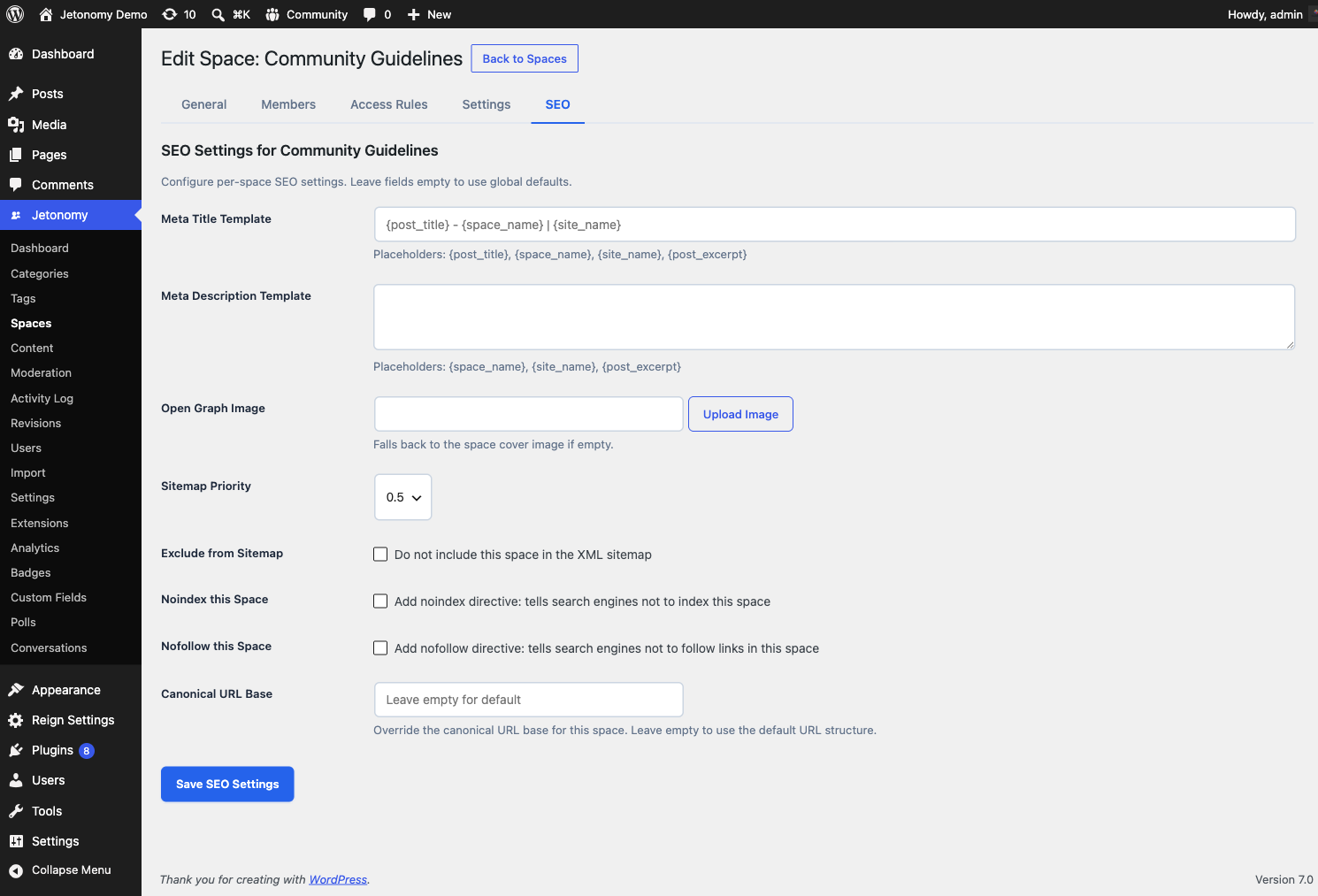
Every space gets a dedicated SEO tab in its settings panel. Inside that tab:
- Meta Title - defaults to the space name. Override for search engines only (the on-site title stays unchanged).
- Meta Description - defaults to the space description. Override with a keyword-rich summary written for search snippets.
- Meta Keywords - legacy field, not used by Google but some vertical engines still read it. Optional.
Both meta title and description support template tokens: {space_name}, {site_name}, {space_count}, {post_count}. For example, a meta title template of {space_name} - {post_count} discussions | {site_name} produces Python Help - 2,481 discussions | MyForum automatically.
Open Graph and Twitter Cards
SEO Pro lets you upload a custom Open Graph image per space - a 1200x630 image used when the space URL is shared on Facebook, LinkedIn, and Slack. It also lets you override:
- Open Graph title (defaults to meta title)
- Open Graph description (defaults to meta description)
- Twitter Card type (summary or summary_large_image)
- Twitter Card image
If you skip these fields, Jetonomy falls back to the meta title/description and uses the default OG image from your main settings.
Schema.org Structured Data
For every space and every post, Jetonomy Pro emits JSON-LD structured data:
- Space pages -
DiscussionForumPostingwith post count and date - Topic pages (Forum) -
DiscussionForumPostingwith author, date, and answer count - Topic pages (Q&A) -
QAPagewithacceptedAnswer(if marked) andsuggestedAnswerentries - Topic pages (Ideas) -
CreativeWorkwithabout(the idea) - User profiles -
PersonwithmemberOfthe space list - Breadcrumbs -
BreadcrumbListon every community page
You do not need to configure any of this. Enabling SEO Pro turns it on automatically. The free plugin emits a subset of these (basic DiscussionForumPosting and BreadcrumbList) - SEO Pro adds the richer types.
Sitemap Controls
Jetonomy core registers a sitemap provider for spaces and posts. SEO Pro adds:
- Include / exclude per space - mark a private support space as excluded from the sitemap with one click
- Priority per space - boost your flagship space above others in the sitemap XML
- Change frequency per space - hint at how often a space updates (always, hourly, daily, weekly, monthly)
- Maximum URLs per sitemap - split large sitemaps into chunks that search engines can crawl without timing out
All sitemap changes take effect on the next request - no flush needed.
Robots Directives and Canonical URLs
- Robots meta per space - set
noindex,nofollow,noarchive, or any combination on a space-by-space basis. Useful for staff-only spaces that should not appear in search results. - Custom canonical URL - override the default canonical URL on a space or topic. Useful when you syndicate content from an external blog and want Google to credit the original.
- robots.txt directives - add SEO Pro specific rules to your site's virtual
robots.txtwithout touching a file.
Enabling SEO Pro
- Go to Jetonomy → Extensions and enable SEO Pro.
- Open any space in Jetonomy → Spaces.
- Click the SEO tab inside the space settings panel.
- Fill in the fields you want to override. Leave the rest blank to inherit the site defaults.
- Save.
No site-wide settings page - SEO Pro is intentionally per-space, so you do not accidentally change defaults that other spaces depend on.
REST API
| Method | Endpoint | Description |
|---|---|---|
GET |
/spaces/{id}/seo |
Get the current SEO settings for a space |
PATCH |
/spaces/{id}/seo |
Update the SEO settings for a space |
Both endpoints require the manage_jetonomy capability or space-admin role.
Compatibility With Site-Wide SEO Plugins
SEO Pro does not replace Yoast, Rank Math, or All in One SEO. It handles the community area only - URLs under /community/ - and leaves your blog, pages, and WooCommerce products entirely alone. If a site-wide SEO plugin already writes og:title for a community URL, SEO Pro's tags take precedence on community pages.
What's Next?
Feature an important post at the top of every space across your whole community.