

Custom Badges
Design your own badges, set the conditions that earn them, and watch members compete to collect them.
PRO - This feature requires Jetonomy Pro.
What You Will Learn
- How to create a badge with a name, icon, and tier
- How to set auto-award conditions
- How to award badges manually as an admin
- How badges display on member profiles
Why Custom Badges Matter
Trust levels and reputation points are invisible to casual members. Badges are visible, collectible, and shareable - they give members a concrete goal to aim for. A "100 Posts" badge tells the community this member is active. A "Top Answerer" badge signals expertise. Badges convert passive lurkers into active contributors.
Enabling Custom Badges
- Go to Jetonomy → Extensions in your WordPress admin.
- Find Custom Badges and click Enable.
- A Badges item appears under the Jetonomy admin menu.
Creating a Badge
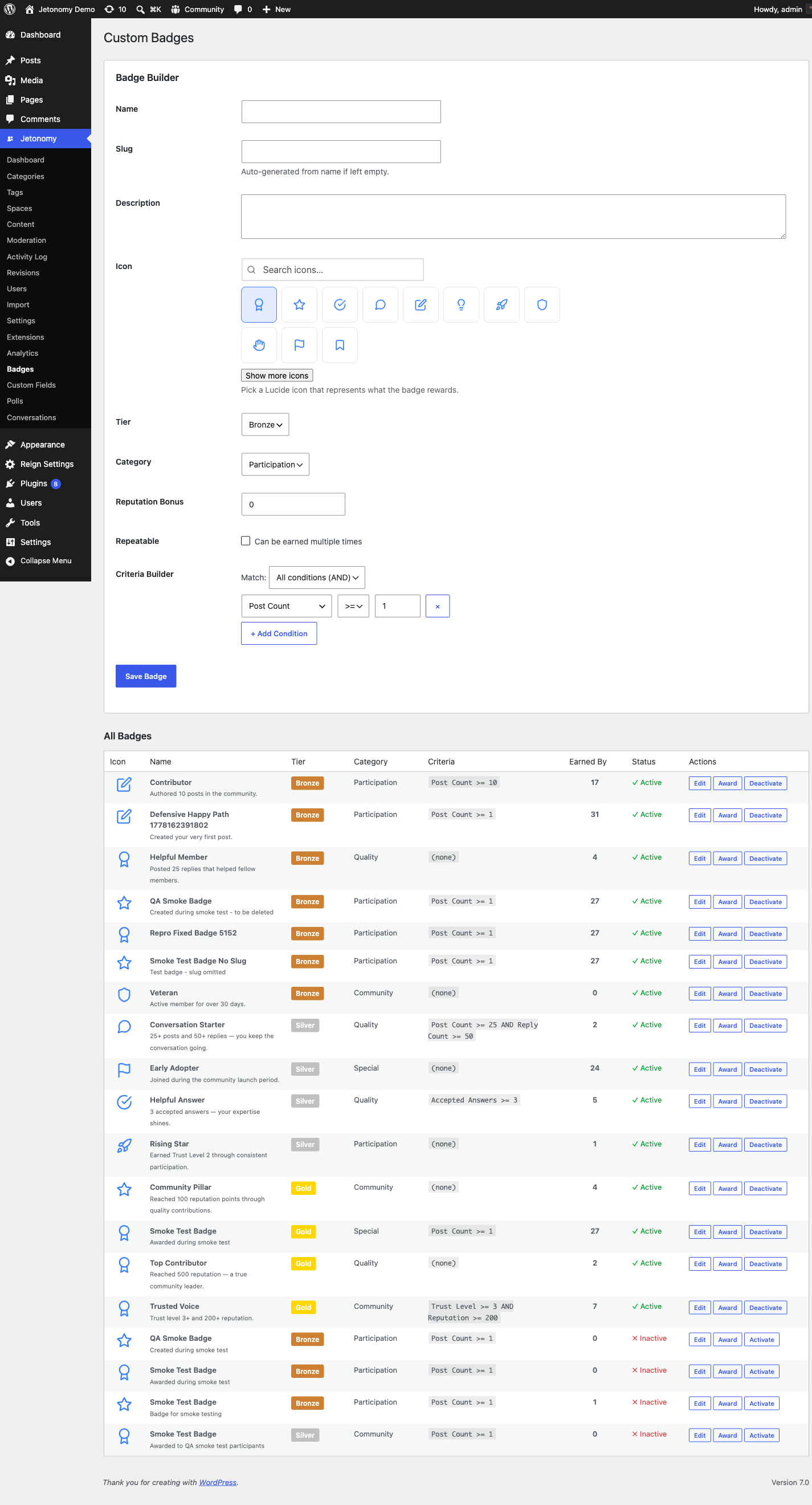
- Go to Jetonomy → Badges.
- Click Create Badge.
- Fill in the badge details:
| Field | Description |
|---|---|
| Name | Displayed on the badge and in the award notification |
| Description | One sentence explaining how to earn it |
| Icon | Upload a 64×64 PNG or SVG icon |
| Tier | Bronze, Silver, or Gold - controls the border color on profile |
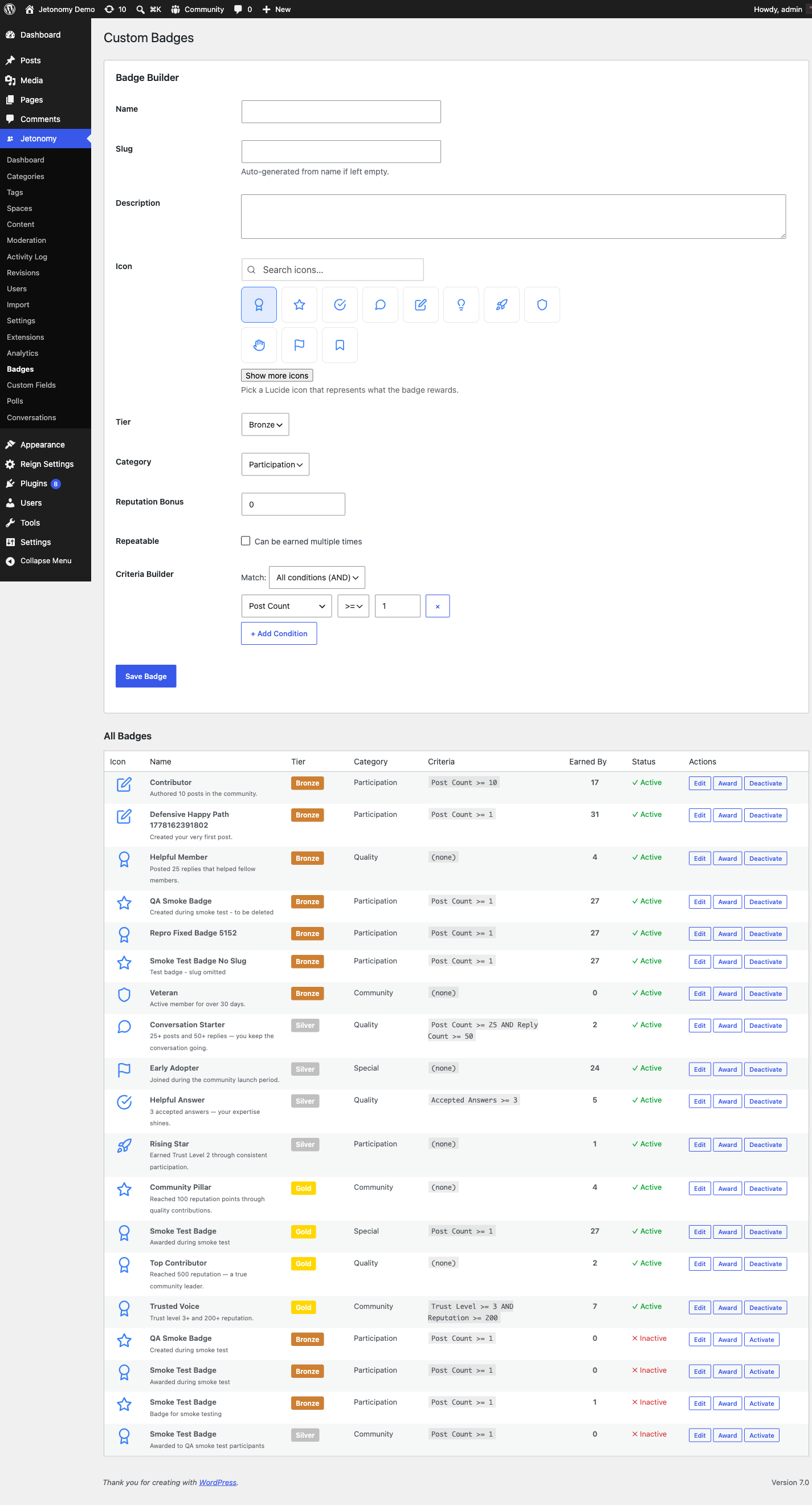
- Set the award conditions (see below).
- Click Save Badge.
Award Conditions
Auto-Award
Auto-awarded badges evaluate all members on a regular schedule and grant the badge automatically when the conditions are met. Choose from built-in criteria:
| Criteria | Example threshold |
|---|---|
| Total posts | 10, 50, 100, 500 posts |
| Accepted answers | 5, 25, 50 accepted answers |
| Total replies | 25, 100, 250 replies |
| Upvotes received | 10, 50, 200 upvotes on any content |
| Days as member | 30, 180, 365 days since joining |
| Reputation | 100, 500, 1000 reputation points |
| Trust level | Trust level 1 through 5 |
| Spaces joined | 3, 10, 25 spaces joined |
Set the threshold for each criteria you want to use. You can combine multiple criteria with all (the member must satisfy every condition) or any (one is enough) to earn the badge.
Note: Auto-evaluation runs automatically - a recurring job every 6 hours (via Action Scheduler, with a WP-Cron fallback), plus event-driven re-evaluation that fires when a member's posts, replies, votes, reputation, or trust level change. There is no manual "evaluate now" button.
Manual Award
Some badges should not be automated - "Staff Pick", "Most Helpful in July", or "Community Founder" are judgment calls. For these, leave all auto-award criteria blank and award manually:
- Go to Jetonomy → Users and open the member's profile.
- Click Award Badge.
- Select the badge from the list and add an optional private note.
- Click Award.
The member receives a notification immediately and the badge appears on their profile.
Badge Tiers
Badges have three visual tiers that appear as border colors on the badge icon:
| Tier | Color | Suggested use |
|---|---|---|
| Bronze | Warm bronze | Entry-level milestones (first post, 7-day streak) |
| Silver | Cool silver | Mid-tier milestones (100 posts, 10 accepted answers) |
| Gold | Bright gold | Elite milestones (500 posts, Top Contributor of the year) |
Tiers are visual only - they do not affect permissions or trust levels.
Badge Display
Badges appear on member profile pages in a dedicated Badges section. Members who have earned no badges see an empty state that lists a few featured badges to work toward - this passively encourages engagement.
The three most recently earned badges also appear in the member's hover card, which pops up when anyone hovers their username throughout the community.
REST API
Custom Badges registers these endpoints under jetonomy/v1:
| Method | Endpoint | Description |
|---|---|---|
GET |
/badges |
List all defined badges and their settings |
POST |
/badges |
Create a badge |
PATCH |
/badges/{id} |
Update a badge |
DELETE |
/badges/{id} |
Delete a badge |
POST |
/users/{id}/badges |
Award a badge to a member |
Badges can be created, edited, and awarded entirely through REST, so you can automate awards from your own tooling or grant a badge as part of an external workflow. Listing badges is open to any logged-in member; creating, editing, deleting, and awarding require manage_options. See the REST API reference for full payloads.
What's Next?
Get a data-driven view of your community's health with the Analytics Dashboard.