

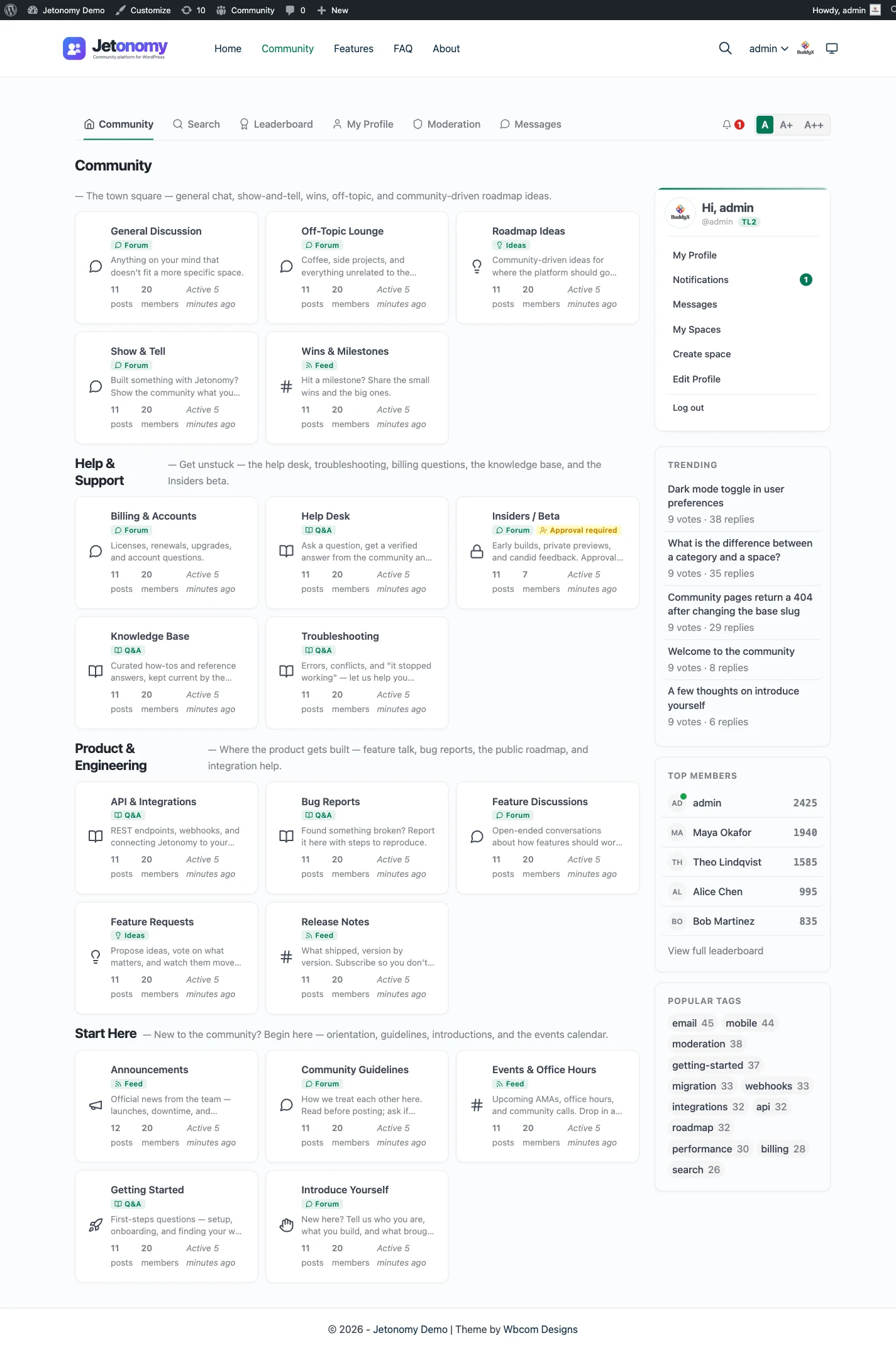

A modern forum, not a classic message board
wpForo is a genuinely capable plugin. It is free, it has been around for years, and it gives you a forum with many layout modes and a deep add-on library. The question is not whether wpForo works. It does. The question is what your forum should feel like to the people using it in 2026.
wpForo carries the look and feel of a classic message board: dense rows, its own styling, a lot of chrome. That is familiar to long-time forum users, but it can feel dated next to the rest of a modern WordPress site, and it can get heavy as the install grows.
Jetonomy takes a different starting point. It is built to read like a current product: threaded replies, clear voting, a calm reading layout, and styling that inherits your theme through CSS variables. The forum looks like part of your site, not a separate module with its own skin.
What you gain beyond the forum
The bigger difference is scope. wpForo is a forum first, and most of what it adds comes through add-ons. Jetonomy ships four space types in the free core:
- A classic forum for ongoing discussion.
- A Q&A space with accepted answers, for support and knowledge.
- An ideas board with a roadmap, so members can propose and vote on what comes next.
- Show & Tell, a short-form feed for member work and quick updates.
That means one plugin covers the forum, the help desk style Q&A, and the feedback board, instead of stitching several tools together. Trust levels 0 to 5 let the community help moderate itself, and a front-end moderation queue keeps owners out of wp-admin for day-to-day work.
Built to stay fast as it grows
wpForo stores its data in its own tables, which is sensible, but larger installs can still feel heavy in practice. Jetonomy stores discussions in 23 dedicated jt_* database tables rather than overloading wp_posts, with indexes designed for forum-shaped queries. In our scalability benchmark, a 10,000-topic community loaded in about 150ms with Redis object caching and about 350ms without it.
For developers, Jetonomy registers 80+ REST routes in Free, with about 60 more in Pro, so you can build a mobile app, a custom front end, or integrations on top of the community. That is a meaningfully larger surface than a classic forum plugin offers.
Moving over is one click
The honest barrier to switching forums is usually the content you already have. Jetonomy removes most of that friction with a one-click importer for wpForo, alongside importers for bbPress and Asgaros. Your forums, topics, replies, and users come across, and because members are WordPress accounts on both sides, the user side is native.
If you want a deeply configurable classic forum and you are happy in wpForo’s admin, there is no reason to move. But if you want a cleaner, modern, theme-matched experience with Q&A and ideas built in, Jetonomy gives you that and brings your wpForo history with you.
What it costs to run each
Both plugins run on the WordPress hosting you already pay for, so neither needs a separate server. wpForo is free to start and has a wide set of options, which is its charm and also its upkeep: more settings, more add-ons and more things to keep compatible after an update. Check the vendor’s site for current terms on its paid add-ons.
Jetonomy keeps its data in its own indexed tables inside your WordPress database and uses Redis or Memcached when your host provides one. Search is MySQL full-text. The core plugin is free, and Pro starts at $69 a year for one site, with one licence covering every extension. See the pricing page for the tiers.
If a Pro licence lapses, Pro extensions switch off after 30 days, while the free plugin and your data keep working. That is worth knowing before you plan around a paid tier.
Moving over, and what to check first
Jetonomy imports from wpForo, bbPress and Asgaros Forum, and from nothing else. The migration and import page shows the screen, and the migration guide walks through the order of work.
What comes across
- Each wpForo forum becomes a Jetonomy space.
- Topics and replies, with their authors.
- Attachments.
- The forum hierarchy.
What you handle yourself
- Redirects, which the importer does not create.
- Tags, subscriptions and reputation, which are not imported.
- Add-on features that only existed for wpForo.
Unlike the bbPress importer, the wpForo one has no dry run, though a second run skips what is already imported instead of duplicating it. Do a staging copy first, and back up before the live run.
What the wpForo importer does with each kind of content
The importer reads wpForo’s own tables, so it still works if you have already deactivated wpForo, as long as the data is in the database. It runs in batches with a progress bar, one wpForo board at a time. That is the part that keeps a big forum from timing out.
- Forums become spaces, and a forum nested under another keeps its parent.
- Each topic arrives with its first post as the body and its other posts as replies.
- Sticky and closed topics keep both states.
- Topics and replies that were waiting for approval come across as pending, so they appear in the moderation queue instead of going live.
- Likes become votes on the replies they were given to. Down-votes are left out.
- Every member who has a wpForo profile gets a Jetonomy profile.
If you run more than one wpForo board, each board is imported in turn and gets its own category, so the boards stay apart. That is a detail most owners do not need, but it is good to know it is handled.
Attachments, private replies and who can see what
wpForo adds uploaded files to the end of a post as markup. The importer finds those files, links them to the new topic or reply as media items, and only then removes the old markup. If a file cannot be recovered, the link stays in the post, so a reader is never left with nothing. Images pasted into the text are registered as media too, which means deleting wpForo’s upload folder later will not break them.
Two parts of the data need a decision from you. A private wpForo reply has no private state in Jetonomy, so it is imported as pending for review rather than published. The Import screen counts these before you start, so you can see how many there are.
Access follows the same cautious rule. A forum that guests could not view becomes a private space where joining needs approval, and everything else becomes a public, open space. If your wpForo permissions were more detailed than that, a developer can adjust the result with a filter before the run, or you can change each space afterwards.
Running it, and running it again
There is no dry run for wpForo. A preview is a bbPress-only option, and the command line refuses the flag for wpForo rather than quietly importing for real. So the safe way to test is a staging copy: clone the site, import there, and read the result.
A second run is safe, though. The importer remembers each wpForo forum, topic and reply by its original ID, so a repeat run recognises what is already in place and adds only what is new. The result screen reports how many items were already imported, which is a different number from items skipped. If an import stops halfway, you can resume it, or start over from the Import screen.
That makes a staged launch practical. Import on staging, test, import on the live site, and run it once more just before you switch traffic across to catch recent posts.
What Jetonomy does not do for a wpForo site
wpForo’s depth comes from settings and add-ons, and a plugin that does fewer things does not match every one of them. Before you move, list what you use and check it against this list.
- No redirects from old wpForo addresses. Plan them with a redirect plugin.
- No tags, subscriptions or reputation come across, and wpForo user groups and custom layouts are not rebuilt.
- Jetonomy has no layout modes. It has one reading layout that follows your theme, with template overrides for developers.
- There is no live chat, voice or video.
- Pro extensions cost money. Private messaging, reactions, polls, badges and analytics need a Pro licence.
The upside of fewer switches is less upkeep. There is no add-on compatibility to check after each update beyond Jetonomy itself and the Pro extensions you use.
A normal week running it
Once the community is live, the work is mostly moderation and small changes. Most of it happens on the front end, so you do not need to open wp-admin for each task.
Open the moderation queue and clear what members have flagged. Check which Q&A questions have no accepted answer and nudge the people who can answer them. Look at new members who are close to a higher trust level, and grant the top levels by hand where it makes sense. Then update the plugin when a release arrives, ideally on staging first.
The weekly moderation workflow shows that routine in more detail, and the trust levels post explains how members earn their way up. With Pro, analytics shows what is being read, which helps you decide what to pin or tidy.
Data, privacy and ownership
Everything lives in your WordPress database, in Jetonomy’s own tables. Members are ordinary WordPress users, and personal data requests go through the export and erase tools that WordPress already has. Members can also delete their own account and data. If you need the content elsewhere, a developer can read it over REST or with WP-CLI.
The Jetonomy family on one WordPress site
Jetonomy is one of several separate, optional plugins from the same team. They share one WordPress site and one login, and each is installed, hosted and updated on its own. A hosted product would bundle these in one bill; here they are pieces you manage.
BuddyNext is the social layer: profiles, an activity feed and groups. With both active, the forum adopts BuddyNext’s look and BuddyNext owns the page header and navigation, with nothing to configure. BuddyNext owns messaging on such a site, so do not plan on Jetonomy messaging there. See the BuddyNext partner page.
Learnomy is the LMS plugin. With Jetonomy Pro, a space can be gated by a Learnomy course or membership plan. Enrolling adds the member, expiry removes them, and their posts stay. See the Learnomy partner page.
The team also makes WP Career Board for a job board, Listora for a directory, Eventonomy for events with RSVP and capacity, WPMediaVerse for member media and WB Gamification for points and badges. They run on the same site as separate plugins, each set up on its own. BuddyX Pro and Reign are themes from the same team, and Jetonomy adopts the active theme’s brand colour.
None of these is required. Each plugin works on its own, and you add one only when a job calls for it. The cost of that freedom is housekeeping: you install, host and update each piece yourself, where a hosted platform would put it all behind one subscription and one support desk.
Other alternatives worth a look
- bbPress wins if you want the lightest free forum on WordPress, and Jetonomy can import from it with a dry run.
- Asgaros Forum wins if you want a simple, free forum that is easy to explain to members.
- phpBB wins when you want a separate board with a large extension library and no tie to WordPress.
- XenForo wins for a big, forum-first community that will pay for a mature standalone product.
- Discourse wins if the forum is the whole product and you can host it.
- Simple:Press is another long-running forum plugin for WordPress, though Jetonomy has no importer for it.
If bbPress is the other plugin on your shortlist, bbPress vs wpForo compares the two head to head.
- Staying with wpForo wins when you use its layouts and add-ons heavily and they work for you.
The comparison hub lists more.
Who should stay with wpForo
The case above is for people who want a cleaner, more modern forum. If that is not you, stay. In short:
- You like wpForo’s admin and have tuned its layout modes.
- You rely on specific wpForo add-ons that have no counterpart.
- Your members are happy and nobody has asked for marked answers or an ideas board.
- You cannot spare the time to check an import carefully.
Move when the look starts to hold the community back, when you want Q&A and ideas in the same plugin, or when a developer needs a REST API. The Q&A and accepted answers page shows the flow most people move for.