

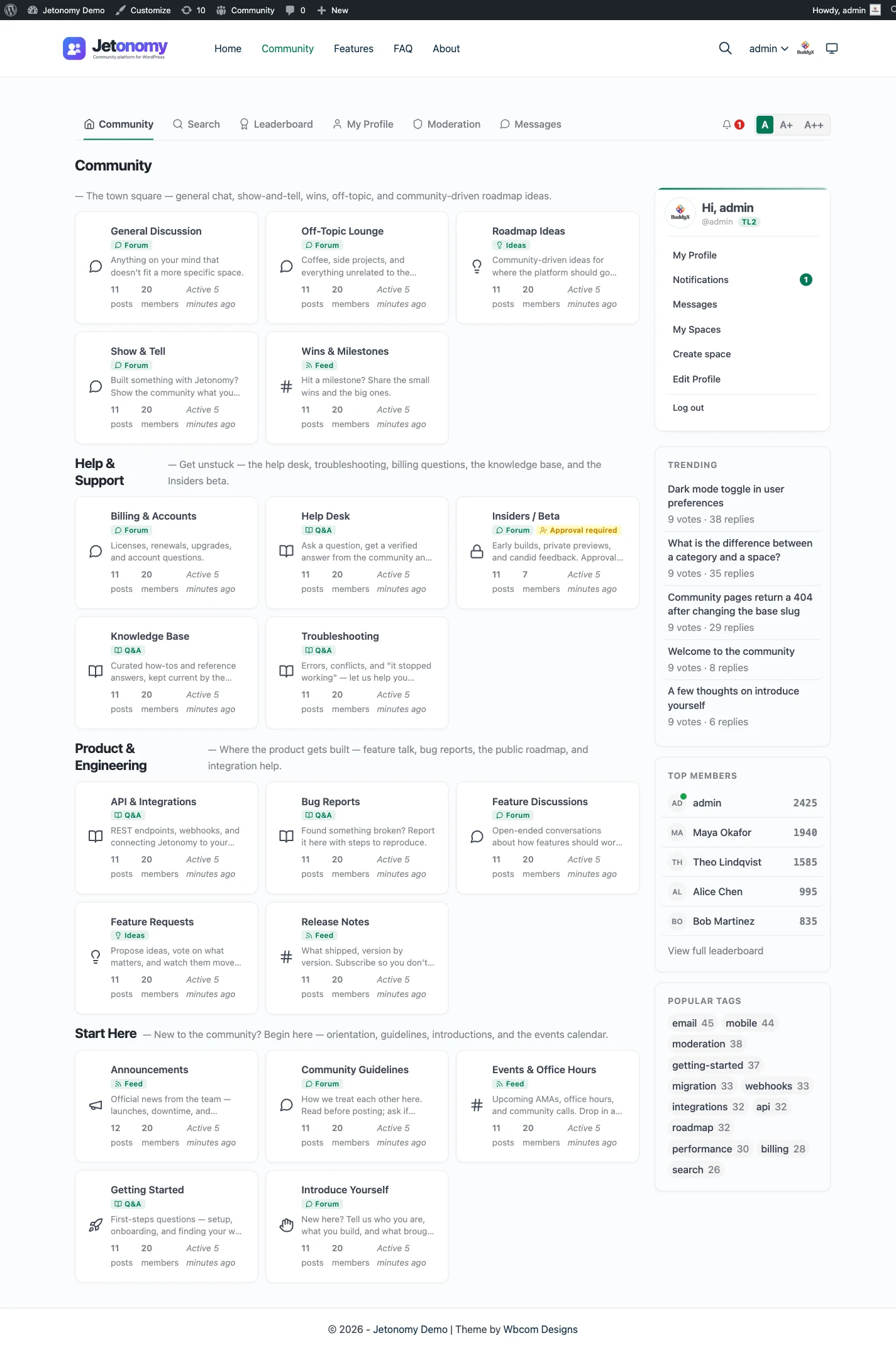
To make a forum website from scratch, you need a domain, hosting, WordPress and a forum plugin, then you build the forum in six stages: plan it on paper, install the plugin, run the setup wizard, create your spaces, set who can read and post, and set up moderation before you invite people. The software side takes an afternoon. The harder part is deciding what the forum is for and getting the first conversations started.
Key points
- A forum website is a website where members start topics and reply in threads. You can build one on WordPress with a plugin, with no code.
- The plugin can be free. A domain and hosting are the costs that every website carries.
- Plan the subjects first. Each subject becomes a space, and structure is much cheaper to set up before members post than after.
- Decide who can read, join and post before you open the doors, and turn on moderation tools on day one.
- Seed the forum with real topics yourself. An empty forum stays empty.
This guide assumes you are starting with nothing: no domain, no hosting, no site. It covers the decisions that come before the install and the order that keeps you out of trouble. If you already run a WordPress site and only want the forum on it, skip to how to add a forum to WordPress, which keeps your theme and member accounts as they are. If you would rather watch the process first, the video How to Make a Forum Website on WordPress walks the same six stages in under five minutes on a real screen.
How do I make a forum website?
Here is the sequence, with the reason for each stage. Skipping the first one is the most common mistake.
- Plan on paper. Write one sentence about what the forum is for, then list the subjects your members will talk about. Keep the list short. Five or six subjects is plenty for a new forum.
- Get the website and the plugin. You need a WordPress site on hosting you control, with a forum plugin installed.
- Run the setup wizard. It opens the first time you activate Jetonomy and has three screens.
- Build your spaces. Each subject from your plan becomes a space, and each space has a type.
- Decide who can read and post. Visibility and join policy decide who can find and read a space. A separate setting narrows who can start topics.
- Set up moderation, then open the doors. Limits for new accounts, a queue for reported posts, and a handful of topics you wrote yourself.
The rest of this guide goes through each stage in the order you would do it.
Do I need hosting, a domain and a plugin?
Yes to all three if you build the forum on your own site, which is what most people mean by making a forum website.
A domain is the address people type. Register it in your own name with an email address you will keep for years. Losing access to that email makes recovering the domain much harder.
Hosting is the computer that serves your site. Any host that runs WordPress will do, as long as it meets the basics. Jetonomy needs WordPress 6.7 or higher, PHP 8.1 or higher, and MySQL 5.7 or higher (or MariaDB 10.4 or higher). Look for a host that includes backups and SSL, and test that a backup restores before you have members.
A forum plugin adds what WordPress lacks out of the box: topics, threaded replies, voting, permissions and moderation. WordPress comments are built for short reactions under a post, not for a community that holds conversations of its own.
Starting fresh means installing WordPress first and building the forum as the main feature of the site. Most hosts offer a one-click WordPress install, and that is all the setup the site needs before the plugin goes on. If you already have a WordPress site, you do not need any of this: add the forum to it instead.
The Jetonomy plugin is downloaded from wbcomdesigns.com rather than searched for inside the WordPress plugin directory. Upload the ZIP under Plugins, Add New Plugin, Upload Plugin, then activate it. It also installs with WP-CLI from the ZIP file, or with Composer. Jetonomy stores its data in its own database tables, not in the shared posts table, which matters later if the forum grows large.
How do I choose a domain name for a forum website?
Pick the name before you pay for hosting, because it is the one part of a forum website that is painful to change. The address ends up in every invitation, every search result and every link your members share.
Two kinds of name work. A topic name says what the forum discusses, which tells a stranger what they are walking into and helps people who search for the subject. A brand name is easier to remember and keeps working if the subject widens later. Whichever you choose, say it out loud to a friend. If they ask how it is spelled, choose again, and avoid hyphens and numbers for the same reason.
If the forum belongs to a business or project that already has a site, a path or subdomain on that domain is often better than a new one, because members already know the address. A new domain suits a forum that stands on its own. Search the name for existing trademarks before you register it, and register it in your own name with the email address you will keep.
Can I build a forum website on WordPress.com?
Search results mix up two things that share a name. WordPress.com is a hosted service that runs WordPress for you. WordPress.org is where you get the free software to install on any host. A forum plugin such as Jetonomy is installed from a ZIP file, so the question is whether your plan lets you upload plugins.
On WordPress.com, check that your plan allows custom plugin uploads before you start, because a plan that does not cannot run a forum plugin at all. On an ordinary WordPress host you can upload plugins freely, which is why this guide assumes one. If you are choosing a host now, pick one that does not restrict plugin uploads, and confirm it meets the PHP and MySQL versions above. Changing platforms later is possible but never free of effort, so the right setup on day one saves a migration.
Can I make a forum website for free?
You can make one without paying a licence fee. The Jetonomy plugin is free and it is not a stripped-down trial: forum, Q&A, ideas and Show & Tell spaces, threaded replies, voting, trust levels, tags, search, a moderation queue, importers and the REST API are all in the free plugin.
What is never free is everything around the software:
- A domain and hosting. Every website has these costs, forum or not. If you already pay for a WordPress site, the forum adds little to that bill.
- Your time. Updates, backups and moderation are recurring jobs. Moderation grows fastest as the forum gets busy.
- Optional extras. Jetonomy Pro is a separate paid plugin that adds things like private messaging, reactions, analytics, email digests and AI moderation. You do not need it to run a complete forum, and you can add it later when you hit a real need. The pricing page lists what each tier covers, and what forum software really costs gives you a worksheet for the longer view.
A free hosted forum service is a different bargain. Setup costs nothing, but you build on someone else’s servers under their rules, and the platform keeps the copy of your community. That trade is fine for some projects and a bad one for others, which is the next question.
WordPress forum vs hosted forum: which should you pick?
Both make a forum website. They differ in who holds the keys.
| Forum on WordPress | Hosted forum service | |
|---|---|---|
| Who owns the data | You. It sits in your database and your backups. | The provider keeps the primary copy. |
| Who owns the domain and design | You, with theme-level control. | Often a subdomain or a fixed template. |
| Setup effort | An afternoon on your own site. | Usually a short sign-up. |
| Upkeep | You apply updates and keep backups. | The provider does. |
| Switching later | Export from your database, or read it over the REST API. | Depends on what the provider lets you download. |
Pick a hosted service if nobody on your team can look after a website and you accept the platform’s terms. Pick WordPress if you want the forum on your own domain, next to the rest of your site, with data that you can back up and move. For most people who already have a WordPress site, the second path is the shorter one.
If you are comparing WordPress plugins specifically, best WordPress forum plugins lays out the options and where each one falls short, including Jetonomy.
Stage 1: what should my forum be about?
Before you install anything, write one sentence: “This forum exists so that [who] can [do what].” If you cannot finish the sentence, the forum will drift.
Then list the subjects. A support forum for a product might have installation, bugs, feature requests and general chat. A hobby community might split by topic or by skill level. Name them the way a visitor thinks, not the way your organisation is organised. “Bugs” works better than “Technical Support Tier 1”.
Also decide the shape of each subject. Not every conversation is the same kind of thing:
- Forum is open discussion with threaded replies.
- Q&A has a question that the asker can close by accepting one reply as the answer, so the best answer sits at the top.
- Ideas lets members vote on requests, and each idea can carry a status that feeds a public roadmap.
- Show & Tell is a short-form feed for introductions, quick updates and sharing work. It appears as Feed in some admin screens.
You can mix these on one site, and that is often the best result. A product community might run a Q&A space for support questions and an Ideas space for requests next to a general forum. If you are unsure which shape fits, read forum vs Q&A vs ideas board before you move on. The feature pages cover each one: discussion forum, Q&A with accepted answers and ideas and roadmap.
Stage 2: install WordPress and the forum plugin
With a WordPress site running on your hosting, download Jetonomy, then go to Plugins, Add New Plugin, Upload Plugin, choose the ZIP and activate it. Activation sets up the database tables and registers the community URLs for you. A notice at the top of the dashboard tells you the community is almost ready and points to the setup wizard.
If you want to look around before you touch your own site, launch the free sandbox linked from the installation docs. It is a disposable Jetonomy install that you can click through to see how spaces, topics, replies and voting behave.
Stage 3: run the setup wizard
The wizard opens the first time you activate the plugin and takes about two minutes. It has three screens: Basics, First Space and Done.
The community URL slug is the word after your site address. It starts as community, which gives you yoursite.com/community/. Change it to forum, hub, discuss or your brand name if that fits better. You can change it later in the settings and the plugin refreshes the URLs for you. If the forum is the main point of your site, you can also serve the community home at your site’s front page.
The default community type controls which space type is preselected when you add a space. It does not limit you, because every space can be any type.
Your first space comes in two paths. Path A asks for a category name and a space name and creates a public, open space that is visible when you finish. Path B imports a demo community with spaces of all four types, sample members, posts and replies, so you can see everything working before you commit to a structure. Demo content is easy to look at and worth deleting before you launch, so choose Path A if this is the real site.
Stage 4: create your spaces and categories
A space is one discussion area. A category is a section of your forum home, with its spaces listed under it. For each subject on your list, add a space under Jetonomy, Spaces, pick its type and file it under a category.
A few habits keep a young forum readable:
- Start narrow. A handful of spaces fills faster than twenty. You can split a busy space later, and merging dead ones is harder to explain to members.
- Avoid deep nesting. One level of categories over spaces is usually enough.
- Write a space description. A sentence about what belongs there is the cheapest moderation you will ever do.
- Add tags later, when real topics show you what people call things. Tags and search keep a large archive usable.
The spaces and categories feature page shows what the structure looks like once it is built.
Stage 5: who can read and who can post?
This is the stage that decides what kind of forum you are running, and it is easier to set now than to change once members have posted. There are three separate controls, and the private forum guide goes deeper if you want a members-only forum.
Visibility says who can find and read a space. Public means anyone can find and read it. Private means signed-in people can find it, but only members can read it. Hidden means only members can find it at all.
Join policy says how people become members of a space: Open, Requires Approval or Invite Only. A private space seen by someone who has not joined shows the topics locked, with a box to send a request.
Who can post narrows posting further on each space, down to admins only, which is a handy way to run an announcements space. A separate option holds each new post until a moderator approves it.
There is also one community-wide switch. Set the community to Private and every logged-out visitor is sent to sign-in, which suits a members-only forum you do not want indexed. Leave it Public and visitors can read, which is how search engines and new members find you. Most forums let anyone read and ask for an account only to post.
If part of your community is paid, a space can be tied to a membership, and the how-to for that is restricting a space to paying members. Monetise your community walks through it.
Stage 6: set up moderation before the first member arrives
Moderation is a recurring job, not a one-time setting, and the tools are easiest to configure while the forum is empty.
New-account limits. A brand-new account starts at trust level 0 with daily limits on topics, replies and votes. By default that is 3 topics, 10 replies and 5 votes a day, which is plenty for a real newcomer and little for a bot. Members move up through the early levels automatically as they post, stay active and receive replies, and level 1 lifts those limits. You can change the numbers in the Permissions settings.
Trust levels never make someone a moderator. Trust levels set how much a member can do. Moderator powers are something you hand out yourself, either with a site role that carries the moderate capability or with a Moderator role inside one space. Read trust levels and moderation for how the layers fit.
A report queue. Members can flag a post, and flagged or held posts wait in the moderation queue. Valid reports remove the content and dismissals keep it. Either way the report is closed. Ten minutes a day there in the first month catches what filters miss.
Spam layers. Turn on a CAPTCHA under Jetonomy, Settings, Anti-Spam, using Cloudflare Turnstile or Google reCAPTCHA v3. Members at trust level 2 and above skip it. If the Akismet plugin is active, Jetonomy sends each new topic and reply through it. Do this before you announce the forum, not after the first spam wave. The how-to on stopping spam and low-quality posts has the full list.
Who looks after the forum. Name a person, even if it is only you for the first month. A forum without moderation drifts into spam within weeks of real traffic.
How do I get people to post on a new forum?
This is where most new forums fail, and no setting fixes it. Nobody wants to start a topic in a space with zero replies. The first visitor looks at an empty forum and, reasonably, concludes that nobody is here.
Break the loop yourself before you announce anything:
- Write real topics. Post genuine questions and answers across your spaces: the common questions people ask in your field, a welcome thread, a “what are you working on” topic.
- Answer them. Reply to your own topics from a second account, or recruit a few people to reply. Votes and accepted answers in a Q&A space make a thread look useful.
- Invite a small group first. Ten people you know will do more than a public launch. Give them a specific ask such as “come answer this one question”.
- Be visibly present. For the first few weeks, check in daily and reply fast. Early responsiveness teaches members that posting here gets a response.
- Give them a way back. Members return when they have a reason: a notification when someone replies, search that finds the old answer, and reputation points and a leaderboard that reward helping. Set up email notifications so replies actually arrive.
If you are moving from another forum, the importers for bbPress, wpForo and Asgaros Forum bring over topics and replies so you do not start empty. See move to Jetonomy from another forum.
What to check before you launch
A short pass in this order catches most launch problems.
- Read it as a stranger. Open the forum in a private window while logged out. Do the space names make sense with real topics in them?
- Test sign-up and posting. A broken registration form loses the first visitor faster than anything else.
- Check the phone. Open the forum on a phone and try to read a topic and reply to it.
- Check notifications. Send yourself a test email and confirm a reply notification arrives.
- Search for something. Search covers topics, spaces and tags, so you can find what you seeded.
- Check what the logged-out view shows. It should match the visibility choices you made in stage 5.
Should I make it more than a plain forum?
Once the basics work, there are a few directions people go:
- Support forum. Q&A spaces mark each question as answered or needing an answer, and accepted answers keep the useful reply at the top. Support with accepted answers covers it.
- Members-only community. Use the Private community setting or private spaces, and consider tying access to a paid membership.
- Product feedback board. An Ideas space with votes and a public roadmap replaces a spreadsheet of feature requests. See feature voting on WordPress.
- A full community. Profiles, reputation and a leaderboard give regulars a reason to stay. Building a community on WordPress covers the bigger picture.
Each of these uses the same six stages with different choices at stages 4 and 5.
What to do today
Today, write your one-sentence purpose and list the subjects. This week, get your WordPress site and hosting in order, install Jetonomy, run the setup wizard and create a space for each subject. Then post the first questions yourself, invite a small group and watch what they ask.
Jetonomy is the free forum plugin for WordPress. See the WordPress forum plugin page for what it does, or the feature overview for each part in detail.