

← All features

Ideas board Free

Let customers vote on what you build next

Members submit ideas and upvote the ones they want most. You set a status on each, Planned, In Progress, Shipped, or Declined, and a built-in roadmap view shows everyone where their request stands.

Read the full ideas and roadmap guide →

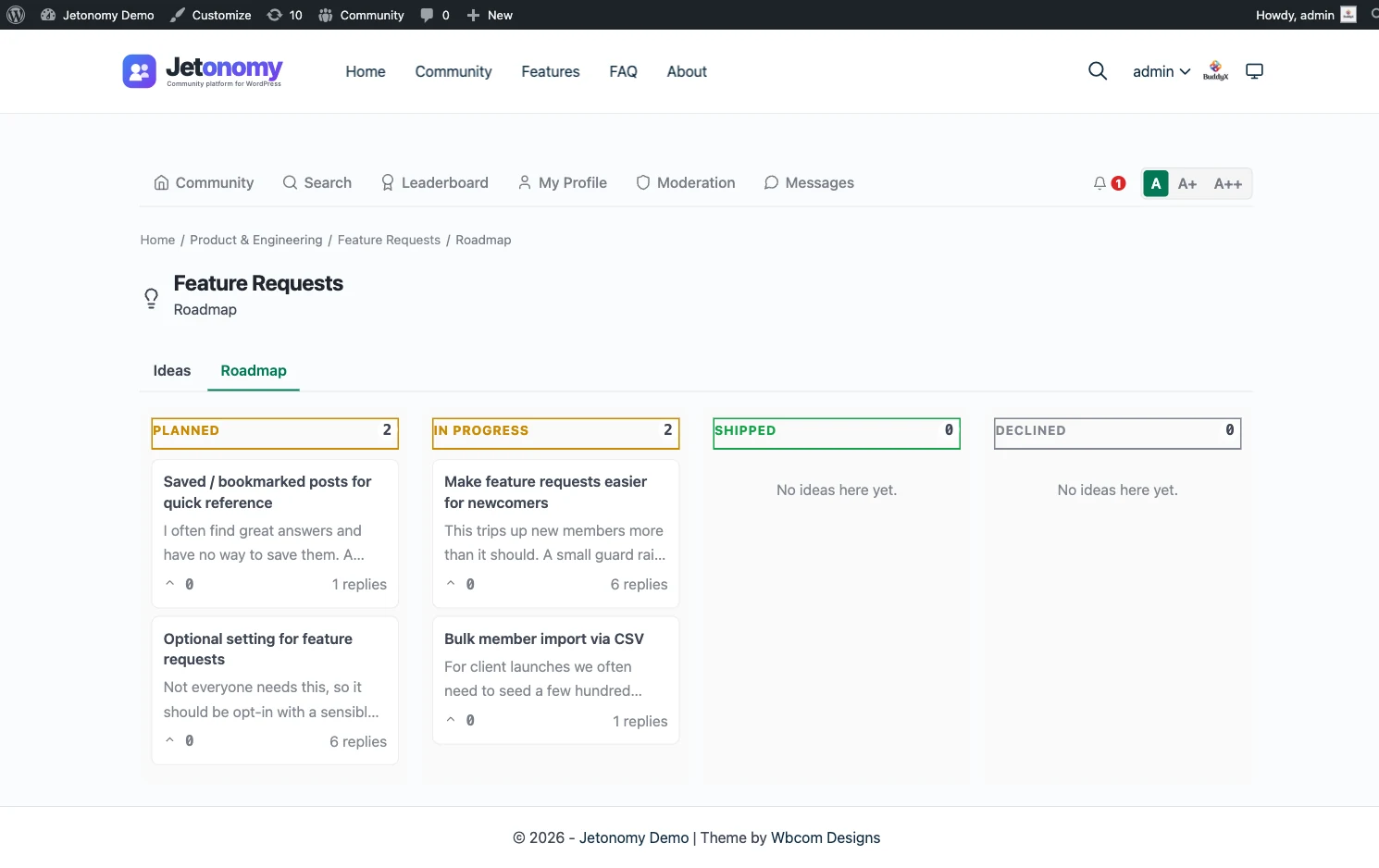
A Jetonomy ideas board showing upvoted feature requests and a roadmap with Planned, In Progress, and Shipped status badges

The problem

Feature requests arrive scattered across email, support tickets, and DMs. You have no single view of what matters most, and customers never hear what happened to the idea they sent.

  • Members submit ideas and upvote the ones they want, so demand is visible, not guessed
  • Set a status per idea: Planned, In Progress, Shipped, or Declined
  • A built-in roadmap view groups ideas into status lanes, sorted by votes within each lane
  • Status changes notify the author and followers through the in-app inbox and email digest
  • Every status change is logged in the idea thread, so the full history stays in one place

Members submit, the community votes

An Ideas space turns scattered feedback into a single ranked list. Members post an idea with a title and description, and everyone else upvotes the ones they want. Vote score drives the default order, so the requests with real demand rise to the top on their own. New ideas start with no status and sit in the list collecting signal while you triage.

This is the difference between guessing and knowing. Instead of weighing which email shouted loudest, you read a list already sorted by how many people actually care.

Set status, fill the roadmap

Every Ideas space ships with a built-in roadmap view. As a moderator or admin, you open an idea and set its status: Planned for what is on the roadmap, In Progress for what you are building, Shipped for what is live, and Declined for what you will not pursue. The idea moves into the matching lane, and within each lane the cards stay sorted by votes.

The result is a roadmap your community can read at a glance. They see what is coming, what is being worked on right now, and what already shipped, without you maintaining a separate spreadsheet or third-party tool.

Close the loop automatically

The hardest part of feedback is following up, so Jetonomy does it for you. When an idea’s status changes, a system entry is added to the idea thread with a timestamp, and the idea’s author plus the space followers get notified through the in-app inbox. For members who follow the space with the email digest on, the change rides along in their next digest.

That means a member who submitted a request months ago hears when it ships. The full status history lives in the idea itself, so anyone landing on it later sees the whole journey from Planned to Shipped.

Who it's for

Product teams

Prioritize the backlog with real vote signal instead of the loudest inbox.

Plugin & SaaS makers

Run a public roadmap on your own domain that ranks for your how-to and feature searches.

Community managers

Close the loop on every request so members see their idea move from Planned to Shipped.

Common questions

How does the roadmap view work?

Every Ideas space includes a built-in roadmap that groups ideas into status lanes: Planned, In Progress, Shipped, and Declined. Within each lane, ideas are sorted by vote score, highest first, so the community can see what is wanted most and exactly where each request stands.

Who sets the status on an idea?

Any space moderator or admin. New ideas start with no status and appear in the idea list while members vote. When you triage one, you pick Planned, In Progress, Shipped, or Declined, and it moves into the matching roadmap lane. You can change a status at any time.

Do members find out when their idea moves?

Yes. A status change posts a system entry in the idea thread and notifies the author and the space followers through the in-app inbox, with the change also rolled into the email digest for members who follow the space. That is how you close the loop instead of leaving requests in silence.

Does it require Pro?

No. The Ideas space type, member voting, the status workflow, and the roadmap view are all in the free plugin. You can run an ideas board next to a forum and a Q&A space from the same install.

Run it on your own WordPress.

Download the free plugin, run the 5-minute wizard, and turn this feature on. No SaaS rent, your data, your domain.