

← All features

Moderation & trust Free

A community that moderates itself

Trust levels 0 to 5 grant abilities automatically as members contribute, so good members earn their way up and you only step in for the edge cases. One front-end queue catches flags and pending posts.

Read the full moderation and trust guide →

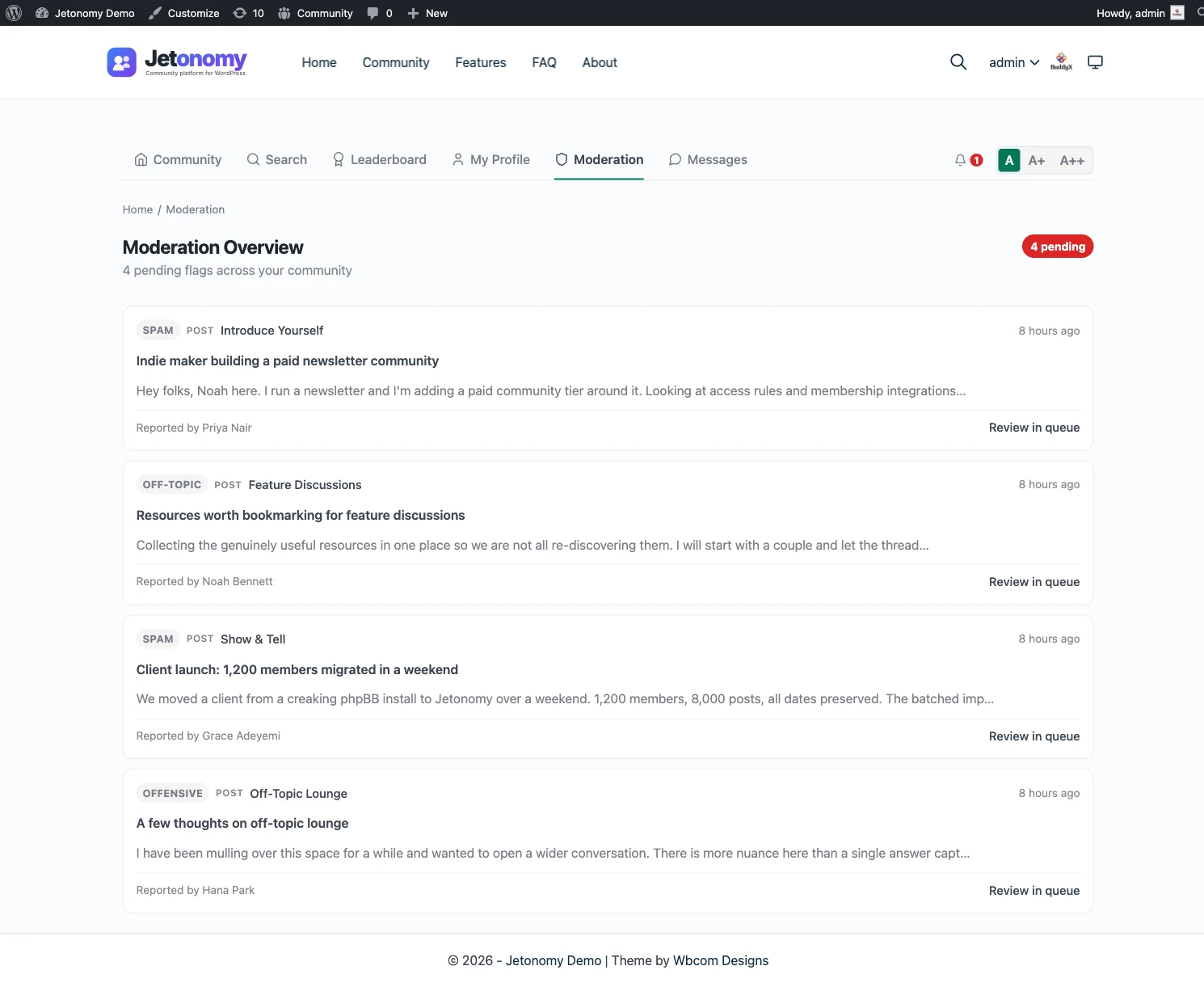
A Jetonomy front-end moderation queue showing flagged and pending posts with approve and reject actions

The problem

Moderation does not scale. At 500 posts a day, one human cannot keep up. Spam and abuse slip through while your team burns out reading every thread by hand.

  • Six trust levels, 0 to 5: members earn 1 to 3 automatically from their activity, you grant 4 and 5 by hand
  • Every level unlocks more abilities, from uploading images to creating spaces to full moderation
  • One moderation queue for pending posts, pending replies, and member flags, on the front end or in wp-admin
  • A three-layer permission model: WordPress capabilities, per-space roles, then trust levels on top
  • Per-space moderation: a Support space moderator sees only Support items, not the whole site

A permission model that grows with your members

Jetonomy resolves what a member can do through three layers that stack on top of each other: WordPress capabilities, the role a member holds inside a given space, and their trust level. The result is a single answer to one question, “can this person do this here?”, without you wiring permissions by hand for every member.

Trust levels are the engine that makes it self-running. There are six, numbered 0 to 5. Everyone starts at 0. Levels 1 through 3 are earned automatically: when a member crosses the activity requirements you set, like a number of posts, days active, and replies received, a scheduled job promotes them. Levels 4 and 5 are reserved for your leaders and moderators, granted by hand from the WordPress Users screen. If a member’s standing drops, the same job moves them back down, so the system stays honest.

Every level unlocks the next ability

Higher trust is not just a label. Each level expands what a member can do without a moderator in the loop. A newcomer can post and flag. The next level up can upload images and edit their own posts. Higher still, members can skip the friction that catches spammers and start their own spaces. At the top, members effectively act as community staff, moderating content and managing other members. You decide where each ability sits by tuning the thresholds in the settings, so promotion can be fast and welcoming or a genuine achievement.

This is the difference between hand-picking moderators and letting a community self-select. Members who consistently contribute quality earn their way up. You only step in for the edge cases: elevating a known expert early, or banning a bad actor.

One queue for everything that needs review

When content does need a human, it lands in one place. The moderation queue has tabs for pending posts, pending replies, member flags, and banned users, each with a live count so nothing sits unnoticed. Pending items are ordered oldest first. Approve publishes, spam trashes and trains your spam filter, and trash removes without the spam mark. On flags, you confirm or dismiss in one click.

The queue works on the front end and in wp-admin, and it respects scope. A moderator for your Support space sees only Support items, not the entire site. That is what lets moderation keep up when you are taking hundreds of posts a day: the right people see the right queue, and most of the work never needs you at all.

Who it's for

Large communities

Let members self-select into trusted roles instead of hand-picking moderators as you grow.

Support and SaaS teams

Catch first posts and flags in one queue so nothing reaches customers unreviewed.

Solo founders

Set the thresholds once and let promotion run on autopilot while you build the product.

Common questions

How do trust levels work?

There are six levels, numbered 0 to 5. Every new member starts at 0. Levels 1 to 3 are earned automatically when a member meets the configured activity requirements, like posts written and days active. Levels 4 and 5 are granted by hand by an admin for your leaders and moderators.

What does each trust level let a member do?

Each level adds abilities on top of the one below it: uploading images, editing their own posts, having posting limits lifted, creating new spaces, and at the top, moderating content and managing members. You set the thresholds in the plugin settings.

Where do moderators review content?

From a single queue with tabs for pending posts, pending replies, flags, and banned users. It lives in wp-admin and on the front end at your community URL, so a space moderator can review without ever touching the dashboard.

Does this require Pro?

No. Trust levels 0 to 5, automatic promotion, the permission model, and the moderation queue are all in the free plugin. Pro adds extras like automated content rules that act before items reach the queue.

Run it on your own WordPress.

Download the free plugin, run the 5-minute wizard, and turn this feature on. No SaaS rent, your data, your domain.