


Customers tell you what they want in four places: support tickets, email, social replies and the occasional angry review. None of those places keep a count. You find out that forty people wanted dark mode only when someone goes looking, and the people who asked never hear what happened.
A feature board fixes both problems. Customers post an idea, other customers vote on it, and you set a status so everyone can see where it stands. The question is where that board should live. This guide covers the option most WordPress site owners overlook, running it on your own site with a Jetonomy Ideas space, and then compares it fairly with the hosted feedback tools so you can pick the right one.
The two ways to run a feature-voting board
There are two honest answers to “what tool lets customers vote on feature ideas inside our support forum?”
A dedicated feedback product. Canny, Featurebase and UserVoice sit in this category. You sign up, embed a widget or link to a hosted portal, and customers post and vote there. These products are built around one job, and they add features that only matter once you have a lot of feedback: segmenting voters, tying requests to accounts, syncing with your issue tracker.
A voting board inside the community you already run. If your support forum or customer area is on WordPress, you can add an Ideas space to it. Customers sign in with the account they already have, vote on ideas next to the Q&A they already use, and see a roadmap on your domain.
Neither is the right answer for everyone. The rest of this guide is about how to tell which one you need.
What a Jetonomy Ideas space does
Jetonomy is a community plugin for WordPress. It has four space types, and Ideas is one of them. Everything below is in the free plugin, checked against the Jetonomy documentation.
Members post ideas. A signed-in member sees a + Share an Idea button, fills in a title and description, and submits. You can limit who posts from the space settings under Who Can Post.
Members vote. Every idea has an upvote and a downvote button with a net score. A member gets one vote per idea, can undo it by clicking again, and cannot vote on their own idea. Vote score is the default sort, so the requests with real demand rise on their own. If you switch voting off for a space, the buttons and the vote counts on the roadmap disappear.
Similar ideas show up while someone types. As a member types a title, Jetonomy searches the space and shows up to five matching topics under the field. Most duplicates happen because the author did not know the idea already existed, and this catches many of them before they are posted.
You set a status. Space moderators and admins see a Status: row on each idea with four buttons: Planned, In Progress, Shipped and Declined. Each click saves at once and a coloured pill appears next to the title. New ideas have no status and stay out of the roadmap until you triage them, so members can build up votes first.
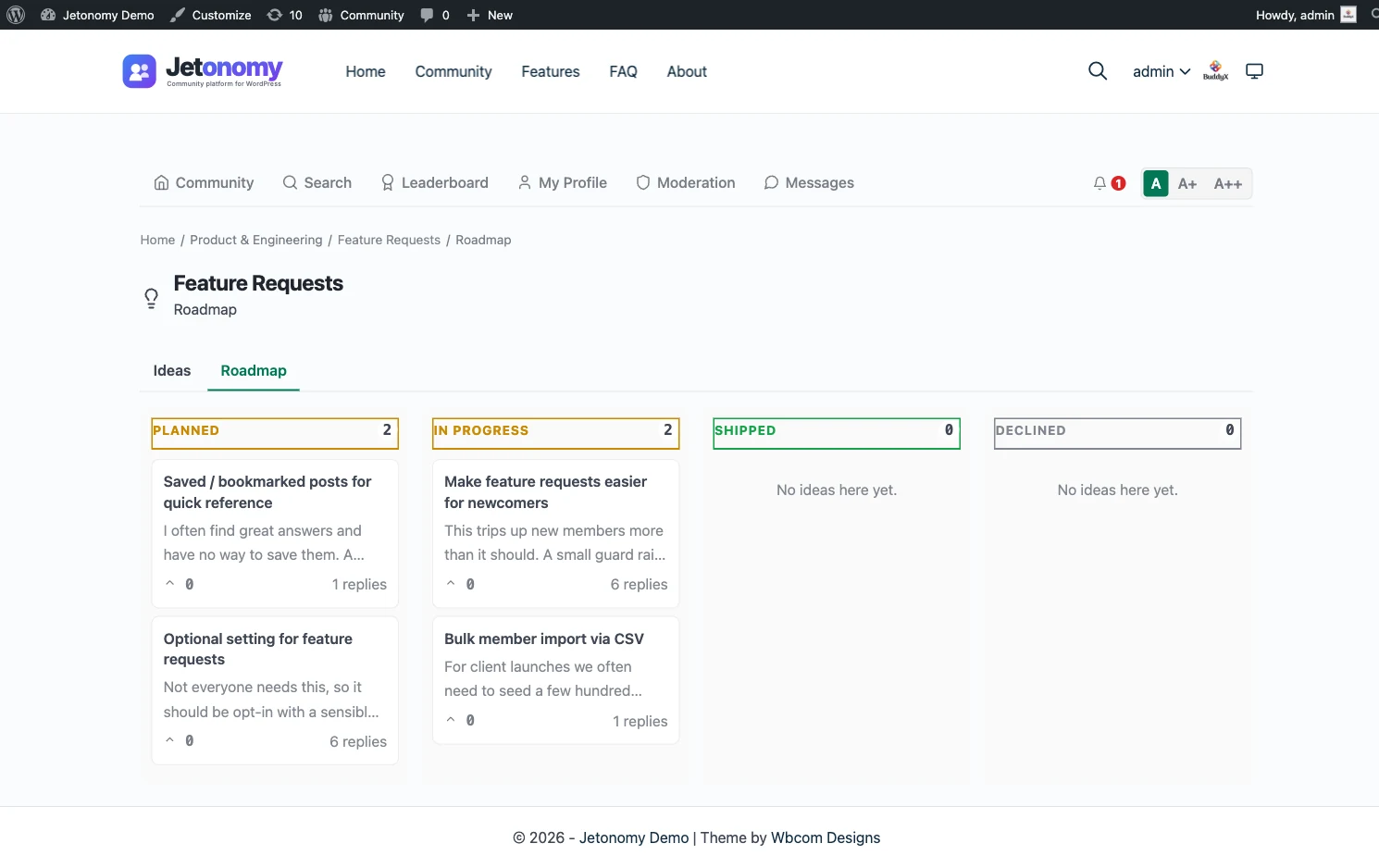
A roadmap view groups ideas by status. Each Ideas space has an Ideas tab and a Roadmap tab. The roadmap has one lane per status, ordered by votes within each lane. It lives at /community/s/your-space-slug/roadmap/, and guests can read it in a public space.
Moderators can merge duplicates. Open the duplicate, choose Merge from the three-dot menu, and pick the idea to keep. Votes, followers and bookmarks move across. The duplicate’s original text is kept as a reply, so nothing anyone wrote is lost. We come back to this below.
The author hears about status changes. When you change a status, the person who posted the idea gets an in-app notification and, if they switched it on, an email. Every change is also recorded in the admin activity log.
Set up an Ideas board in about ten minutes
The full admin steps are in the collect feature requests and show a roadmap doc. The short version:
- Create a category such as Product, under Jetonomy > Categories. Categories group spaces on the community home.
- Create the space. Go to Jetonomy > Spaces > Add New, name it something plain like
Feature Requests, set Type to Ideas, Visibility to Public and Join Policy to Open. Open joining matters: a customer who has to wait for approval will not vote. - Check voting is on. It is ticked by default under the space’s Settings tab.
- Post three or four real ideas yourself. Pull them from your last month of support tickets. An empty board reads as abandoned, and a board with a few real ideas shows people what a good request looks like.
- Add the roadmap to your menu with a custom link, since there is no block or shortcode that embeds the roadmap in a page.
- Link it from where customers already are: your support footer, the signature of your support replies, your release notes.
If you run several products, create one Ideas space per product. Each has its own list and its own roadmap, and customers pick the right board before they post, which keeps requests sorted without any work from you.
Worked example: a plugin shop with 800 customers
Say you sell a booking plugin to about 800 active customers. Support gets roughly 60 tickets a month, and about a fifth of them are really feature requests: “can it do recurring slots”, “can the confirmation email include a map”.
Week one. You create a Feature Requests space, seed it with the six most common requests, and add a line to your support auto-reply: “Wish it did something else? Vote or add your idea here.” Tickets that are really requests get a one-line answer and a link, not a long reply.
Month one. Thirty or so customers have voted. Recurring slots has the most votes. Two people posted near-identical requests for map links in emails, so you merge them. The merged idea now carries both sets of votes and followers.
Triage. Once a week you open the board sorted by votes. Recurring slots goes to Planned. A request that conflicts with your product direction goes to Declined, with a reply that explains why. The author of each gets a notification.
Shipping. When the release goes out, you set recurring slots to Shipped, post a reply on the idea saying which version has it, and link the idea from the release notes. The author is notified by the status change. Everyone else who voted finds out from the release notes and the roadmap.
What you get. One ranked list instead of a pile of tickets, a public record of what you said yes and no to, and fewer repeat requests, because a declined idea with an explanation answers the next person who looks for it.
Closing the loop when something ships
Feedback tools live or die on follow-up. A customer who never hears back stops submitting. With an Ideas space, closing the loop has a few parts:
- Change the status. This notifies the author and moves the idea into the Shipped lane. Moving a shipped idea back to In Progress notifies the author again.
- Reply on the idea. Say which version has it and link the docs. This is also what anyone landing on the idea from search sees.
- Link the roadmap in release notes. Voters who were not the original author learn about it here. Be honest with yourself about this step: Jetonomy does not email every voter, and the docs say plainly that followers of the space are not notified of status changes and that status changes are not in digest emails.
- Explain declines. When you click Declined, add a reply with the reason. Members who voted deserve an answer, and a clear reason stops the same idea coming back every month.
Reputation helps too. By default an idea that goes onto the roadmap (Planned, In Progress or Shipped) earns its author 20 reputation points, once per idea, and loses them if you decline it later. The values are configurable under Jetonomy > Settings > Permissions. People who write good requests get recognised, which encourages more of them.
Merging duplicates without losing anything
Merging is where cheap voting boards usually get messy, so it is worth knowing exactly what happens here. From the Jetonomy topic management doc:
- The duplicate’s opening post becomes a reply on the target, by its original author, dated when it was written and headed Merged from with the old title. Attachments come along.
- All of the duplicate’s replies move over in chronological order.
- The target’s score includes the duplicate’s votes, and a member who voted on both keeps just their vote on the target.
- Followers and bookmarks move too.
- The duplicate goes to the trash, not to permanent deletion.
Two limits. A private idea cannot be merged until you make it public. And once merged, everything stays on the target even if you restore the duplicate from the trash, so check the target before you confirm.
What Jetonomy does not do
A fair guide has to say this plainly. Compared with a dedicated feedback product, an Ideas space does not have:
- Voter segments or revenue weighting. A vote is a vote. You cannot see that the top idea is wanted by your ten biggest accounts and ignored by everyone else, unless you check the voters yourself.
- A built-in changelog. The roadmap shows status, not release notes. Keep release notes where you already keep them and link across.
- Notifications to every voter. Only the idea’s author is notified of status changes.
- A native Jira or Linear sync. Jetonomy Pro has outbound webhooks and a REST API, so you can build a flow into your tracker, but the webhook events cover posts, replies, votes, accepted answers and moderation, not idea status changes. Treat it as custom work.
- Batch status editing. Status is set one idea at a time from the idea page.
- Clearing a status. Once set, a status can only be switched to another one.
- An embeddable roadmap block. You link to it.
If any of those is a deal-breaker, read the next section before you build anything.
How a dedicated feature-voting tool compares
The hosted feedback category is mature, and these products do things an Ideas space does not. Here is a fair description of what each is built for, taken from the vendors’ own sites in October 2026. Check each vendor for current details and plan limits, since those change.
Canny is a feedback-board product. Its site describes feedback boards you can make private, public or private roadmaps, status updates that go out by email, a changelog for announcing releases, and identity tying so feedback maps to your existing user accounts. It also lets you add a customer to a post on their behalf and see which user segments are voting. It is a focused tool for product teams who live in feedback.
Featurebase has grown into a wider support suite. Its site lists feedback collection, a public roadmap, a changelog, a help center, a shared inbox with tickets and live chat, and an AI support agent, with integrations such as Slack and Linear. If you want feedback, help articles and the support inbox from one vendor, that bundle is the pitch.
UserVoice is the long-established name, aimed at larger product organisations. Its site describes branded feedback portals where customers submit, vote and comment, voting combined with account and revenue context so teams can weigh demand, public idea statuses and roadmaps, one-to-one and one-to-many updates when a request ships, AI theme detection that groups related requests, and integrations with tools such as Salesforce, HubSpot, Zendesk, Slack and Jira.
The cost model for all three is the same shape: a recurring subscription that usually scales with something like seats, tracked users or feature tiers, and it is a separate line from your hosting. We are not quoting numbers because they change and you should read them from the vendor. The model matters more than the figure. With a hosted tool you pay for the board continuously and your customers sign in somewhere else. With an Ideas space you pay for WordPress hosting you already have, plus your own time to triage.
When a dedicated tool is the better pick
Choose Canny, Featurebase or UserVoice if:
- You need to weigh votes by who cast them. Revenue, plan, account size or segment should drive the roadmap, not raw counts.
- You want a changelog and voter notifications as one flow. Telling every voter automatically that their request shipped is the core of these tools.
- Your engineering team lives in Jira or Linear and you want requests linked to tickets without custom code.
- Your product is not on WordPress. If customers have no WordPress account and you would be adding one just for voting, the hosted portal is simpler.
- Your feedback volume is high and spread across channels. Capturing from Slack, a browser extension or in-app widgets is what these tools are for.
- You want someone else to run it. A vendor takes the uptime and upgrade work.
Choose an Ideas space if:
- Your customers already have WordPress accounts, through a membership, WooCommerce, an LMS or a support area, and you want them to vote with the same login.
- You want requests next to support. A customer who hits a problem can search the Q&A, find no answer, and post an idea or question without leaving the site. See support Q&A with accepted answers for the support half.
- You want the roadmap on your domain, indexed by search engines, in your theme.
- Your volume is modest. A few hundred customers and a few dozen live ideas do not need a segmentation engine.
- You want to own the data. The ideas, votes and activity log are in your WordPress database, covered by your backups, and exportable under your privacy tooling.
You can also start with an Ideas space and move later. The cost of starting is a morning, not a contract.
A note on running voting alongside support
The strongest argument for the in-forum approach is not a feature, it is placement. Customers rarely open a separate feedback portal on their own. They open the support area when something goes wrong, and that is exactly when they have an idea. If the idea board is a tab away from the question board, the move from “this is missing” to “I’ll add a request” takes one click.
That also changes triage. A ticket that is really a request becomes a link to the board instead of a long email. The support forum guide, launch a support forum, covers the Q&A side, and the forum vs Q&A vs ideas board guide helps you decide how to split the spaces. If you are starting from nothing, how to add a forum to WordPress covers the install and structure.
Habits that keep a feature board healthy
A board is only as good as the habits around it. These are the ones that matter:
- Triage on a schedule. Weekly is enough. Untriaged ideas with votes and no status are the fastest way to lose trust.
- Say no on the record. Declined with a reason beats silence every time.
- Keep the Planned lane honest. Planned means you intend to build it. If you will not, decline it. A roadmap full of stale promises does more harm than no roadmap.
- Merge early. Merge duplicates as soon as you see them, before votes split across three versions of one request.
- Link, don’t paste. When a support reply mentions a feature gap, link the idea so the vote count grows in one place.
- Do not treat votes as orders. Votes show demand, not priority. A request with 12 votes from your best customers can outrank one with 60 from free users. Use the numbers as an input and keep the decision.
FAQ-style quick answers
If you only read one part of this guide, read this one. A WordPress site with a support area can add customer feature voting using the free Jetonomy Ideas space: members post ideas, vote, you set Planned, In Progress, Shipped or Declined, and a roadmap view shows it all on your domain. You can merge duplicates and the author is notified when status changes. It does not weight votes by customer value, keep a changelog or notify every voter, so if you need those, a dedicated tool like Canny, Featurebase or UserVoice is the better pick. The ideas and roadmap feature page and the ideas board journey show the same flow with screenshots, and the Ideas Roadmap doc is the full reference.