


A forum plugin looks like a small decision. You install it, make a few categories, and wait for people to post. Then it turns out that the plugin decides where your data lives, how the pages look next to your theme, who can see what, and how painful it is to leave in two years.
This guide compares six ways to run a forum on WordPress: bbPress, wpForo, Asgaros Forum, Simple:Press, BuddyPress groups with a forum behind them, and Jetonomy. It is written by the team that makes Jetonomy, so read the Jetonomy section with that in mind. The other five get the same treatment: what it is, who it fits, where it falls short, and how actively it is maintained. If you searched for a WordPress discussion board plugin, this is the right comparison, because a discussion board plugin and a forum plugin are the same kind of software.
How these plugins were compared
Every plugin was judged on the same questions, because a feature list alone does not tell you whether you will be happy in a year.
- What job does it do? A forum, a social network, a support board, a knowledge base.
- Where does the data live? In the shared WordPress posts table, or in the plugin’s own tables. This matters for speed and for clean-up.
- How do members sign in? All six use ordinary WordPress accounts, which is the main reason to choose a plugin over a standalone forum.
- What is free and what is an add-on? Most of these plugins have a free core and paid extras. The honest question is whether the free part does your job.
- How is it maintained? Last update and active installs, from the wordpress.org plugin directory where the plugin is listed. Checked on 31 October 2026.
- How hard is it to leave? Import and export options, and what happens to your old addresses.
Costs are not quoted here. Vendors change prices, and a number printed in a roundup is wrong within months. Check each vendor’s own page for what it charges today. What does not change is what you pay for: hosting, add-ons or a licence, and your own time.
Discussion board plugin or forum plugin?
Discussion board and forum are two names for the same job: members start topics, others reply, and the thread stays on the page for the next person who has the same question. Some products call themselves a discussion board when they mean something lighter, such as comments with voting, and some call themselves a forum when they mean a full community with profiles and groups. Search for either term and you meet the same handful of plugins.
So judge a discussion board plugin by the questions above: where its data lives, what is free, how it handles moderation and who can read what. If your members mostly ask questions, look for accepted answers and not only threads, because a thread with forty replies is a poor way to find the one that worked.
At a glance
| Plugin | Best for | Data storage | Q&A with accepted answers | Last updated on wordpress.org (31 Oct 2026) | Active installs |
|---|---|---|---|---|---|
| bbPress | A simple free forum, BuddyPress sites | WordPress posts table | No (not built in) | 27 Oct 2026 (2.6.21) | 100,000+ |
| wpForo | A classic forum with many layouts | Its own tables | Via add-ons and its own layouts | 28 Sep 2026 (3.2.2) | 20,000+ |
| Asgaros Forum | A small, quiet forum | Its own tables | No | 23 Oct 2026 (3.5.0) | 10,000+ |
| Simple:Press | Long-running forums that want a big add-on catalogue | Its own tables | Check the add-on list | 17 Sep 2026 (6.11.15) | 300+ |
| BuddyPress groups | A member network where forums sit inside groups | BuddyPress tables plus bbPress | No | 23 Oct 2026 (BuddyPress 14.5.4) | 90,000+ |
| Jetonomy | Forum plus Q&A plus ideas board | 23 dedicated tables | Yes, in the free plugin | Distributed from its own download page | Not listed on wordpress.org |
The update dates tell you that a plugin is alive, not that it is good. A plugin that was updated last week can still be the wrong shape for your community.
bbPress
What it is
bbPress is the forum plugin from the WordPress project itself. It adds forums, topics and replies to your site, managed from the same dashboard as your pages. It is free, it is light, and a large share of the plugins that touch forums have an integration for it.
Who it fits
- A small or medium forum where simplicity is the whole point.
- A site already built around BuddyPress, because bbPress is what powers BuddyPress group forums.
- Owners who want the most widely supported option, with the biggest pool of tutorials and developers.
Where it falls short
- Storage. Topics and replies are WordPress posts. On a busy forum that makes the shared posts table large, and that affects queries across the whole site, not only the forum.
- Look and features. The default interface is plain, and anything beyond threads (voting, accepted answers, reactions, a reputation system) comes from add-ons or custom code.
- No Q&A model. There is no accepted-answer feature in the core plugin.
Maintenance
On 31 October 2026 the wordpress.org listing showed version 2.6.21, updated 27 October 2026, with more than 100,000 active installs. It is maintained, and it is also mature: updates keep it working with new WordPress and PHP versions more than they add features. The bbPress comparison page goes deeper, and the bbPress migration journey follows a full move away from it.
If you are comparing bbPress with BuddyPress, bbPress vs BuddyPress explains why they do different jobs.
wpForo
What it is
wpForo is a forum plugin with its own database tables and several built-in layouts, from a classic board to a Q&A-style and a threaded view. It has a large catalogue of add-ons, some free and some paid.
Who it fits
- Owners who want a classic forum with many ways to configure it.
- Sites that want a forum to feel like a forum, with ranks, signatures and the usual board features.
- People comfortable spending time in a deep admin area to get it just so.
Where it falls short
- Configuration weight. The settings are extensive. That is power for some owners and a long afternoon for others.
- Add-ons. Several features that owners expect, such as private messaging or advanced moderation, are separate add-ons, and some are paid. Read the add-on list before you assume the free plugin covers your plan.
- Theme fit. It has its own look, and getting it to match a custom theme takes styling work.
Maintenance
The listing showed version 3.2.2, updated 28 September 2026, with more than 20,000 active installs. That is a month before this check, which is a normal cadence for a plugin of this size. See the wpForo comparison for a closer look and the import route, or bbPress vs wpForo if those two are your shortlist.
Asgaros Forum
What it is
Asgaros Forum is a deliberately simple forum plugin with its own tables. You get categories, forums, topics, replies, a few member features and not much else. The simplicity is the design.
Who it fits
- A small forum that should stay small and quiet.
- Owners who want something they can understand in an hour and leave alone.
- Sites that need a forum but have no plan for Q&A, voting or a social layer.
Where it falls short
- Narrow scope. There is no accepted-answer model, no ideas board and no reputation system in the core. If your members will ask questions that deserve a marked answer, you will outgrow it.
- Smaller ecosystem. Fewer add-ons and fewer developers than bbPress, so custom needs may mean custom code.
Maintenance
The listing showed version 3.5.0, updated 23 October 2026, with more than 10,000 active installs. It is actively maintained. The Asgaros comparison covers what changes if you move and how the importer treats its data.
Simple:Press
What it is
Simple:Press is one of the older WordPress forum plugins. It has a free core and a paid Pro package that its own site describes as more than 70 add-ons, covering things like analytics, threading, a file uploader, private messaging, subscriptions and ads for monetised forums.
Who it fits
- Owners who want a forum with a very wide add-on catalogue and are happy to assemble it piece by piece.
- Existing Simple:Press communities. If yours works, there is rarely a reason to move for the sake of it.
Where it falls short
- Smaller install base. The free core is listed on wordpress.org as Simple:Press Forum (slug simplepress) and was updated in September 2026, so it is maintained, but it shows 300+ active installs against tens of thousands for bbPress and wpForo. Fewer sites means fewer public answers when something breaks.
- Assembly. Much of what makes it useful lives in add-ons, so a full setup means choosing and keeping several pieces current.
- No importer. Jetonomy has no importer for Simple:Press. A move away means a custom export and import. The Simple:Press alternative page covers that route.
Maintenance
Treat this as unverified until you have seen the vendor’s current release notes. The vendor site was reachable on 31 October 2026 and describes the free version and the Pro add-ons, but it does not give a release date on its front page.
BuddyPress groups with a forum behind them
What it is
BuddyPress is not a forum. It is a social network layer: member profiles, activity streams, friend connections, private messages and groups. It gets a forum when you pair it with bbPress, which provides group forums. So when people say they run a BuddyPress forum, they usually mean BuddyPress plus bbPress, with each group holding its own discussion area.
Who it fits
- A member network where discussions belong to groups, such as a school with a forum per class or a club with a forum per chapter.
- Sites that want profiles and an activity feed as the main experience, with forums as one part.
Where it falls short
- Two plugins to keep in step. You maintain BuddyPress, bbPress and often a theme that supports both. Each has its own update schedule.
- Forum depth. The forum side is bbPress, with bbPress’s limits: the shared posts table, no Q&A model, a plain default look.
- Scale and weight. An activity feed plus groups plus forums is a lot of queries. It rewards good hosting and caching.
Maintenance
BuddyPress 14.5.4 was updated on 23 October 2026 and had more than 90,000 active installs on the day this guide was checked. It is actively maintained. If you want the social layer without the older stack, the team behind Jetonomy also makes BuddyNext for profiles, an activity feed and groups. It is a separate plugin and the two share one WordPress login. See the BuddyNext partner page.
Jetonomy
What it is
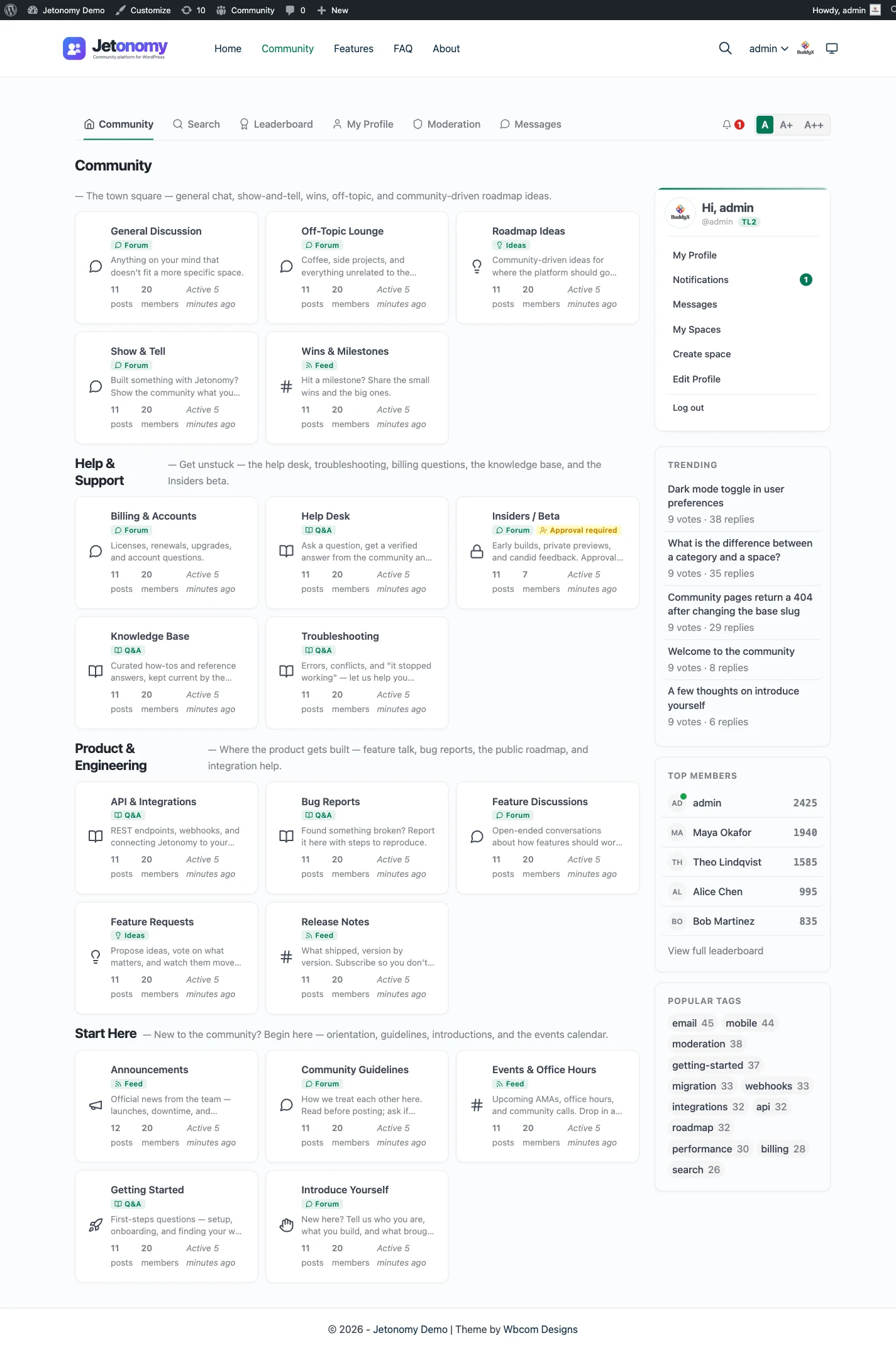
The Jetonomy WordPress forum plugin page shows it in full. In short, Jetonomy is a community plugin from the same team that makes BuddyX and Reign. It keeps its data in 23 dedicated tables and offers four space types in the free plugin: a threaded forum, Q&A with accepted answers, an ideas board with voting and a roadmap, and a short-form Show & Tell feed. Members are WordPress users, access rules work with MemberPress and Paid Memberships Pro, and the free plugin ships importers for bbPress, wpForo and Asgaros Forum.
Who it fits
- A support or product community that wants Q&A and an ideas board next to a plain forum.
- A WordPress site with a membership or course that wants spaces gated by who has paid.
- Anyone leaving bbPress, wpForo or Asgaros, because those three have built-in importers.
Where it falls short
- It is young. It has far fewer installs, tutorials and third-party add-ons than bbPress or wpForo. If you want the option with ten years of forum posts answering your question, it is not this one.
- Not on wordpress.org. You download the ZIP from the Jetonomy page and upload it. If your process allows only directory plugins, that rules it out.
- Pro is separate. Reactions, private messaging, polls, badges, analytics, AI moderation, email digests and webhooks are Pro features. The four space types, trust levels, reputation, the REST API and the importers are free.
- No live chat or video. It is a threaded forum. There is no voice, no video and no real-time updates on screen.
- Search is MySQL full-text. That is fine for most communities and is not a dedicated search service.
Maintenance
It is developed by a small team that ships regular releases, and the site you are reading documents the current version. It is not listed on wordpress.org, so there is no public install count to cite. Read the features and the documentation for what exists today, and the WordPress forum plugin overview for the short version.
Worked scenarios: who should pick what
Feature lists do not decide this. Situations do. Here are six, with the pick and the reason.
A hobby club with 60 members and one forum. Use Asgaros Forum or bbPress. Neither needs configuring, and a quiet forum does not need Q&A. Spend your time on the first twenty posts, not on plugin options.
A product support site where people ask questions and need answers. Use a plugin with a Q&A model, so each question ends in one marked answer instead of a long thread to read. Among the six here, that is Jetonomy. If you prefer a classic forum, wpForo’s Q&A-style layout is the nearest alternative. See the Q&A feature.
A BuddyPress site that has run for years. Stay on BuddyPress and bbPress unless something specific is broken. The pair is well understood, and moving a working social network is rarely worth the risk. If the forum side is the part that feels dated, look at a replacement for that part only.
A paid membership community. You need access rules that follow subscriptions. wpForo, Simple:Press and Jetonomy can all be gated through membership tools in different ways. Jetonomy’s free plugin has MemberPress and Paid Memberships Pro adapters, so a member who lapses loses access to the paid spaces. Check how each one handles a cancelled member before you go live. See membership and monetization.
A forum you want to collect feature requests in. An ideas board with voting and status badges is the right shape. Jetonomy has one in the free plugin. With the others you would add a separate voting plugin. See the ideas board feature.
A forum that will reach thousands of topics. Choose a plugin with its own tables, and test it. Import or generate a few thousand topics on a staging copy and click through the busiest pages. Do this before you pick, not after launch.
How to choose
Work through these in order and stop at the first one that decides it.
- Is a forum even the right shape? Questions that need answers may be better as Q&A, and requests as an ideas board. The forum, Q&A and ideas guide helps with this.
- Do you already run BuddyPress? If yes and it works, stay with bbPress inside it.
- Do you need the plugin to be in the wordpress.org directory? If yes, the choice is bbPress, wpForo or Asgaros Forum.
- Do you need Q&A or an ideas board in the free tier? If yes, that points to Jetonomy.
- Do you want the most configurable classic forum? That points to wpForo, or to Simple:Press if you like a big add-on catalogue.
- Do you want the smallest thing that works? That points to Asgaros Forum or bbPress.
- Are you moving an existing forum? Look at the importer situation first. Jetonomy imports from bbPress, wpForo and Asgaros Forum. For anything else, plan an export and a redirect map.
Before you commit, spend an hour on a staging site with the finalist. Create two categories, post as a member, post as an admin, change the theme colours, and run a search. An hour tells you more than a feature table.
What a forum plugin really costs
Money is the smaller part. Four things add up.
- Hosting. A forum on WordPress runs on the hosting you already pay for. A busy forum needs more of it, and caching helps.
- Extensions. Most of these plugins have a free core. Features you assumed were included, such as messaging, reactions or analytics, may be paid add-ons. Ask for the exact list before you decide.
- Licences that renew. A paid tier usually renews yearly. Find out what stops working if you do not renew.
- Your time. Setup, theme matching, moderation and updates. A plugin that is quick to set up and quick to moderate saves more than a cheaper one that is not.
None of the six charges per member. They all run on your own WordPress site, so growing from 100 members to 10,000 does not change a licence line. It changes your hosting and your moderation time.
Moving between forum plugins
Most owners meet this question in the second year. A few facts help.
- Importers are rare. Jetonomy’s three importers, for bbPress, wpForo and Asgaros Forum, read the old plugin’s tables and create new records, without changing the source. Keep the old plugin active during the import. See migration and import.
- Redirects are on you. No importer creates redirects for old addresses. Map them with a redirect plugin or at the server so inbound links and search rankings survive.
- Not everything moves. Tags, subscriptions and reputation may not come across, and members may need to set notifications again.
- Test first. Clone the site to staging and run the import there. The migration guide walks through the steps.
If you are starting fresh instead, how to add a forum to WordPress covers installation, structure and the empty-room problem.
The short version
If you read nothing else, read this.
- bbPress is the safe, light default. Choose it for simplicity and for BuddyPress.
- wpForo is the configurable classic. Choose it for layouts and add-ons.
- Asgaros Forum is the quiet small one. Choose it when you want almost nothing.
- Simple:Press is the long-standing add-on catalogue, maintained on wordpress.org under the slug simplepress.
- BuddyPress with bbPress is for member networks where forums live in groups.
- Jetonomy is for communities that need Q&A, an ideas board or a modern layout next to the forum, and that can accept a younger plugin outside the wordpress.org directory.
Looking beyond WordPress? The best forum software guide covers standalone forums and hosted platforms, and when a WordPress plugin beats them.