

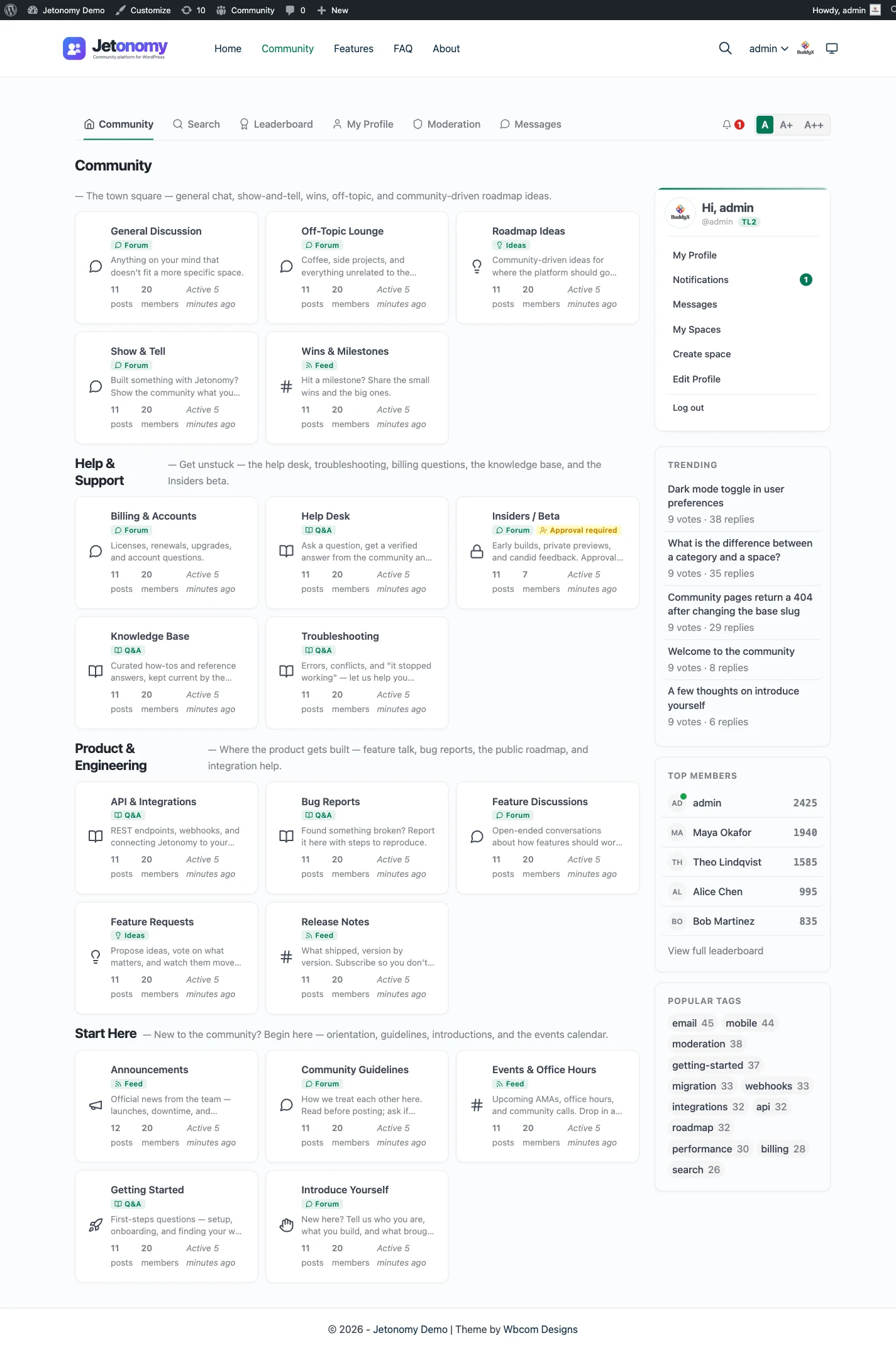
A discussion forum is a website, or a section of a website, where people post topics and others reply to them. Each topic gets its own page, the replies stack up underneath it in order, and the whole conversation stays on the site where anyone can find it again, including through a search engine. That is the definition in one breath. The rest of this guide explains how that works in practice, what separates a forum from chat and social groups, and what people use forums for.
Key points
- A discussion forum is a website where people post topics and others reply, and each topic keeps its own page.
- Threads stay on the site, so answers can be found again later through the forum’s search or a search engine.
- Forums come in four common shapes: open discussion, questions and answers, an ideas board with voting, and announcements.
- Chat is better for quick talk in the moment; a forum is better for anything people will want to find next month.
- You can host one yourself, use a hosted service, or add one to WordPress with a forum plugin.
Forum definition: what a discussion forum is
Think of a forum as a set of public noticeboards that never get wiped. Someone walks up and pins a question or an idea. Other people leave notes under it. Next week a stranger arrives, reads the whole thread, and either learns what they came for or adds one more note.
Three things make that different from other places people talk online:
- Topics are the unit. The conversation is organized around a subject with a title, not around a time of day. You can tell what a thread is about before you open it.
- Every topic has its own address. You can link to it, bookmark it, and send it to a friend. It does not move or scroll off.
- The archive is the point. A forum gets more useful as it grows, because every finished thread becomes something the next person can read instead of asking again.
You will also hear forums called message boards, discussion boards, or community forums. The names shift a little by era and audience, but they all describe the same idea. If you want a video walkthrough of the definition, the first clip below covers it in a few minutes.
How forums and discussions work
Behind the simple idea sits a small set of parts. Almost every forum, whatever software runs it, has these.
Topics and replies
A member starts a topic with a title and a body. Other members add replies. On most forums replies can be nested, so you can answer one specific reply instead of the topic as a whole. Jetonomy, for example, threads replies up to three levels deep. Keeping the nesting shallow stops long threads from turning into a staircase that nobody can follow.
Spaces and categories
A forum with one big list of topics is hard to use once it passes a few dozen posts. So forums group topics into sections. Different software uses different words: boards, categories, channels, groups. In Jetonomy they are called spaces, and spaces can be grouped under categories. A support space, a general chat space and an ideas space can live side by side, each with its own rules about who can read and who can post.
Accepted answers and voting
Replies are not all equal, and good forums give members a way to say so. Voting lets members push useful posts up and weak ones down, so a long thread shows its best contributions first. In a question-and-answer forum there is a second signal: the person who asked can mark one reply as the accepted answer. That reply is flagged as the solution, so a visitor who lands on the thread from a search does not have to read forty replies to find it.
Moderation
Any open forum attracts spam and the occasional bad actor, so every serious forum has a way to deal with them. Members flag posts they think do not belong. Flagged posts, and any posts caught by spam filters, land in a moderation queue where a moderator reviews them and decides what happens. Moderators can be given authority over a single section without getting the keys to the whole site.
Members and trust
Who is allowed to do what, and when? Many forums handle this with roles (administrator, moderator, member) and with a trust system, where new accounts are limited at first and gain freedom as they take part. The point is to make the front door easy for real people while making it tedious for spammers. Jetonomy documents six trust levels, and the early levels lift limits such as daily posting caps and CAPTCHA checks as members build a record.
Search and search engines
A forum has its own search box so members can look for an existing thread before they start a new one. Just as important, a forum that publishes real pages with sensible titles and addresses can be indexed by Google and other search engines. That is how a thread written in March ends up answering a stranger’s question in October. It is also the biggest difference between a forum and most chat tools.
The four common shapes of a forum
Not every forum is a plain list of conversations. Over the years four shapes have become standard, and many communities run more than one at the same time.
1. Open discussion. The classic forum. Anyone can start a topic on any subject in the section, and replies follow in a thread. There is no single correct outcome. This shape fits general talk, support threads where several answers are valid, and community chatter.
2. Question and answer. Every topic is a question, replies are answers, and one answer gets accepted. This is the shape for help desks and knowledge bases, because it produces clear, findable solutions.
3. Ideas board with voting. Members post suggestions, others vote them up, and the owner marks each idea as planned, in progress, shipped or declined. It doubles as a public roadmap and shows you what people want most.
4. Announcements. A section where staff post news and members read and react. Replies may be open, limited, or turned off. In a platform that has no separate announcement type, this is simply an open discussion section with posting limited to the people running the community.
In Jetonomy these shapes map onto four space types: Forum, Q&A, Ideas and Show & Tell. Show & Tell is a short-form feed with optional titles, good for introductions, check-ins and sharing work. Announcements are run as a Forum space where only your team posts. The type is set per space, so one site can hold all of them together. For help choosing between them, read forum vs Q&A vs ideas board.
Discussion forum vs chat vs social groups vs comments
People often ask whether they need a forum at all when they already have a Discord server, a Slack workspace, or a Facebook Group. They are different tools that do different jobs. Here is an honest comparison.
| Discussion forum | Chat (Slack, Discord) | Social group (Facebook Groups) | Comment section | |
|---|---|---|---|---|
| Main unit | A topic with replies | A message in a stream | A post in a feed | A reply under an article |
| Pace | Slow to medium | Real time | Medium | Slow |
| Old content is easy to find | Yes, by topic and search | Poor, it scrolls away | Weak, feed driven | Only on that one page |
| Indexed by search engines | Yes, if public | Generally no | Generally no | Yes, but tied to the article |
| Structure | Sections, topics, tags | Channels and threads | One feed, some topics | None |
| Who owns the data | You, if self-hosted | The platform | The platform | You or a comment service |
| Best for | Lasting answers and discussion | Live, fast conversation | Reaching people where they already are | Reactions to one piece of content |
Chat wins on speed. If the question is “who is free at three?”, a chat room is better than a forum every time. A forum wins on memory. If the question is “how do I fix this error?”, you want the answer to still be on a page next year. Many communities use both, with chat as the room people drop into and a forum as the written record. If you are weighing the options, our pages on Discord, Slack and Facebook Groups go through the tradeoffs in more detail.
Comments are a special case. A comment section is a tiny forum attached to one article, with no sections, little structure and no way to start a new subject. It is fine for reactions to a post, but it cannot hold a community. If your readers have started using the comments for real discussion, that is a sign you may want a forum, and the guide on alternatives to Disqus for reader threads covers that case.
Discussion forum examples
This section describes generic patterns rather than particular websites. They are the shapes you will meet again and again, and each one maps onto a clear job. For seven fuller examples, with what the good ones do and how to build each on WordPress, read discussion forum examples.
A product help desk
Customers ask questions about a product, other customers and staff reply, and the best reply is marked as the answer. Over time the forum becomes a library of solutions. New visitors search before they file a ticket, so the same question is answered once instead of fifty times. This is usually a Q&A section.
A hobby club
Gardeners, cyclists, board game players, model builders. People post photos, trade tips, ask for recommendations and argue happily about gear. The mix is mostly open discussion, with a Show & Tell style section for people to share what they made.
An ideas and feedback board
A software team or a service business collects suggestions, lets members vote, and marks the status of each idea. Voting turns a pile of requests into a ranked list, and the status labels tell members their input went somewhere. It is a roadmap that members can see and shape.
An announcements area
The team posts news, release notes and event dates. Members read, react and ask follow-up questions in the replies. Because every announcement is its own topic with its own page, it is easy to link to from an email or a social post.
A knowledge base built from questions
Instead of writing every help article up front, some teams let real questions create the content. A question is asked, answered and accepted, and the resulting page is a help article written in the customer’s own words, which often matches how other customers search.
A school or course discussion area
Students post questions about an assignment, discuss readings, and help each other. The teacher can step in to answer or pin a note. Keeping it in a forum rather than a chat means the questions from this term are there for the next one.
A staff or internal forum
Teams use private forums for policy questions, process notes, “how did we do this last time” threads and cross-department talk. Unlike a chat channel, the thread stays put, which suits knowledge that outlasts the week it was written.
A local group
A neighborhood, a town, a parents’ association or a club chapter. Topics cover recommendations, events, lost and found, and local news. A forum suits it because older posts, such as “who fixed your roof?”, stay useful.
A brand community
A company gathers its customers in one place to swap tips, show what they built, and talk to the team. Members help each other, which lowers the load on support, and the company hears directly what people think. A mix of spaces usually works best: help, ideas, and a showcase.
The second video below shows several of these patterns in a live community.
Who runs a discussion forum, and why
People set up forums for a handful of recurring reasons.
Support deflection. When customers can find an answer themselves, fewer of them open a ticket. A searchable archive of accepted answers does that work without anyone sitting at a desk.
Answers that last. A chat message is gone from view in a day. A forum thread is still there in three years. If your community produces knowledge, a forum is how you keep it.
Search traffic. Public topics are pages. Pages with useful titles and real answers can bring in visitors who were never going to find you through advertising. This is a slow benefit that grows with the archive.
Owning the data. On a third-party platform, your members, your conversations and your access rules sit in someone else’s product, under someone else’s terms. Running your own forum keeps the content and the member list with you.
Direct contact with your audience. A forum shows you what people ask, complain about and wish for, in their own words, with no survey needed.
None of this means a forum is right for everyone. A forum needs a few active members to get going, and someone has to look after it. If you only need a quick place to talk with ten colleagues, chat is simpler. If you want people to ask, answer and find things later, a forum is the better fit.
How to start a discussion forum
Starting is mostly a set of small decisions.
- Pick one job. Support, discussion, ideas, or something else. A forum that tries to do everything on day one usually does none of it well.
- Choose where it lives. There are three broad options, covered below.
- Create one or two sections. Start narrow. You can add more when members ask for them.
- Write the first topics yourself. An empty forum looks abandoned. Post a welcome, a few starter questions, and a simple set of rules.
- Invite a small first group. Ten people who care are worth more than a thousand who do not. Ask them to reply, and reply back quickly.
- Moderate early. Set the tone in the first weeks and spam stays rare.
Hosted, self-hosted, or a WordPress plugin
- Hosted service. Someone else runs the software. Setup is quick and there is no server to look after, but the content sits on their platform and plans often change as you grow.
- Self-hosted forum software. You install an application such as Discourse, Flarum, NodeBB or phpBB on your own server. You have full control, and you also have the work of running a server and keeping it updated.
- A WordPress plugin. If you already have a WordPress site, a plugin adds the forum inside it, using your existing logins, theme and database. This is often the least effort for an existing site.
Our guide to the best forum software compares these groups by situation. If you have chosen WordPress, the best WordPress forum plugins lines up the options, and how to add a forum to WordPress walks through the setup.
Starting a forum with Jetonomy
Jetonomy is a forum plugin for WordPress. It runs inside your existing site, so members use the same login and the same theme. The free plugin includes all four space types (Forum, Q&A, Ideas and Show & Tell), threaded replies, voting, a moderation queue with flagging, trust levels, tags, and search. Search results cover topics, spaces and tags.
On the search side, Jetonomy gives each topic a clean address and can add a community section to the standard WordPress sitemap. Structured data and title patterns are set in the SEO settings tab. That is what lets public topics be found the way described earlier.
Jetonomy Pro is a separate paid plugin that adds extras on top, such as polls, reactions, private messaging, file attachments, analytics and advanced moderation. You do not need Pro to run any of the four space types. The feature pages show what each part looks like, and the discussion forum feature page is a good place to begin.
If you are not on WordPress, or you want a hosted product, the other options in the guides above may be a better match. The right tool is the one that fits the community you are building.
A short checklist before you launch
- Can you say in one sentence what the forum is for?
- Have you picked a space shape that matches that job?
- Are there five or six starter topics already posted?
- Is there a short set of written rules and someone to enforce them?
- Can a stranger find the forum, read a topic without signing up, and understand where to post?
- Do you know who will reply in the first week?
If you can answer yes to most of these, you are ready. A forum does not need to be large to be useful. It needs a clear purpose, a few people who show up, and the patience to let the archive grow.