

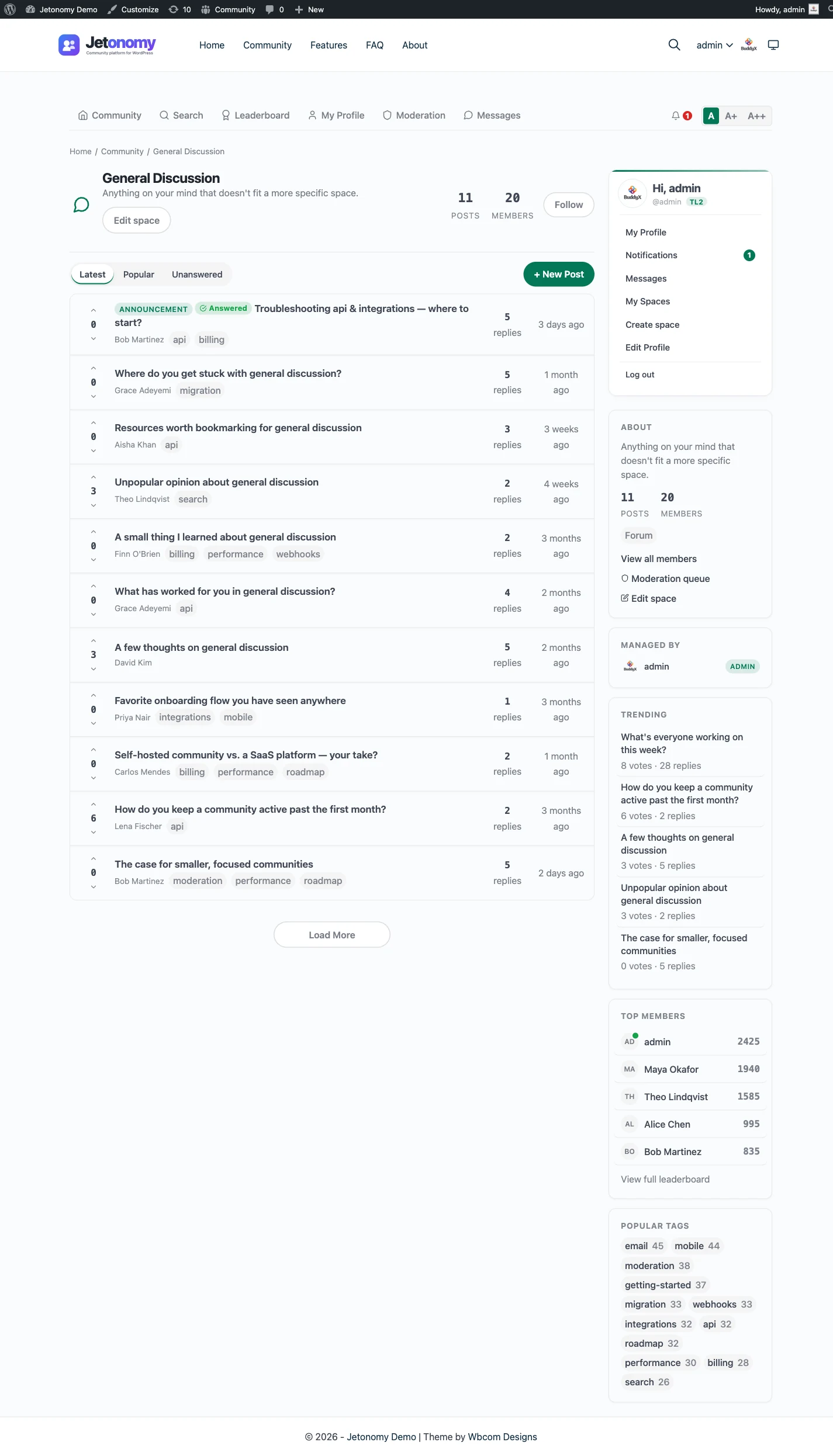
Groups and forums both put people in a shared place to talk, but they are built for different things. A group is organized around its members: you join it, see who else belongs and read a running feed of what they share. A forum is organized around topics: every question or subject gets its own page with replies underneath, and the archive stays searchable long after the conversation ends. If your people mostly come to belong, you want a group. If they mostly come to ask and to find answers, you want a forum. Many sites need both.
Key points
- A group is a social space: membership, a feed of short posts and member profiles. A forum is a topic space: titled threads, replies, search and sometimes an accepted answer.
- Groups suit belonging and updates. Forums suit questions, support, long discussions and anything you want to find again next year.
- A group’s feed scrolls away as new posts arrive. A forum topic keeps a stable address, so it can be linked and found through search.
- On WordPress, BuddyPress provides groups, bbPress provides forums, and Jetonomy provides forum, Q&A, ideas and feed spaces. BuddyPress groups can be paired with Jetonomy spaces, and BuddyNext spaces can carry a Jetonomy Discussions tab.
- You do not have to pick one. Run groups for belonging and a forum for the knowledge, and connect them so members keep one identity.
We make Jetonomy, a forum plugin for WordPress, and BuddyNext, a social community plugin that works with it. That shapes the examples. We name other options where they fit, and we say where something is not available.
What is the difference between a forum and a group?
The short version is the unit of conversation.
In a group, the unit is the person and the post. You join a group because you are the kind of person it is for: runners in your city, owners of a product, alumni of a program. You see who else is there, you follow what they post, and you post short updates yourself. The experience is closer to a club room or a shared noticeboard that keeps moving.
In a forum, the unit is the topic. Someone starts a thread with a title, others reply in order, and the thread sits at its own address. You do not need to belong to the group to benefit from it. A visitor who lands on the page from a search engine can read the whole exchange. The experience is closer to a library of conversations.
| Group | Forum | |
|---|---|---|
| Main unit | A member’s post in a feed | A topic with replies |
| What it is organized around | Who belongs | What is being discussed |
| Pace | Fast and continuous | Slow to medium |
| Old content | Scrolls down, hard to find | Stays at a stable address |
| Search engines | Mostly not indexed, often private | Public topics can be indexed |
| Typical signals | Joins, likes, comments, follows | Votes, accepted answers, reply counts |
| Best for | Belonging and updates | Answers and lasting discussion |
Neither is better. A group that behaves like a forum frustrates people who cannot find last month’s answer. A forum that behaves like a group feels cold and slow to people who came to chat.
What is a group, in the social sense?
A social group has four common parts.
- Membership. People join, are approved or are invited. The group has a list of members, and in many setups a role for the person who runs it.
- A feed. A stream of posts from members, newest first. It may include images, links, polls and short comments.
- Profiles. Members have identities that show up in the group: a photo, a name, a short bio, sometimes a list of the other groups they belong to.
- Privacy. A group can be open to anyone, visible but join-by-request, or hidden and invite-only.
The strength of a group is momentum. When someone posts, others see it right away and respond. That makes members feel the place is alive, which in turn makes them check back. It is also why groups are good for events, introductions, announcements and the low-stakes chatter that makes people feel they know each other.
The weakness is memory. A feed is built for the moment, so a useful answer is buried within a day or two. Anyone who joins later has to scroll, guess or ask again, and the same question comes round every few weeks.
What is a forum, in the structured sense?
A forum has a different set of parts.
- Topics with titles. A subject you can understand before opening it.
- Replies in order. Often nested a level or two, so you can answer one reply and not the whole thread. In Jetonomy replies thread up to three levels deep.
- Sections. Boards, categories or spaces that sort topics by subject so the list stays usable.
- Search and sorting. Latest, popular, unanswered and a search box, so people can find what exists.
- Voting and accepted answers. A way to say which reply helped. In a Q&A format, the person who asked marks one reply as the accepted answer.
- Moderation. Flags, a queue and a way to deal with spam.
The strength of a forum is memory. Each solved thread is a page that the next person can find. A good forum gets more useful as it grows, because the archive grows with it. Public topics can be read without an account, which makes forums a good fit for support and for sharing knowledge with people outside your membership.
The weakness is warmth. A forum can feel formal, and it does not show who is around right now. Members who want fast back-and-forth usually go somewhere else to find it. If you want a fuller definition, our guide on what a discussion forum is goes through the parts one by one.
When should you choose a group?
A group is the better fit when the main value is the people.
- A local or interest community. Neighbors, hobbyists or fans who want to meet, share and plan. What matters is who is there.
- A cohort or class. People who start together and move through something together benefit from a shared feed and a shared identity.
- A private team space. Staff or volunteers who need a place to post updates and photos, with membership that you control.
- An event or program. A temporary group that exists for a weekend, a challenge or a season, and then goes quiet on purpose.
- A customer circle with a social feel. Customers who want to show their work, trade tips informally and know each other by name.
Signs that a group is the wrong shape: members keep asking the same questions, the best answers are lost in the feed, and nobody outside the group can find anything the group knows.
When should you choose a forum?
A forum is the better fit when the main value is the content.
- Support. A customer asks how to fix something, a member or staff answers and the thread stays for the next customer.
- Documentation gaps. Questions show what your docs are missing, and answered threads fill that gap.
- Long discussions. Topics that need careful replies and several viewpoints, which a stream cuts short.
- Feature requests. An ideas board where members vote and you mark requests as planned, in progress, shipped or declined.
- Public knowledge. A topic area where people outside your membership arrive from search, read and sometimes join.
Signs that a forum is the wrong shape: the topics are two lines long, replies are mostly reactions, and the people who visit want to chat instead of look something up. The guide on forum, Q&A or ideas board helps pick the right format once you know you need a forum.
Do you need both a group and a forum?
Often, yes. The two do different jobs, and most communities with more than a few hundred people end up with both jobs.
A simple way to decide is to list the things your members do and sort them.
| Members want to | Needs |
|---|---|
| Introduce themselves and see who else is here | Group |
| Share a photo or a quick update | Group |
| Ask how to do something and get a lasting answer | Forum |
| Vote on what gets built next | Forum (ideas format) |
| Plan a meetup | Group |
| Follow a long technical discussion | Forum |
| Look up something answered last year | Forum |
If your list has items in both columns, you have both jobs. The risk of running both is splitting your members across two places with two memberships and two sets of notifications. The way around it is to connect them, so that joining one gives access to the other, and a new topic in the forum can show up where the group is looking. The WordPress options below do that in different ways.
How does this look on WordPress?
WordPress has no group or forum built in, so you add them with plugins. These are the common setups.
BuddyPress groups
BuddyPress adds social features to WordPress: member profiles, an activity stream, friend connections and groups. A BuddyPress group has members, a name and description, a privacy level and its own activity feed. Group admins and moderators can manage members.
On its own, a BuddyPress group is a group in the sense used here. For a forum inside it, BuddyPress has long relied on bbPress, so a group can have a forum tab. That setup is still common on older sites.
bbPress
bbPress is the long-standing WordPress forum plugin. It provides forums, topics and replies, and stores them in the WordPress posts table. It is simple and free, and it is the forum engine behind BuddyPress group forums. It does not have Q&A with accepted answers built in. Our comparison of WordPress forum plugins goes through the options and what each fits.
Jetonomy spaces
Jetonomy organizes a community into spaces. A space has a type, a visibility and a join policy. The types are:
- Forum. General discussion and support, with threaded replies and voting.
- Q&A. Every post is a question and the person who asked, or a moderator, can accept one reply as the answer. Accepting an answer is a Q&A space feature only.
- Ideas. Feature requests with votes and statuses, plus a roadmap tab. The statuses are Planned, In Progress, Shipped and Declined.
- Feed. Short posts without a required title, shown as cards in a stream. The setup wizard offers it under the name Show & Tell.
Visibility can be public, private or hidden, and the join policy can be open, require approval or be invite-only. A hidden space is always invite-only. That combination gives a space a good deal of group behavior: a Feed space with a private visibility and an approval policy works like a members-only club room. A Q&A space that is public and open works like a help center.
So Jetonomy spaces sit closer to the forum side, with a Feed type and access controls that borrow from the group side. They do not replace a full social layer such as profiles with connections or a site-wide activity feed.
Pairing BuddyPress groups with Jetonomy
If your site already runs BuddyPress, Jetonomy pairs with it directly. When the BuddyPress Groups component is active, the group creation screen gets a Discussion Forum section with three choices: no forum, create a new discussion forum, or link an existing one. Creating one makes a matching Jetonomy space with the group’s name, description and visibility.
Once a group is paired, membership moves both ways. A member who joins the group is added to the space, a member who joins the space is added to the group, and a member who leaves or is banned from the group is removed from the space. A group admin becomes a space admin, and a group moderator becomes a space moderator. The group gains a Forum tab with its recent topics, and each member profile gets a Forum section with their posts, replies and bookmarks.
New topics in the paired space can be announced on the group’s activity stream, and comments on that activity flow back into the topic as replies. That needs the BuddyPress Activity component; without it the rest still works. The BuddyPress integration doc has the full details.
The practical effect is that the group stays the place people belong, and the forum becomes the place their questions are answered, with one membership across the two.
BuddyNext and Jetonomy
BuddyNext is a social community plugin from the same team, with profiles, a home feed, member connections and spaces. A BuddyNext space is a group in the social sense. Jetonomy is the forum and Q&A layer that goes with it.
The two connect in a few ways. A space owner can switch on Discussion for a space under its Integrations settings, which adds a Discussions tab. That tab lists the space’s recent discussions with author, reply count and vote count, and it can open the full forum. Members also get a Discussions link and a Discussions tab on their profile.
When someone starts a discussion in a public forum, a “started a discussion” card can appear in the BuddyNext feed, controlled by an owner setting. Only published, public discussions are mirrored this way, so private spaces and private topics do not leak into the feed. Comments on that card and replies in the forum stay in sync in both directions. Replies and accepted answers also show up as notifications in the BuddyNext bell.
One limit is worth stating: discussion notifications appear in the bell and are not emailed through BuddyNext. You can read the BuddyNext side in the BuddyNext and Jetonomy integration page, and the Jetonomy side in the BuddyNext integration doc.
How do you choose for your site?
Work through a few questions in order.
- What do people do on a typical visit? If the answer is “ask something and read the answer”, start with a forum or Q&A space. If it is “see what everyone is up to”, start with a group.
- Do you want outsiders to find it? Public forum topics can be indexed and arrive from search. Group feeds are usually private or poorly indexed. If search traffic matters, you need a public forum.
- Will answers be reused? If the same question will be asked again, the archive is the asset. That points to a forum.
- Do members need to know each other? If familiarity is the point, you need profiles, connections and a feed, which points to a group or a social layer.
- Do you already run BuddyPress or a social plugin? If yes, pair it with a forum instead of replacing it. If not, decide whether you want the social side at all.
- How much do you want to maintain? Two systems means two sets of settings. Pairing through an integration keeps that to one membership.
Then start small. Create one group or one space for the job that matters most, post a few starter topics yourself and invite your first members. Add the second piece once members ask for it. Splitting a community early makes both halves feel empty.
What about Facebook Groups, Discord and Slack?
Hosted tools sit on the same spectrum. A Facebook Group is a group in the social sense: posts live in one feed, they move down as new ones arrive and the content belongs to the platform. Discord and Slack are closer to live chat, where the unit is a message in a channel. Both are great where people already are and weak at long-term findability.
A forum on your own site gives you topics at addresses you control and an archive you can move. Some communities keep a chat or group for energy and use a forum as the written record. If you are weighing this, the pages on Facebook Groups and Discord compare them with Jetonomy in more detail.
A short checklist before you decide
- Write down the three or four things members will do most often, then mark each as a group job or a forum job.
- Decide whether outsiders should be able to read your content.
- Check whether your site already has BuddyPress, bbPress or another social layer you should connect to.
- Pick one starting space and a clear name for it. “Ask a question” sets better expectations than “General”.
- Decide who moderates. Both groups and forums need someone to read reports.
- Plan how members will move between the group and the forum, if you run both. One membership is easier on them than two.
If you are ready to add the forum side, the walkthrough on how to add a forum to WordPress takes you from install to your first members.