

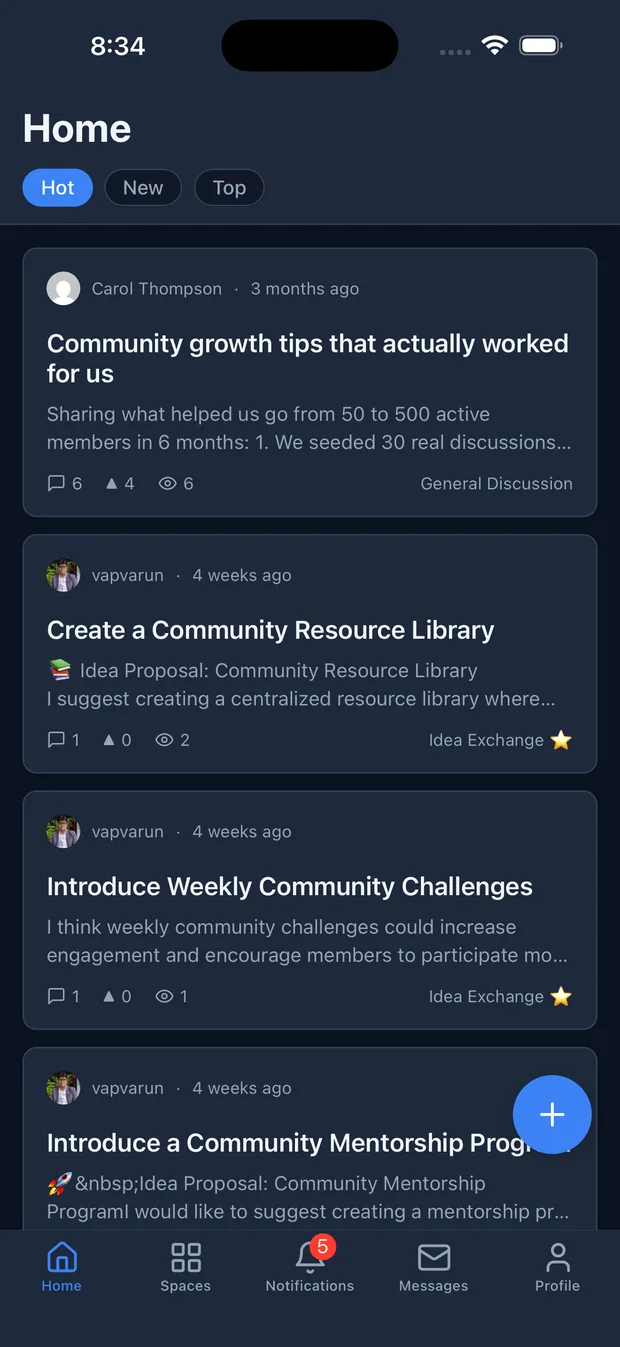
Your members already carry your community in their pocket every day. The question is whether it lives behind a browser tab they have to remember to open, or behind a home-screen icon that taps them on the shoulder when someone replies. The Jetonomy iOS app is the second option: a native home for your WordPress community, with a real feed, spaces, Q&A, private messaging, and push notifications, all reading and writing the same site your website already uses.
This guide walks the whole path: what the app actually is, the one thing you need to run it, how members connect securely to your own site, how native push works, and how to ship the app under your own brand. It is short on purpose, because the setup genuinely is short. Most of the work is a plugin you may already have.
What the app is, and what it is not
The Jetonomy app is a native iOS application, not a web page in a frame. It talks to your community’s REST API and renders real screens built for the worst case: thousands of posts, hundreds of replies, and never a full-page reload. Members browse every space in one feed, sort by Hot, New, or Top, post and reply with a native composer, upvote the best answers, react, vote in polls, and send private messages. Roles, permissions, and moderation carry over exactly as they are on the web, because it is the same community. There is nothing to migrate and no second copy of your data.
One honest note on availability. The app is currently rolling out to Jetonomy Pro communities and is moving through App Store review. Treat this as a feature that is arriving rather than a live store link you can hand out today. The setup below is what you do to be ready the moment it lands, and if you run a white-label build, on your own timeline.
The one requirement: Jetonomy Pro with a valid license
Here is the single most important fact, stated plainly. The mobile app requires Jetonomy Pro with a valid license. It is a Pro benefit. If your site runs Jetonomy Pro, the app comes with it at no extra cost, with no separate purchase and no per-seat pricing. If your site runs only the free Jetonomy plugin, you get the full web community but not the native app.
That split is deliberate and easy to reason about. The free plugin is your community on the web, running on your own jt_* tables in your own database. Pro layers on the advanced pieces, and the app is one of them. So the first step is simply this: install the free Jetonomy plugin and Jetonomy Pro on your existing WordPress site, activate them, and enter your Pro license key. No new hosting, no separate platform, no rebuild. If your community already runs on Jetonomy Pro, you are effectively ready today.
Step 1: Run Jetonomy Pro on your site
If you are not on Pro yet, install the free Jetonomy plugin first, then Jetonomy Pro, then activate your license from the Jetonomy settings. The Pro plugin checks for its free counterpart and for a valid license before it enables the app-facing features, so both have to be in place. Once the license is active, the REST endpoints the app relies on are live, and your existing spaces, members, and moderation rules are already what the app will show. You do not configure a second community. The app is a new window onto the one you have.
Step 2: Members get the app
There are two ways your members end up with the app on their phone.
The first is the public App Store listing, Jetonomy for iOS, which they download for free and point at your site. This is the path once the app has cleared review and is generally available, and it is the simplest for most communities: you tell members to search the store, install, and open.
The second is a white-label build shipped under your own name and icon, which lands on the App Store as your community’s own app. This is a Pro option, covered in more detail at the end. Either way the download is free for your members and included with your Pro license. Nothing about pricing changes because someone opened the app instead of the website.
Step 3: Members connect and sign in securely
This is the step that usually raises a question, so it is worth being precise. A member opens the app, types your community’s web address, and is sent to your own WordPress login screen to approve access. Sign-in uses WordPress core Application Passwords, the authentication mechanism built into WordPress itself. That means the credentials are minted by your site, stored encrypted on the member’s device, and never pass through a third party. There is no separate app account, no middleman service holding your members’ logins, and nothing extra for you to host.
The practical upshot for you as the site owner is that authentication is standard WordPress, not a bespoke token system you have to trust or maintain. A member who signs in on the app is the same WordPress user they are on the web, with the same role and the same permissions. A member can revoke the app’s access at any time from their WordPress profile, exactly as they would any other application password. If you want to see how the sign-in flow is wired, the app is open source, so you or your developer can read it before you trust it.
Step 4: Turn on native push
The home-screen icon earns its place when it can tap a member on the shoulder. Native push notifications for the app run through the Jetonomy Pro Web Push extension. This is the same extension that delivers browser push on the web, and it is also the backend that sends native notifications to the iOS app. You configure push once and both channels light up.
Push fires for the events that matter and that already raise a bell notification: a new reply on a member’s topic, a reply in a topic they follow, a mention, an accepted answer, a new private message, and an awarded badge. Crucially, it is always subject to each member’s own notification preferences, so the channel stays useful instead of noisy. Members choose which events reach them from their notification settings, and they can turn any of it off. For the full setup, including the one-time key generation, see the web and native push guide.
Step 5: Ship it under your own brand (optional)
For many communities the standard Jetonomy app is exactly right. But if you want the app to be unmistakably yours, Pro communities can white-label it. You supply your own name, icon, splash screen, and colours, and the build lands on the App Store as your community’s own app rather than a generically branded one.
Because everything site-specific comes from configuration, a branded build is a build profile rather than a fork of the source. Your developer, or ours, produces a release with your identity baked in, pointed at your WordPress site, using the same open-source shell every Jetonomy community app runs on. The community underneath is still your own WordPress install, still your own data, still authenticated with Application Passwords. Only the wrapper changes.
Where to start
The path is shorter than it sounds. Get Jetonomy Pro running with a valid license on the WordPress site you already have, enable the Web Push extension so notifications land natively, and your community is ready for the app the moment it reaches your members. If you want the app to carry your own name and icon, plan the white-label build alongside that. For the full picture of what the app does screen by screen, see the mobile app overview, and if you are also thinking about paid tiers, the app respects the same access rules as your membership and monetization setup. Your members already have the phone. This is how you give them the door.