

← All features

Notifications Pro

Push notifications that land instantly

Browser push reaches members even when your site is closed, and the same extension drives the native push in the Jetonomy mobile app. A reply, a mention, or an accepted answer shows up on the member's screen the moment it happens.

Read the full web push guide →

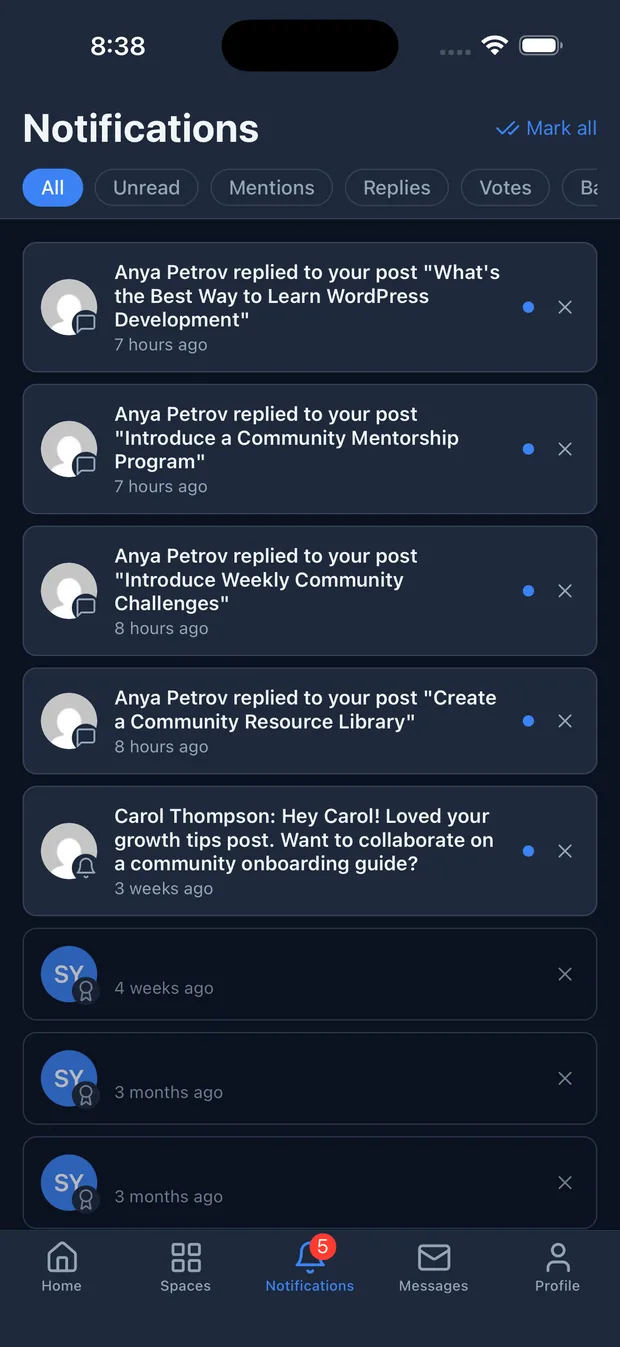
Jetonomy notifications on an iPhone showing replies, mentions, and badges

The problem

Email open rates sit around 20 to 30 percent, and a member who has closed your tab is unreachable. For a reply to a question or a mention from a teammate, waiting for the next inbox check is too slow.

  • Browser push on Chrome, Edge, Firefox, and Safari, no app install required
  • The same extension powers native push in the Jetonomy iOS app
  • Fires for replies, follows, mentions, accepted answers, new messages, and badges
  • One-click VAPID key generation and an automatic service worker, no manual setup
  • Members subscribe with one tap and control every event from their notification settings

Reach members the moment something happens

Email is slow and easy to ignore. A member who has closed your tab is, for most tools, out of reach until they choose to come back. Push notifications close that gap. They appear directly on the member’s screen with no inbox, no subject line, and no waiting, which is why push open rates run well above email. For the events that matter most, a reply to a question or a mention from a teammate, that immediacy is the whole point.

Push fires for the same events that raise a bell notification, always subject to each member’s own preferences: a new reply on their topic, a new reply in a topic they follow, a mention, an accepted answer, a new private message, and an awarded badge. Members decide which of those reach them, so the channel stays useful instead of noisy.

One extension, web and mobile app

This single Pro extension powers two delivery channels. On the web it uses a standard service worker that Jetonomy registers automatically on every community page, so browser push works on Chrome, Edge, Firefox, and Safari with no app to install. It is also the backend that sends native push to the Jetonomy iOS app, so a community running the app gets real device notifications from the same system, wired to the same member preferences. You configure push once and both channels light up.

Set up once, members opt in with a tap

Setup is deliberately short. In the Web Push settings you click Generate VAPID Keys, which creates the key pair your server needs to authenticate with browsers, then toggle the feature on. There is no service worker to write and no manual wiring.

Members opt in on their own terms. The first time a logged-in member visits a community page after you enable push, a prompt invites them to turn it on, and the browser’s native permission dialog opens only after they click, never automatically. From their notification settings they can unsubscribe at any time or fine-tune exactly which events reach them.

Who it's for

Time-sensitive communities

Get a reply or a mention onto the member's screen instantly instead of waiting for an inbox check.

Mobile-first communities

Ship the Jetonomy iOS app with real native push, driven by the same extension that runs web push.

Community managers

Reach members who have closed the tab, with open rates well above what email delivers.

Common questions

Which events send a push?

Push fires for the same events as bell notifications, based on each member's preferences: a new reply on their topic, a new reply in a topic they follow, a mention, an accepted answer, a new private message, and an awarded badge. Members choose which of these trigger a push from their notification settings.

Does it work on the mobile app too?

Yes. This one extension powers both channels. On the web it delivers browser push through a service worker, and it is also the backend that sends native push notifications to the Jetonomy iOS app, so members get the same alerts whichever way they use your community.

Which browsers are supported?

Chrome and Edge on desktop and Android, Firefox on desktop with limited mobile support, and Safari on macOS 13 and later and iOS 16.4 and later. On iOS, Safari requires the member to add your site to their Home Screen first, which is an Apple platform requirement.

How much setup is involved?

Very little. You click Generate VAPID Keys once and toggle Web Push on. Jetonomy registers the service worker automatically on every community page, and members subscribe by tapping the prompt that appears on their next visit. The browser permission dialog only ever opens after a member clicks, never on page load.

Run it on your own WordPress.

Download the free plugin, run the 5-minute wizard, and turn this feature on. No SaaS rent, your data, your domain.