

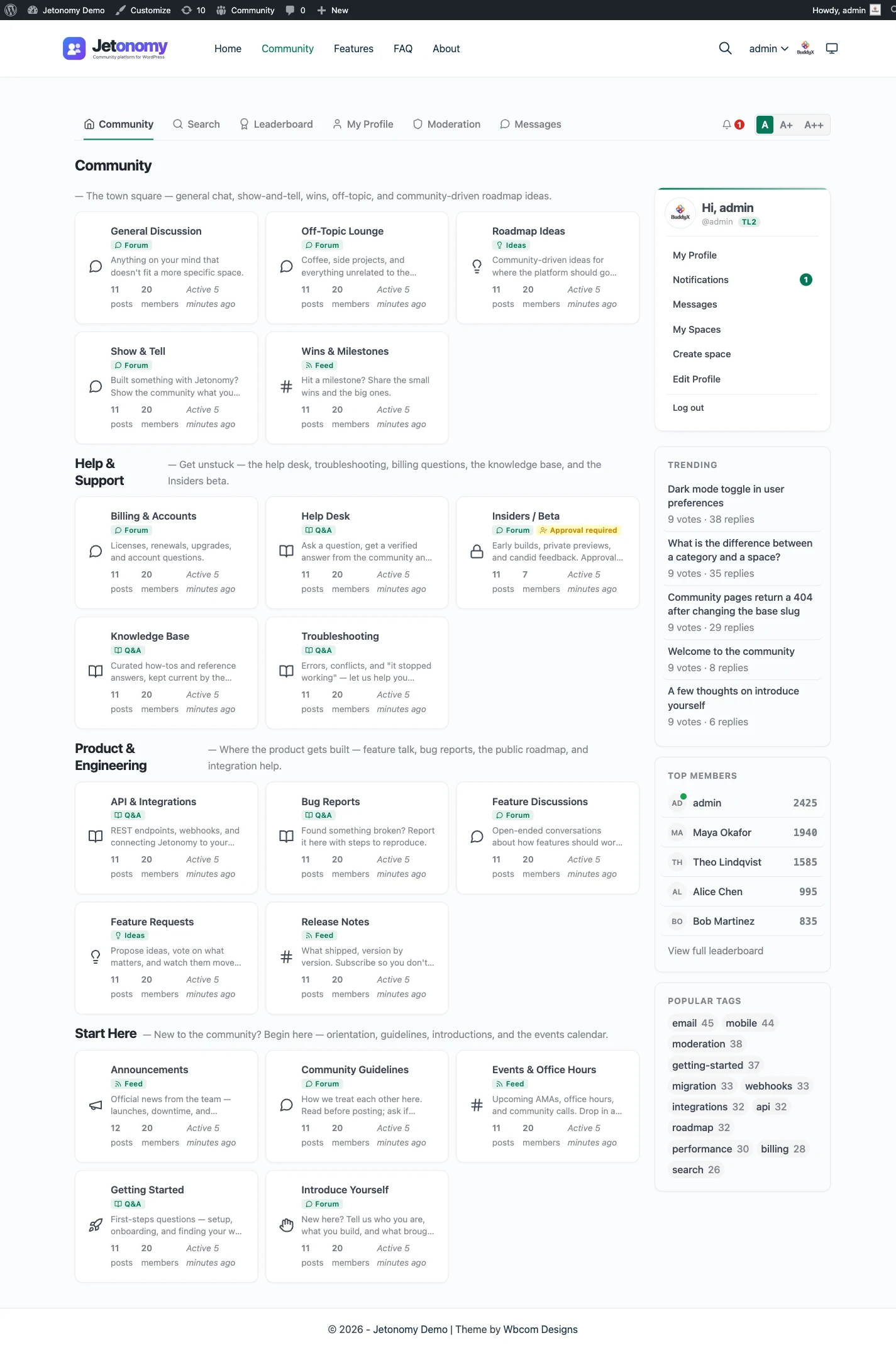
Building an online community used to mean bolting a forum onto your site, then a Q&A plugin, then a reactions plugin, then something for moderation, and praying they all played nicely together. In 2026 you do not have to do that. This guide walks you through the whole thing end to end: deciding where to host it, choosing the right format, structuring it, moderating it, and actually getting people to show up and talk.
It is written to be useful even if you never touch Jetonomy. Where Jetonomy is the obvious fit, we will say so plainly. Where a hosted service might suit you better, we will say that too.
Why WordPress for a community in 2026
The strongest argument for building your community on WordPress is also the simplest: you probably already own it. Your marketing site, your blog, your docs, maybe your store all run on WordPress already. Adding a community means one more thing on a stack you already understand, not a second platform with its own login, its own billing, its own theme, and its own export rules.
That single-stack advantage compounds. Your members use the same account across your content and your community. Your SEO lives under one domain instead of being split across a subdomain you rent. Your design system, your caching, your backups, and your hosting all cover the community automatically. There is no integration to maintain between “the website” and “the place people talk.”
Then there is ownership. When you self-host on WordPress, the conversations, the member profiles, and the data all live in your database, on infrastructure you control. You can export it, migrate it, back it up, and query it however you like. Contrast that with a hosted SaaS community, where your content lives on someone else’s servers under their terms, and leaving means an export file and a lot of broken links.
None of this means SaaS is wrong. Hosted platforms genuinely remove work. If you want to weigh the trade-offs honestly, we keep a full alternatives comparison that does not pretend self-hosting is free of effort. SaaS options like Circle are polished and fast to start, and a free option like Facebook Groups costs nothing up front. The catch with both is the same: you are building your community on rented land, your reach depends on their algorithm or their pricing, and your data is only as portable as they allow. WordPress trades a little more setup for a lot more control.
Step 1: Decide self-hosted vs hosted SaaS
This is the decision that shapes everything else, so make it deliberately rather than by default.
Hosted SaaS means you sign up, you get a community, and you never think about servers, updates, or security patches. That convenience is real and it is worth money to a lot of people. The trade-off is the cost model. Most SaaS communities run on monthly subscriptions that scale with the number of members or active users you have. A community that succeeds gets more expensive precisely because it succeeded. You also accept that the data, the uptime, and the feature roadmap are someone else’s call.
Self-hosted means the software runs on your own WordPress site. You handle hosting and updates, the same way you already do for the rest of your site. In return you own the data outright, you can extend anything, and your cost is predictable. With Jetonomy specifically, the core plugin is free, so a fully functional community adds nothing to your baseline beyond the hosting you already pay for.
Here is the honest summary:
| Factor | Self-hosted (WordPress) | Hosted SaaS |
|---|---|---|
| Setup effort | You install and configure | Sign up and go |
| Data ownership | You own it, in your database | Lives on their servers |
| Cost model | Flat, predictable, often yearly | Monthly subscriptions that scale with members |
| Extensibility | Full code and API access | Whatever the vendor exposes |
| Maintenance | You manage updates and hosting | Handled for you |
If you already run WordPress and you care about owning your data and keeping costs flat, self-hosting is the better long-term call. If you want zero infrastructure and are happy to pay a subscription that grows with you, SaaS is reasonable.
Cost is usually the tie-breaker, and it is worth being concrete about. Jetonomy core is free. Jetonomy Pro is a flat yearly price that starts at $69 per year, regardless of how many members you have. There is no per-seat charge and no surprise bill the month you go viral. You can see exactly what is in each tier on the pricing page.
Step 2: Choose your format
A community is not one shape. The biggest mistake people make is picking “a forum” out of habit when their actual goal calls for something else. Jetonomy ships five space types, and you can mix them in a single community, so this is not an either-or decision.
- Discussion forum. Threaded conversation, the classic format for ongoing topics, announcements, and general chat. Best when you want broad, open-ended discussion. See the forum feature.
- Question and answer. Single best answer rises to the top, the rest stay as supporting context. Ideal for support, knowledge bases, and anywhere “what is the right answer” matters more than “what does everyone think.” See Q&A with accepted answers.
- Ideas and roadmap. Members post suggestions, others vote, and the best ideas rise. Perfect for product feedback and feature requests. See ideas and roadmap.
- Show and tell. Members share what they have made, with the focus on the work itself rather than back-and-forth debate. Good for portfolios, builds, and creative communities.
- Feed. Short, fast, social-style updates. Good for casual sharing and keeping a community warm between bigger discussions.
Most healthy communities use two or three of these. A SaaS product might run a Q&A space for support, an ideas space for the roadmap, and a forum for everything else. A creator might run a feed for daily updates and a show-and-tell space for member work.
Do not over-think it at launch. Pick the one format that matches your single most important goal, add at most one more, and grow from there. We go deeper on choosing in the format guide, which compares the strengths of each side by side.
Step 3: Install and structure your spaces
With the format decided, the build itself is fast. Install Jetonomy from your WordPress plugins screen the same way you install anything else, activate it, and create the page where your community will live. Drop the community onto a page, and you have a working community shell.
The part that actually matters is structure, and this is where the extreme-scale mindset pays off. Think about where your community will be in a year, not where it is on day one. A space that makes sense with twenty posts can become unusable with two thousand if you did not plan for categories.
Jetonomy organizes content into spaces, and spaces can be grouped with categories. A space is a single area with one format, for example “Feature requests” as an ideas space or “Support” as a Q&A space. Categories group related spaces so people can find their way around as you grow. Start with a small, clear set, name them for what members want to do rather than for your internal org chart, and resist the urge to create a space for every micro-topic. Empty spaces signal a dead community; a few active ones signal a live one.
A sensible starting structure for most communities is three to five spaces across one or two categories. You can always split a busy space later. The mechanics of setting all this up, including how spaces and categories nest, are covered on the spaces and categories feature page.
Step 4: Set up moderation and trust before you launch
This is the step people skip, and it is the one that bites hardest. Moderation is not something you bolt on after the spam arrives. You set it up before anyone joins, so that the first bad actor hits a wall instead of your inbox.
Jetonomy has a trust system built in, with trust levels from 0 to 5. New members start low and earn capabilities as they participate constructively. A brand-new account does not get the same posting power as a member who has been contributing for months. This single mechanism quietly handles most of the spam and low-effort noise that plagues open communities, because the people most likely to cause problems have the least ability to do so.
On top of that, there is a moderation queue. Flagged content, posts from low-trust members, and anything caught by your rules lands in one place for review rather than going live unchecked. You decide what gets held and what flows straight through. Before launch, set your defaults: decide whether new members are auto-approved or held for first post, decide what triggers a flag, and make sure you or a trusted moderator will actually watch the queue in the early days when first impressions are formed.
The full set of controls, including how trust levels map to capabilities and how the queue works, is on the trust levels and moderation page. Get this right before you invite anyone, and you save yourself the painful cleanup of moderating a community you let run wild for a week.
Step 5: Seed and grow engagement
A community with no posts is the hardest thing in the world to join. Nobody wants to be the first to speak into an empty room. Your job at launch is to make the room feel alive before you open the doors.
Start by seeding. Before you invite your wider audience, post the questions you already know people ask, answer them yourself, and start a few genuine discussions. Bring in a small group of friendly early members, the people who will reply because they like you, and let them warm the place up. Ten real conversations are worth more than a polished, empty shell.
Once people are in, the mechanics of engagement matter. Jetonomy ships the tools that keep communities sticky:
- Reputation and leaderboards. Members earn reputation for helpful contributions, and leaderboards make that visible. This is not about gamifying for its own sake; it is about recognizing the people who make the community good, which makes them do more of it. See reputation and leaderboards.
- Reactions and polls. Low-friction ways to participate. Not everyone will write a paragraph, but most people will tap a reaction or vote in a poll, and that lightweight participation keeps the community feeling active and gives quieter members a way in. See reactions and polls.
The growth pattern that works is consistency over intensity. Show up regularly, reply to early members personally, highlight good contributions publicly, and let the reputation system reinforce the behavior you want. Communities are grown, not launched. The features make participation easy, but the early human effort is what turns a quiet space into a habit.
Step 6: Migrate an existing forum
If you are not starting from zero, you have a different first step: getting your existing content across without losing it. The good news is that you do not have to rebuild years of discussions by hand.
Jetonomy includes one-click importers for the most common WordPress forum plugins. If you are running bbPress, wpForo, or Asgaros, you can bring your topics, replies, and structure across directly. This matters because the content you already have is the seed content for your new community; migrating it means you launch with a living archive instead of an empty board.
People most often make this move from bbPress, which has served WordPress for a long time but has not kept pace with what modern communities expect. If that is you, we have written specifically about the trade-offs in the bbPress alternative comparison, and the step-by-step process lives in the migration guide. Migrate on a staging copy first, check that your structure mapped the way you wanted, then go live.
One thing worth flagging for either path: everything in Jetonomy is reachable through a REST API, and the data lives in around 24 dedicated jt_* tables in your own database. That means your content is queryable, exportable, and yours, whether you are migrating in or, years from now, deciding to do something else with it. Ownership is not just a launch-day talking point; it is what protects you long term. If you want to gate parts of your community behind a paid membership, that REST-backed foundation also integrates cleanly with membership tools like MemberPress, Paid Memberships Pro, Restrict Content Pro, and WooCommerce.
Where to start
The whole point of building on WordPress in 2026 is that you do not need to assemble a fragile tower of five plugins to get a real community. You decide whether you want to own your stack or rent it, you pick the formats that match your goal, you structure your spaces with growth in mind, you set up trust and moderation before anyone arrives, and you seed the room so it feels alive on day one.
If you already run WordPress, the fastest honest path is to install Jetonomy, which is free and self-hosted, create a couple of spaces, set your moderation defaults, and invite your first ten people this week. Start free, see whether your community takes, and reach for Pro from $69 a year only when you actually want the advanced pieces. Browse the full feature set to see exactly what is included, and if you are still weighing options, the alternatives comparison lays them out without spin. The best time to start a community was a year ago. The second best time is this afternoon.