

How AI moderation works
Moderation is the heaviest job in any community. Every post and every reply is a possible spam attempt, an abuse report, or a duplicate question. At a handful of topics a day one person can keep up. At hundreds, they cannot.
Jetonomy Pro puts a language model in front of the queue. It reads every new post and every new reply, scores spam probability, and checks the content against the moderation policy you set. Anything above the line goes to the moderation queue with a generated reason. Everything else publishes as normal. The model does not replace your moderators, it filters what they see so their attention lands on the calls that actually need a human.
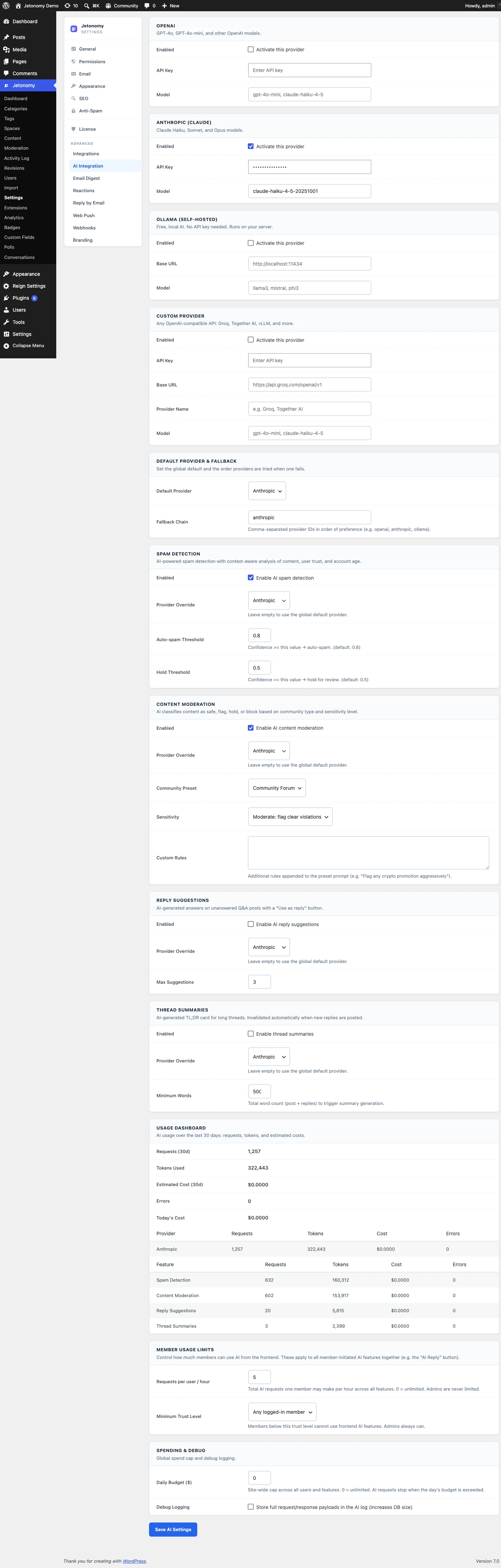
You stay in control of which features run. Spam detection, content moderation, reply suggestions, and thread summaries each have their own toggle, so you can enable only what you need and assign different features to different providers.
Pick a provider, including your own
The AI layer is built on a pluggable adapter pattern, and four providers ship out of the box. Ollama runs on your own server for full data control. OpenAI and Anthropic are hosted options for fast setup and high-quality moderation. The custom provider connects any OpenAI-compatible endpoint you run yourself.
Every feature can be given a primary provider plus an optional fallback chain. A typical setup is Ollama first for privacy, with OpenAI as a fallback for the moments the local model is restarting. If the primary errors mid-request, Jetonomy retries the next provider before surfacing anything to you.
For content moderation, four tuned presets give you a starting policy: Community Forum, Support Desk, Kids Safe, and Academic. Pick the closest one, edit the plain-English policy text, and the model reads new content against your version.
See cost and stay private
A usage dashboard widget appears on the main Jetonomy admin as soon as a provider is connected. It shows requests today and this month, token usage by feature, estimated spend by provider with the share of the monthly cap consumed, average response time, and error rate. If a feature starts running hot, you see it and can pause that one feature without touching the rest.
For communities that cannot send member content to an outside API, run Ollama locally and nothing leaves your server. Every model decision is also recorded to an audit log, so you keep a permanent record of what the AI did and why, which is useful for compliance reviews.